
博客系统-元素重叠
博客系统-元素重叠
提问于 2015-04-04 15:00:08
我正在做一个简单的博客服务。
我将使用表单和PHP将每个新条目附加到包含所有博客条目的文件中,这些条目将加载到我的主页上。
现在的情况:
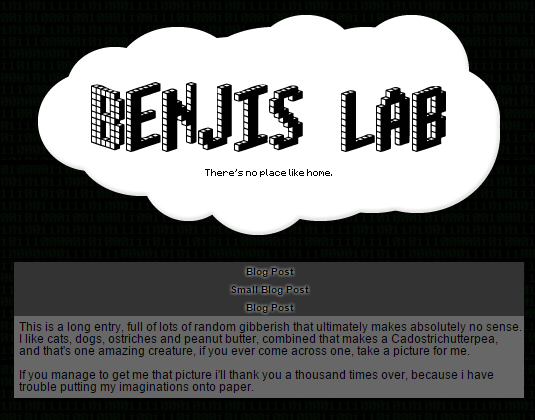
HTML:
<p class="title">Blog Post</p><br>
<pre class="body">
This is a long entry, full of lots of random gibberish that ultimately makes absolutely no sense.
I like cats, dogs, ostriches and peanut butter, combined that makes a Cadostrichutterpea,
and that's one amazing creature, if you ever come across one, take a picture for me.

If you manage to get me that picture i'll thank you a thousand times over, because i have
trouble putting my imaginations onto paper.
</pre>

<p class="title">Small Blog Post</p><br>
<pre class="body">
A Cadostrichutterpea was spotted today in Thailand.
</pre>

<p class="title">Blog Post</p><br>
<pre class="body">
This is a long entry, full of lots of random gibberish that ultimately makes absolutely no sense.
I like cats, dogs, ostriches and peanut butter, combined that makes a Cadostrichutterpea,
and that's one amazing creature, if you ever come across one, take a picture for me.

If you manage to get me that picture i'll thank you a thousand times over, because i have
trouble putting my imaginations onto paper.
</pre>
CSS:
p.title
{
    overflow: auto;
    text-shadow: 0 0 5px #ffffff;
    text-align:center;
    width: 500px;
    margin:0px auto;
    padding: 5px 5px 5px 5px;
    background: rgb(51, 51, 51);
    background-size: 1px 1px;
    font-weight: bold;
    position: fixed;
    left: 0; right: 0;
    font-family: sans-serif;
    font-size: 10px;
    color: bold;
    line-height:100%;
}
pre
{
    width: 500px;
    margin:0px auto;
    padding: 5px 5px 5px 5px;
    background: rgb(103, 103, 103);
    position: fixed;
    left: 0; right: 0;
    font-family: sans-serif;
    font-size: 12px;
    color: black;
    line-height:100%;
}
我想让它看起来像:
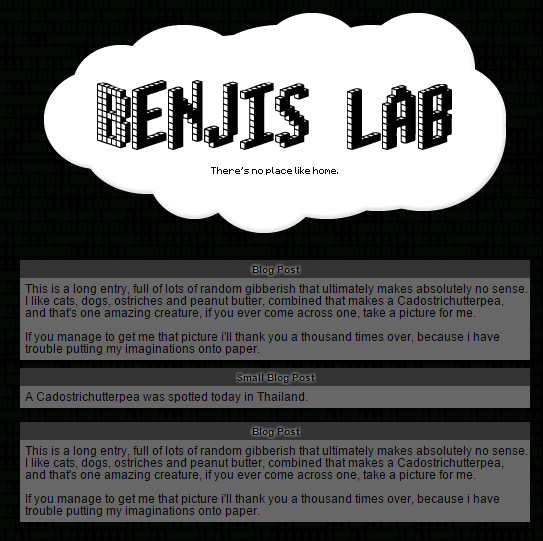
我只是不知道如何使p/pre元素相互叠加,而不是层叠起来。
我可以添加大量的换行符,并尝试使用PHP来根据条目的长度来确定我需要的中断次数。
有什么更好的方法吗?
当我硬编码这些位置以查看它的外观时,当我将页面向下滚动时,所有的元素也会滚动,所以您看到的元素无法满足屏幕的需要,有什么方法可以阻止这种情况吗?
回答 2
Stack Overflow用户
回答已采纳
发布于 2015-04-04 15:06:59
您正在使用position: fixed;定位您的所有元素,这就是为什么它们是分层的,并且不会像预期的那样滚动。
尝试删除position: fixed;。
看这个http://jsfiddle.net/054eoa3e/。
我还在您的<br>标题之后删除了<p>元素,因为不需要这些元素。有关定位的更多信息,请参见w3schools。
Stack Overflow用户
发布于 2015-04-04 15:06:47
消除所有出现的position:fixed。
在此之前:
p.title
{
    overflow: auto;
    text-shadow: 0 0 5px #ffffff;
    text-align:center;
    width: 500px;
    margin:0px auto;
    padding: 5px 5px 5px 5px;
    background: rgb(51, 51, 51);
    background-size: 1px 1px;
    font-weight: bold;
    position: fixed;
    left: 0; right: 0;
    font-family: sans-serif;
    font-size: 10px;
    color: bold;
    line-height:100%;
}
pre
{
    width: 500px;
    margin:0px auto;
    padding: 5px 5px 5px 5px;
    background: rgb(103, 103, 103);
    position: fixed;
    left: 0; right: 0;
    font-family: sans-serif;
    font-size: 12px;
    color: black;
    line-height:100%;
} <p class="title">Blog Post</p><br>
<pre class="body">
This is a long entry, full of lots of random gibberish that ultimately makes absolutely no sense.
I like cats, dogs, ostriches and peanut butter, combined that makes a Cadostrichutterpea,
and that's one amazing creature, if you ever come across one, take a picture for me.
If you manage to get me that picture i'll thank you a thousand times over, because i have
trouble putting my imaginations onto paper.
</pre>
<p class="title">Small Blog Post</p><br>
<pre class="body">
A Cadostrichutterpea was spotted today in Thailand.
</pre>
<p class="title">Blog Post</p><br>
<pre class="body">
This is a long entry, full of lots of random gibberish that ultimately makes absolutely no sense.
I like cats, dogs, ostriches and peanut butter, combined that makes a Cadostrichutterpea,
and that's one amazing creature, if you ever come across one, take a picture for me.
If you manage to get me that picture i'll thank you a thousand times over, because i have
trouble putting my imaginations onto paper.
</pre>
之后:
p.title
{
    overflow: auto;
    text-shadow: 0 0 5px #ffffff;
    text-align:center;
    width: 500px;
    margin:0px auto;
    padding: 5px 5px 5px 5px;
    background: rgb(51, 51, 51);
    background-size: 1px 1px;
    font-weight: bold;
    left: 0; right: 0;
    font-family: sans-serif;
    font-size: 10px;
    color: bold;
    line-height:100%;
}
pre
{
    width: 500px;
    margin:0px auto;
    padding: 5px 5px 5px 5px;
    background: rgb(103, 103, 103);
    left: 0; right: 0;
    font-family: sans-serif;
    font-size: 12px;
    color: black;
    line-height:100%;
} <p class="title">Blog Post</p><br>
<pre class="body">
This is a long entry, full of lots of random gibberish that ultimately makes absolutely no sense.
I like cats, dogs, ostriches and peanut butter, combined that makes a Cadostrichutterpea,
and that's one amazing creature, if you ever come across one, take a picture for me.
If you manage to get me that picture i'll thank you a thousand times over, because i have
trouble putting my imaginations onto paper.
</pre>
<p class="title">Small Blog Post</p><br>
<pre class="body">
A Cadostrichutterpea was spotted today in Thailand.
</pre>
<p class="title">Blog Post</p><br>
<pre class="body">
This is a long entry, full of lots of random gibberish that ultimately makes absolutely no sense.
I like cats, dogs, ostriches and peanut butter, combined that makes a Cadostrichutterpea,
and that's one amazing creature, if you ever come across one, take a picture for me.
If you manage to get me that picture i'll thank you a thousand times over, because i have
trouble putting my imaginations onto paper.
</pre>
页面原文内容由Stack Overflow提供。腾讯云小微IT领域专用引擎提供翻译支持
原文链接:
https://stackoverflow.com/questions/29447866
复制相关文章
相似问题
腾讯云开发者

Copyright © 2013 - 2026 Tencent Cloud. All Rights Reserved. 腾讯云 版权所有
深圳市腾讯计算机系统有限公司 ICP备案/许可证号:粤B2-20090059  粤公网安备44030502008569号
腾讯云计算(北京)有限责任公司 京ICP证150476号 | 京ICP备11018762号