
如何将QString或QStringList传递给QTableWidgetItem
如何将QString或QStringList传递给QTableWidgetItem
提问于 2015-03-30 20:38:27
我正在尝试使用QTableView和QTableWidgetItem创建一个表。
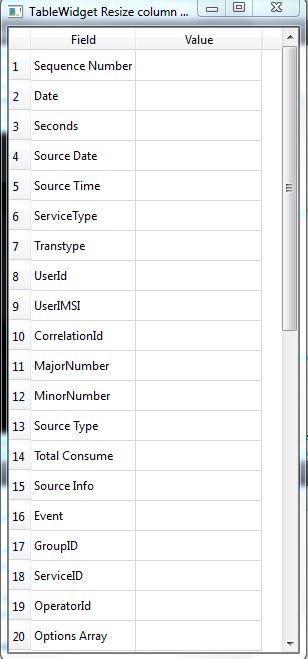
基本上,我正试图在第一个标题下创建几行具有某些名称的行。
但问题是,我正在以某种名称传递每一行。
我想使用QString,QStringList数组来实现同样的目标。
目前,我不会在第二个标题下传递任何值。
请建议怎么做。请找到输出窗口。
下面是我的代码片段:
#include <QApplication>
#include <QtGui>
#include <QMainWindow>
#include <QTableWidget>
#include <QString>

#define ROW_NUMBER 20
#define COL_NUMBER 2

int main(int argc , char **argv)
{
    QApplication app(argc,argv);

    QMainWindow *window = new QMainWindow();

    window->setWindowTitle(QString::fromUtf8("TableWidget Resize column width"));
    window->resize(200,250);

    QTableWidget *table = new QTableWidget();
    table->setRowCount(ROW_NUMBER);
    table->setColumnCount(COL_NUMBER);

    table->setSizePolicy(QSizePolicy::Expanding,QSizePolicy::Expanding);

    table->setHorizontalHeaderLabels(QString("Field;Value").split(";"));

    table->setItem(0,0,new QTableWidgetItem("Sequence Number"));
    table->setItem(1,0,new QTableWidgetItem("Date"));
    table->setItem(2,0,new QTableWidgetItem("Seconds"));
    table->setItem(3,0,new QTableWidgetItem("Source Date"));
    table->setItem(4,0,new QTableWidgetItem("Source Time"));
    table->setItem(5,0,new QTableWidgetItem("ServiceType"));
    table->setItem(6,0,new QTableWidgetItem("Transtype"));
    table->setItem(7,0,new QTableWidgetItem("UserId"));
    table->setItem(8,0,new QTableWidgetItem("UserIMSI"));
    table->setItem(9,0,new QTableWidgetItem("CorrelationId"));
    table->setItem(10,0,new QTableWidgetItem("MajorNumber"));
    table->setItem(11,0,new QTableWidgetItem("MinorNumber"));
    table->setItem(12,0,new QTableWidgetItem("Source Type"));
    table->setItem(13,0,new QTableWidgetItem("Total Consume"));
    table->setItem(14,0,new QTableWidgetItem("Source Info"));
    table->setItem(15,0,new QTableWidgetItem("Event"));
    table->setItem(16,0,new QTableWidgetItem("GroupID"));
    table->setItem(17,0,new QTableWidgetItem("ServiceID"));
    table->setItem(18,0,new QTableWidgetItem("OperatorId"));
    table->setItem(19,0,new QTableWidgetItem("Options Array"));

    table->resizeColumnsToContents();

    window->setCentralWidget(table);

    window->show();

    return app.exec();
}
回答 1
Stack Overflow用户
回答已采纳
发布于 2015-03-30 20:43:22
QString test;

test = "a";

// First Column
table->setItem(0,0,new QTableWidgetItem(a));

// Second Column
table->setItem(0,1,new QTableWidgetItem(a));
就像那样或者:
// 100% working example
QVector< QString > string;
QVector< QString > value;

string.append( "Nr1" );
string.append( "Nr2" );
string.append( "Nr3" );
string.append( "Nr4" );

value.append( "1" );
value.append( "2" );
value.append( "3" );
value.append( "4" );

ui->twTable->setSortingEnabled( false );

for( int i = 0 ; i < string.size( ) && i < value.size( ) ; ++i )
{
    ui->twTable->insertRow( 0 );

    // First Column
    ui->twTable->setItem( 0 , 0 , new QTableWidgetItem( string[i] ) );

    // Second Column
    ui->twTable->setItem( 0 , 1 , new QTableWidgetItem( value[i] ) );
}

ui->twTable->setSortingEnabled( true );array,QStringList的工作方式是相同的,只是没有附加。
阵列:
QString str[5] = { "a" , "b" , "c" , "d" , "e" };

for( int i = 0 ; i < 5 ; ++i )
{
    ui->twTable->insertRow( 0 );

    // First Column
    ui->twTable->setItem( 0 , 0 , new QTableWidgetItem( str[i] ) );

    // Second Column
    ui->twTable->setItem( 0 , 1 , new QTableWidgetItem( str[i] + QString::number( i ) ) );
}
QStringList:
QStringList str = { "a" , "b" , "c" , "d" , "e" };

for( int i = 0 ; i < 5 ; ++i )
{
    ui->twTable->insertRow( 0 );

    // First Column
    ui->twTable->setItem( 0 , 0 , new QTableWidgetItem( str[i] ) );

    // Second Column
    ui->twTable->setItem( 0 , 1 , new QTableWidgetItem( str[i] + QString::number( i ) ) );
}
并以相反的顺序:
// Probably the output you want:
QString str[5] = { "a" , "b" , "c" , "d" , "e" };

for( int i = 4 ; i >= 0 ; --i )
{
    ui->twTable->insertRow( 0 );

    // First Column
    ui->twTable->setItem( 0 , 0 , new QTableWidgetItem( str[i] ) );

    // Second Column
    ui->twTable->setItem( 0 , 1 , new QTableWidgetItem( str[i] + QString::number( i ) ) );
}当您使用固定数量的行时删除ui->twTable->insertRow( 0 ),就像在代码中所做的那样。
附带注意:我倾向于在插入项时禁用排序,然后启用排序,这样在输入行时,行就不会自动排序到不同的位置。
页面原文内容由Stack Overflow提供。腾讯云小微IT领域专用引擎提供翻译支持
原文链接:
https://stackoverflow.com/questions/29355838
复制相关文章
相似问题
腾讯云开发者

Copyright © 2013 - 2026 Tencent Cloud. All Rights Reserved. 腾讯云 版权所有
深圳市腾讯计算机系统有限公司 ICP备案/许可证号:粤B2-20090059  粤公网安备44030502008569号
腾讯云计算(北京)有限责任公司 京ICP证150476号 | 京ICP备11018762号