
角浮油问题
角浮油问题
提问于 2015-03-27 13:04:18
我有严重的问题,这个邪恶的光滑滑块,它工作时,数据被加载到它。问题是,我有几个类别,现在根据用户单击的类别,旋转木马应该改变并显示从ajax请求返回的图像。从昨天开始,我一直在网上寻找解决方案,但我一直在不断地错误地寻找解决方案,我设法解决了其中的几个问题,并让旋转木马工作,现在我想做的是在从下拉列表中选择了一个类别之后,让图像发生变化。
这是我当前的错误:
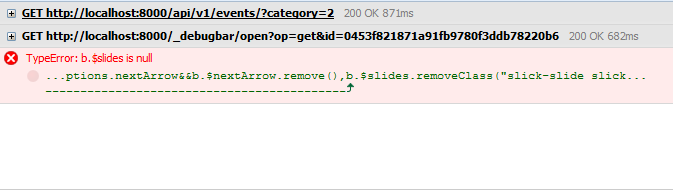
controller.js
$scope.getEvents = function() {
            $.ajax({
                type: "GET",
                url: '/api/v1/events/',
                headers: {
                    'X-XSRF-Token': $("meta[name='csrf_token']").attr("content")
                },
                data: {
                  category: $scope.d.category
                },
                dataType: 'json',
                success: function (data) {

                    if (data.responseCode == 200) {
                        $scope.slickApply(function() {
                            $scope.d.events = data.responseData;
                            $scope.$apply();
                        });
                    }
                }
            });
        };
slick.js
'use strict';
angular.module('vendor').directive('slick', [
  '$timeout',
  function ($timeout) {
    return {
      restrict: 'AEC',
      scope: {
        initOnload: '@',
        data: '=',
        currentIndex: '=',
        accessibility: '@',
        adaptiveHeight: '@',
        arrows: '@',
        asNavFor: '@',
        appendArrows: '@',
        appendDots: '@',
        autoplay: '@',
        autoplaySpeed: '@',
        centerMode: '@',
        centerPadding: '@',
        cssEase: '@',
        customPaging: '&',
        dots: '@',
        draggable: '@',
        easing: '@',
        fade: '@',
        focusOnSelect: '@',
        infinite: '@',
        initialSlide: '@',
        lazyLoad: '@',
        onBeforeChange: '&',
        onAfterChange: '&',
        onInit: '&',
        onReInit: '&',
        onSetPosition: '&',
        pauseOnHover: '@',
        pauseOnDotsHover: '@',
        responsive: '=',
        rtl: '@',
        slide: '@',
        slidesToShow: '@',
        slidesToScroll: '@',
        speed: '@',
        swipe: '@',
        swipeToSlide: '@',
        touchMove: '@',
        touchThreshold: '@',
        useCSS: '@',
        variableWidth: '@',
        vertical: '@',
        prevArrow: '@',
        nextArrow: '@',
        slickApply: '='
      },
      link: function (scope, element, attrs) {
        var destroySlick, initializeSlick, isInitialized;
        destroySlick = function () {
          return $timeout(function () {
            var slider;
            slider = $(element);
            slider.slick('unslick');
            slider.find('.slick-list').remove();
            return slider;
          });
        };
        scope.slickApply = function(apply){
          if (isInitialized) {
            var slider;
            slider = $(element);
            slider.slick('unslick');
          }
          apply();
          initializeSlick();
        }
        initializeSlick = function () {
          return $timeout(function () {
            var currentIndex, customPaging, slider;
            slider = $(element);
            if (scope.currentIndex != null) {
              currentIndex = scope.currentIndex;
            }
            customPaging = function (slick, index) {
              return scope.customPaging({
                slick: slick,
                index: index
              });
            };
            slider.slick({
              accessibility: scope.accessibility !== 'false',
              adaptiveHeight: scope.adaptiveHeight === 'true',
              arrows: scope.arrows !== 'false',
              asNavFor: scope.asNavFor ? scope.asNavFor : void 0,
              appendArrows: scope.appendArrows ? $(scope.appendArrows) : $(element),
              appendDots: scope.appendDots ? $(scope.appendDots) : $(element),
              autoplay: scope.autoplay === 'true',
              autoplaySpeed: scope.autoplaySpeed != null ? parseInt(scope.autoplaySpeed, 10) : 3000,
              centerMode: scope.centerMode === 'true',
              centerPadding: scope.centerPadding || '50px',
              cssEase: scope.cssEase || 'ease',
              customPaging: attrs.customPaging ? customPaging : void 0,
              dots: scope.dots === 'true',
              draggable: scope.draggable !== 'false',
              easing: scope.easing || 'linear',
              fade: scope.fade === 'true',
              focusOnSelect: scope.focusOnSelect === 'true',
              infinite: scope.infinite !== 'false',
              initialSlide: scope.initialSlide || 0,
              lazyLoad: scope.lazyLoad || 'ondemand',
              beforeChange: attrs.onBeforeChange ? scope.onBeforeChange : void 0,
              onReInit: attrs.onReInit ? scope.onReInit : void 0,
              onSetPosition: attrs.onSetPosition ? scope.onSetPosition : void 0,
              pauseOnHover: scope.pauseOnHover !== 'false',
              responsive: scope.responsive || void 0,
              rtl: scope.rtl === 'true',
              slide: scope.slide || 'div',
              slidesToShow: scope.slidesToShow != null ? parseInt(scope.slidesToShow, 10) : 1,
              slidesToScroll: scope.slidesToScroll != null ? parseInt(scope.slidesToScroll, 10) : 1,
              speed: scope.speed != null ? parseInt(scope.speed, 10) : 300,
              swipe: scope.swipe !== 'false',
              swipeToSlide: scope.swipeToSlide === 'true',
              touchMove: scope.touchMove !== 'false',
              touchThreshold: scope.touchThreshold ? parseInt(scope.touchThreshold, 10) : 5,
              useCSS: scope.useCSS !== 'false',
              variableWidth: scope.variableWidth === 'true',
              vertical: scope.vertical === 'true',
              prevArrow: scope.prevArrow ? $(scope.prevArrow) : void 0,
              nextArrow: scope.nextArrow ? $(scope.nextArrow) : void 0,
              slickApply: '='
            });
            slider.on('init', function (sl) {
              if (attrs.onInit) {
                scope.onInit();
              }
              if (currentIndex != null) {
                return sl.slideHandler(currentIndex);
              }
            });
            slider.on('afterChange', function (event, slick, currentSlide, nextSlide) {
              if (scope.onAfterChange) {
                scope.onAfterChange();
              }
              if (currentIndex != null) {
                return scope.$apply(function () {
                  currentIndex = currentSlide;
                  return scope.currentIndex = currentSlide;
                });
              }
            });
            return scope.$watch('currentIndex', function (newVal, oldVal) {
              if (currentIndex != null && newVal != null && newVal !== currentIndex) {
                return slider.slick('slickGoTo', newVal);
              }
            });
          });
        };
        if (scope.initOnload) {
          isInitialized = false;
          return scope.$watch('data', function (newVal, oldVal) {
            if (newVal != null) {
              if (isInitialized) {
                destroySlick();
              }
              initializeSlick();
              return isInitialized = true;
            }
          });
        } else {
          return initializeSlick();
        }
      }
    };
  }
]);回答 1
Stack Overflow用户
发布于 2016-04-14 08:54:26
感谢@njj在https://github.com/vasyabigi/angular-slick/issues/2上的解决方案,我找到了如何轻松地修复它。
只需改变你的:
<slick infinite="true" slides-to-show="3" slides-to-scroll="3" dots="true" arrows="true" init-onload="true" data="ctrl.users" responsive="ctrl.breakpoints">
    <div ng-repeat="user in ctrl.users track by $index">
        ...
    </div>
</slick>
转到
<div ng-if="ctrl.users && ctrl.ready">
    <slick infinite="true" slides-to-show="3" slides-to-scroll="3" dots="true" arrows="true" init-onload="true" data="ctrl.users" responsive="ctrl.breakpoints">
        <div ng-repeat="user in ctrl.users track by $index">
            ...
        </div>
    </slick>
</div>
并添加您的控制器
$timeout(function() {
    ctrl.ready = true;
}, 1000);这样,slick在加载users和ready有$timeout之前不会插入它(这要感谢ng-if父级)。
在您的具体情况下,我猜在两个数据取取之间设置为false,如果为false,则会正确地重新加载/重新加载。
页面原文内容由Stack Overflow提供。腾讯云小微IT领域专用引擎提供翻译支持
原文链接:
https://stackoverflow.com/questions/29301378
复制相关文章
相似问题
腾讯云开发者

Copyright © 2013 - 2026 Tencent Cloud. All Rights Reserved. 腾讯云 版权所有
深圳市腾讯计算机系统有限公司 ICP备案/许可证号:粤B2-20090059  粤公网安备44030502008569号
腾讯云计算(北京)有限责任公司 京ICP证150476号 | 京ICP备11018762号