
熊猫从嵌套词典中获得的数据(elasticsearch结果)
我很难把elasticsearch的结果翻译成熊猫。我正在尝试编写一个抽象函数,该函数采用嵌套字典(任意数量的级别),并将它们压缩成熊猫数据格式。
下面是一个典型的结果
-编辑:我也添加了父键
x1 = {u'xColor': {u'buckets': [{u'doc_count': 4,
u'key': u'red',
u'xMake': {u'buckets': [{u'doc_count': 3,
   u'key': u'honda',
   u'xCity': {u'buckets': [{u'doc_count': 2, u'key': u'ROME'},
     {u'doc_count': 1, u'key': u'Paris'}],
    u'doc_count_error_upper_bound': 0,
    u'sum_other_doc_count': 0}},
  {u'doc_count': 1,
   u'key': u'bmw',
   u'xCity': {u'buckets': [{u'doc_count': 1, u'key': u'Paris'}],
    u'doc_count_error_upper_bound': 0,
    u'sum_other_doc_count': 0}}],
 u'doc_count_error_upper_bound': 0,
 u'sum_other_doc_count': 0}},
 {u'doc_count': 2,
u'key': u'blue',
u'xMake': {u'buckets': [{u'doc_count': 1,
   u'key': u'ford',
   u'xCity': {u'buckets': [{u'doc_count': 1, u'key': u'Paris'}],
    u'doc_count_error_upper_bound': 0,
    u'sum_other_doc_count': 0}},
  {u'doc_count': 1,
   u'key': u'toyota',
   u'xCity': {u'buckets': [{u'doc_count': 1, u'key': u'Berlin'}],
    u'doc_count_error_upper_bound': 0,
    u'sum_other_doc_count': 0}}],
 u'doc_count_error_upper_bound': 0,
   u'sum_other_doc_count': 0}},
    {u'doc_count': 2,
u'key': u'green',
u'xMake': {u'buckets': [{u'doc_count': 1,
   u'key': u'ford',
   u'xCity': {u'buckets': [{u'doc_count': 1, u'key': u'Berlin'}],
    u'doc_count_error_upper_bound': 0,
    u'sum_other_doc_count': 0}},
    {u'doc_count': 1,
      u'key': u'toyota',
     u'xCity': {u'buckets': [{u'doc_count': 1, u'key': u'Berlin'}],
    u'doc_count_error_upper_bound': 0,
    u'sum_other_doc_count': 0}}],
 u'doc_count_error_upper_bound': 0,
 u'sum_other_doc_count': 0}}],
 u'doc_count_error_upper_bound': 0,
 u'sum_other_doc_count': 0}}
我想要的是具有最低级别的doc_count的数据格式。
第一次记录
 red-honda-rome-2

 red-honda-paris-1

 red-bmw-paris-1
我在“熊猫”( json_normalize 这里 )中偶然发现了“熊猫”(这里),但我不知道如何提出这些论点,而且我也看到了关于整理嵌套词典的不同建议,但我无法真正理解它们是如何工作的。如果能帮我开始工作,Elasticsearch结果表将不胜感激。
更新
我尝试使用dpath,这是一个很好的库,但是我不知道如何抽象这个库(以一个函数的形式,它只以桶名作为参数),因为dpath不能处理值是列表(而不是其他字典)的结构。
import dpath
import pandas as pd

xListData = []
for q1 in dpath.util.get(x1, 'xColor/buckets'):
      xColor = q1['key']
for q2 in dpath.util.get(q1, 'xMake/buckets'):
    #print '--', q2['key']
    xMake = q2['key']
    for q3 in dpath.util.get(q2, 'xCity/buckets'):
        #xDict = []
        xCity = q3['key']
        doc_count = q3['doc_count']
        xDict = {'color': xColor, 'make': xMake, 'city': xCity, 'doc_count': doc_count}
        #print '------', q3['key'], q3['doc_count']
        xListData.append(xDict)

pd.DataFrame(xListData)
这意味着:
city    color   doc_count   make
0   ROME    red     2   honda
1   Paris   red     1   honda
2   Paris   red     1   bmw
3   Paris   blue    1   ford
4   Berlin  blue    1   toyota
5   Berlin  green   1   ford
6 Berlin green 1 toyota回答 2
Stack Overflow用户
发布于 2015-04-01 08:51:47
尝试使用递归函数:
import pandas as pd
def elasticToDataframe(elasticResult,aggStructure,record={},fulllist=[]):
    for agg in aggStructure:
        buckets = elasticResult[agg['key']]['buckets']
        for bucket in buckets:
            record = record.copy()
            record[agg['key']] = bucket['key']
            if 'aggs' in agg:
                elasticToDataframe(bucket,agg['aggs'],record,fulllist)
            else:
                for var in agg['variables']:
                    record[var['dfName']] = bucket[var['elasticName']]

                fulllist.append(record)

    df = pd.DataFrame(fulllist)
    return df
然后用您的数据(x1)和正确配置的'aggStructure‘dict调用函数。数据的嵌套性质必须反映在这个dict中。
aggStructure=[{'key':'xColor','aggs':[{'key':'xMake','aggs':[{'key':'xCity','variables':[{'elasticName':'doc_count','dfName':'count'}]}]}]}]
elasticToDataframe(x1,aggStructure)
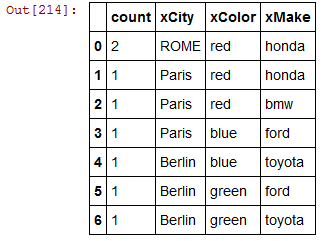
干杯
Stack Overflow用户
发布于 2016-10-28 09:46:13
有一个项目可以开箱即用:https://github.com/onesuper/pandasticsearch
还可以使用递归生成器和MultiIndex功能手动完成:
https://github.com/onesuper/pandasticsearch/blob/master/pandasticsearch/query.py#L125
https://stackoverflow.com/questions/29280480
复制相似问题
腾讯云开发者

Copyright © 2013 - 2026 Tencent Cloud. All Rights Reserved. 腾讯云 版权所有
深圳市腾讯计算机系统有限公司 ICP备案/许可证号:粤B2-20090059  粤公网安备44030502008569号
腾讯云计算(北京)有限责任公司 京ICP证150476号 | 京ICP备11018762号