
可见区域外目标标注的方向
可见区域外目标标注的方向
提问于 2015-03-26 05:32:29
我想在屏幕的所有侧面显示方向图像。例如,如果目标的位置是用户位置的右侧,并且位于可见地图区域之外,那么我想添加一个方向图像,如下面的图片所示(绿色注释是用户的位置,红色的注释是目标的方向,它超出了屏幕的范围):
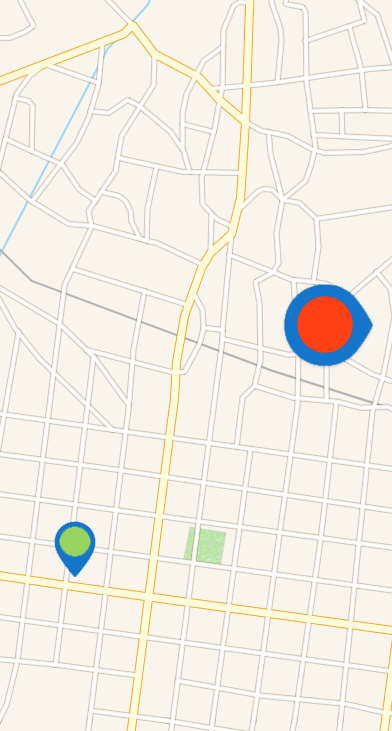
这样做的标准方法是什么?
回答 1
Stack Overflow用户
回答已采纳
发布于 2015-04-17 19:30:58
最简单的方法是将四个“指针”视图放在地图上方的每个基数上。然后,当用户移动映射(使用mapView:regionDidChangeAnimated:委托方法)时,确定应该显示哪个指针。隐藏所有其他的,然后显示正确的。另外,将转换应用到指针,以便像您所做的那样表示轴承的角度。
下面是具有上述配置的故事板的屏幕截图:
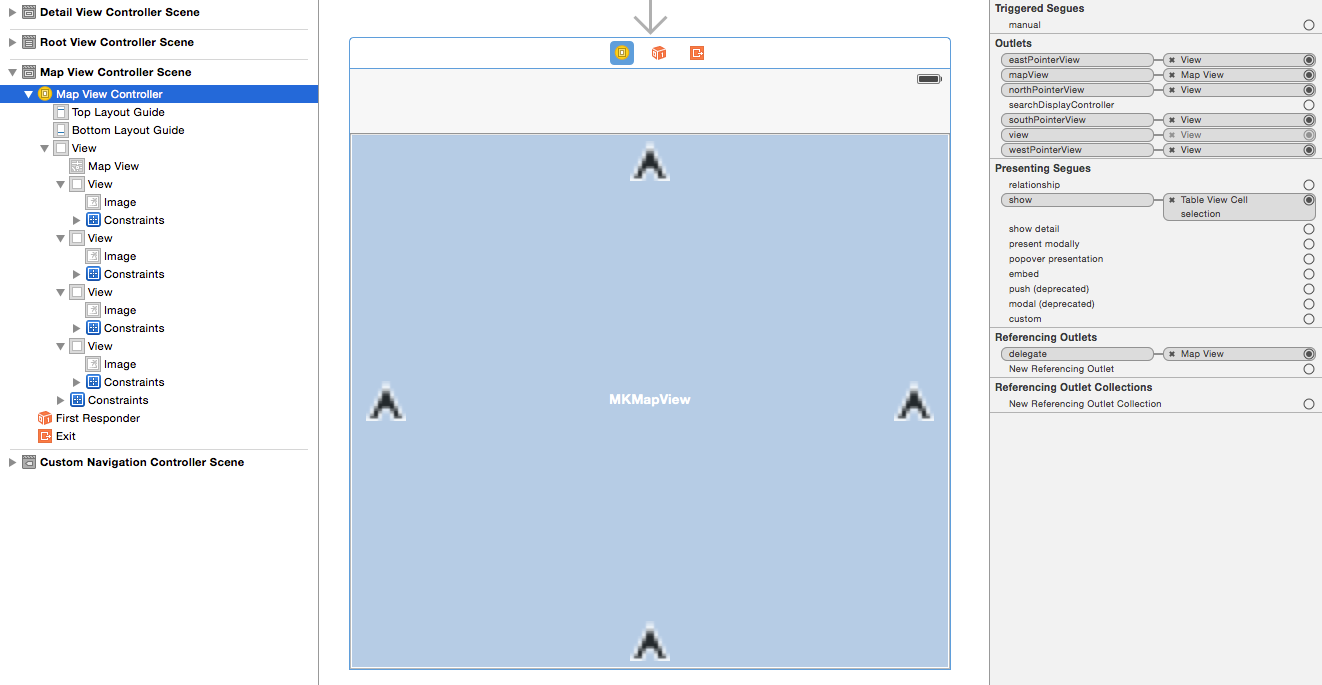
下面是一个示例实现(当然,Code不是最优的):
//
//  MapViewController.m
//  AnimationTest
//
//  Created by Scott Atkinson on 4/17/15.
//

#import "MapViewController.h"

@import MapKit;

typedef NS_ENUM(NSInteger, CardinalPoint) {
    North,
    South,
    East,
    West
};

@interface MapViewController () <MKMapViewDelegate>

@property (weak, nonatomic) IBOutlet MKMapView *mapView;

// Views that show cardinal points on the map (Only one should be shown at a time)
@property (weak, nonatomic) IBOutlet UIView *northPointerView;
@property (weak, nonatomic) IBOutlet UIView *eastPointerView;
@property (weak, nonatomic) IBOutlet UIView *westPointerView;
@property (weak, nonatomic) IBOutlet UIView *southPointerView;

// Location to show on the map
@property (strong, nonatomic) CLLocation * targetLocation;

@end

@implementation MapViewController

- (void)viewDidLoad {
    [super viewDidLoad];

    [self hidePointerViews];

    // Add the location to the map
    self.targetLocation = [[CLLocation alloc] initWithLatitude:37.331898 longitude:-122.029824];
    MKPlacemark * placemark = [[MKPlacemark alloc] initWithCoordinate:self.targetLocation.coordinate addressDictionary:nil];
    [self.mapView addAnnotation:placemark];
}


// ******************** MKMapViewDelegate ********************
#pragma mark - MKMapViewDelegate

// As the map moves, update the cardinal pointer views
- (void) mapView:(MKMapView *)mapView regionDidChangeAnimated:(BOOL)animated {
    if([self isCurrentLocationVisible] && ![self isTargetLocationVisible]) {
        // The user location is visible, but the target is not, so show a pointer
        double bearing = [self bearingToLocation:self.targetLocation fromLocation:self.mapView.userLocation.location];
        [self showCardinalPointDirection:bearing];

    } else {
        // Hide the pointers
        [self hidePointerViews];
    }
}


// ******************** Coordinate Helpers ********************
#pragma mark - Coordinate Helpers

- (BOOL) isCurrentLocationVisible {
    return MKMapRectContainsPoint(self.mapView.visibleMapRect,
                                  MKMapPointForCoordinate(self.mapView.userLocation.coordinate));
}

- (BOOL) isTargetLocationVisible {
    return MKMapRectContainsPoint(self.mapView.visibleMapRect,
                                  MKMapPointForCoordinate(self.targetLocation.coordinate));
}

// From: http://stackoverflow.com/questions/3925942/cllocation-category-for-calculating-bearing-w-haversine-function
double DegreesToRadians(double degrees) {return degrees * M_PI / 180.0;};
double RadiansToDegrees(double radians) {return radians * 180.0/M_PI;};

/// Calculate the bearing between two points
-(double) bearingToLocation:(CLLocation *) destinationLocation fromLocation:(CLLocation *) fromLocation {

    double lat1 = DegreesToRadians(fromLocation.coordinate.latitude);
    double lon1 = DegreesToRadians(fromLocation.coordinate.longitude);

    double lat2 = DegreesToRadians(destinationLocation.coordinate.latitude);
    double lon2 = DegreesToRadians(destinationLocation.coordinate.longitude);

    double dLon = lon2 - lon1;

    double y = sin(dLon) * cos(lat2);
    double x = cos(lat1) * sin(lat2) - sin(lat1) * cos(lat2) * cos(dLon);
    double radiansBearing = atan2(y, x);

    if(radiansBearing < 0.0)
        radiansBearing += 2*M_PI;

    return RadiansToDegrees(radiansBearing);
}

// ******************** Pointer View ********************
#pragma mark - Pointer View

- (void) hidePointerViews {
    self.northPointerView.hidden =
    self.southPointerView.hidden =
    self.eastPointerView.hidden =
    self.westPointerView.hidden = YES;
}

- (void) showCardinalPointDirection:(double) bearing {
    CardinalPoint point = [self cardinalPointWithBearing:bearing];

    // Determine which pointer should be shown based on the bearing
    UIView * activePointer;
    switch (point) {
        case North:
            activePointer = self.northPointerView;
            break;
        case South:
            activePointer = self.southPointerView;
            break;
        case East:
            activePointer = self.eastPointerView;
            break;
        case West:
            activePointer = self.westPointerView;
            break;
    }

    // Rotate the pointer to show the bearing
    activePointer.transform = CGAffineTransformMakeRotation(DegreesToRadians(bearing));

    // Hide all pointers except the pertinent one
    [self hidePointerViews];
    activePointer.hidden = NO;
}

/// Returns the cardinal point for a given bearing (in Degrees)
- (CardinalPoint) cardinalPointWithBearing:(double) bearing {
    if (bearing > 45.0 && bearing <= 135.0) {
        return East;
    } else if (bearing > 135.0 && bearing <= 225.0) {
        return South;
    } else if (bearing > 225.0 && bearing <= 315.0) {
        return West;
    } else {
        return North;
    }
}
@end此外,指针旋转是基于userLocation和targetLocation之间的方位。感觉有点奇怪。也许更好的方法是使旋转建立在其他点的基础上。也许那一刻可见区域的中心..。
页面原文内容由Stack Overflow提供。腾讯云小微IT领域专用引擎提供翻译支持
原文链接:
https://stackoverflow.com/questions/29271692
复制相关文章
相似问题
腾讯云开发者

Copyright © 2013 - 2026 Tencent Cloud. All Rights Reserved. 腾讯云 版权所有
深圳市腾讯计算机系统有限公司 ICP备案/许可证号:粤B2-20090059  粤公网安备44030502008569号
腾讯云计算(北京)有限责任公司 京ICP证150476号 | 京ICP备11018762号