
django模型选择列表
django模型选择列表
提问于 2015-03-24 07:45:13
我正在使用django 1.7.2,我已经得到了一些代码,以便将选择列表放在模型中。
以下是代码:
YOB_TYPES = Choices(*(
    ((0, 'select_yob', _(' Select Year of Birth')),
     (2000, 'to_present', _('2000 to Present'))) +
    tuple((i, str(i)) for i in xrange(1990, 2000)) +
    (1, 'unspecified', _('Prefer not to answer')))
)
....
year_of_birth_type = models.PositiveIntegerField(choices=YOB_TYPES, default=YOB_TYPES.select_yob, validators=[MinValueValidator(1)])
....
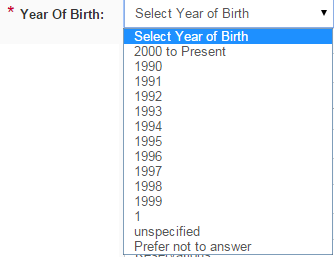
上面的代码给出了不正确的选择列表,如下所示。我读过几篇这样的文章&谷歌搜索和浏览文档,但是我被困住了,我在兜圈子。
当前代码是这样显示选择列表的,这是错误的:
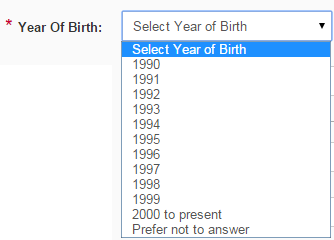
但是,我希望选择列表显示如下:
回答 2
Stack Overflow用户
回答已采纳
发布于 2015-03-24 09:47:52
您应该用另一个元组包装最后一个元组:
YOB_TYPES = Choices(*(
    ((0, 'select_yob', _(' Select Year of Birth')),
     (2000, 'to_present', _('2000 to Present'))) +
    tuple((i, str(i)) for i in xrange(1990, 2000)) +
    ((1, 'unspecified', _('Prefer not to answer')),))
)Stack Overflow用户
发布于 2015-03-24 10:03:22
1)在添加元组时必须小心--需要在末尾设置逗号,以便python将其解释为元组:
YOB_TYPES = Choices(*(
    ((0, 'select_yob', _(' Select Year of Birth')),
     (2000, 'to_present', _('2000 to Present'))) +
    tuple((i, str(i)) for i in xrange(1990, 2000)) +
    ((1, 'unspecified', _('Prefer not to answer')),))
)
2)你必须根据你想让它们出现在列表中的顺序来排列你的选择--所以"2000到现在“应该移到后面的一个位置。
3)使用标签属性更有意义--并删除您选择的第一项:
empty_label="(Select Year fo Birth)"页面原文内容由Stack Overflow提供。腾讯云小微IT领域专用引擎提供翻译支持
原文链接:
https://stackoverflow.com/questions/29227302
复制相关文章
相似问题
腾讯云开发者

Copyright © 2013 - 2026 Tencent Cloud. All Rights Reserved. 腾讯云 版权所有
深圳市腾讯计算机系统有限公司 ICP备案/许可证号:粤B2-20090059  粤公网安备44030502008569号
腾讯云计算(北京)有限责任公司 京ICP证150476号 | 京ICP备11018762号