
视图以预览为中心,而不是在设备上
视图以预览为中心,而不是在设备上
提问于 2015-03-21 17:42:32
我在活动中添加了一个片段,它的布局非常简单:
<?xml version="1.0" encoding="utf-8"?>
<RelativeLayout xmlns:android="http://schemas.android.com/apk/res/android"
    android:layout_width="match_parent"
    android:layout_height="match_parent"
    android:gravity="center_vertical"
    android:padding="16dp">

    <Button
        android:id="@+id/fragment_pay_request_pbutton"
       style="@style/ButtonsStyle"
        android:text="Pay" />

    <Button
        android:layout_marginTop="16dp"
        android:id="@+id/fragment_pay_request_rbutton"
        style="@style/ButtonsStyle"
        android:layout_below="@id/fragment_pay_request_pbutton"
        android:text="Request" />
    <Button
        android:layout_marginTop="16dp"
        android:id="@+id/fragment_pay_request_bbutton"
        style="@style/ButtonsStyle"
        android:layout_below="@id/fragment_pay_request_rbutton"
        android:text="Bills" />
</RelativeLayout>
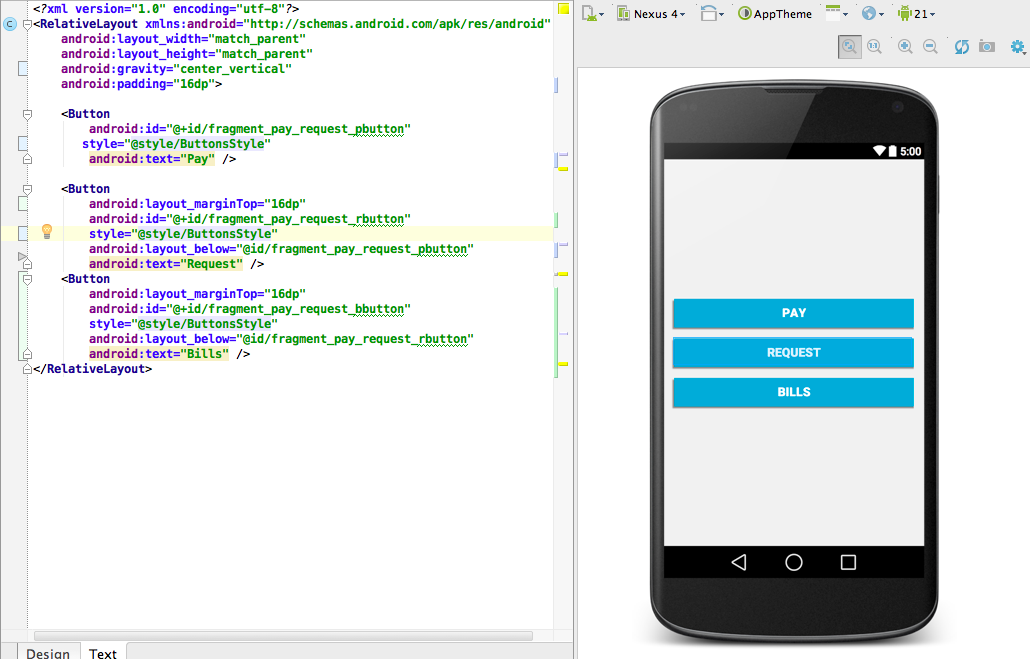
预览版上一切都很好:
但在设备上:
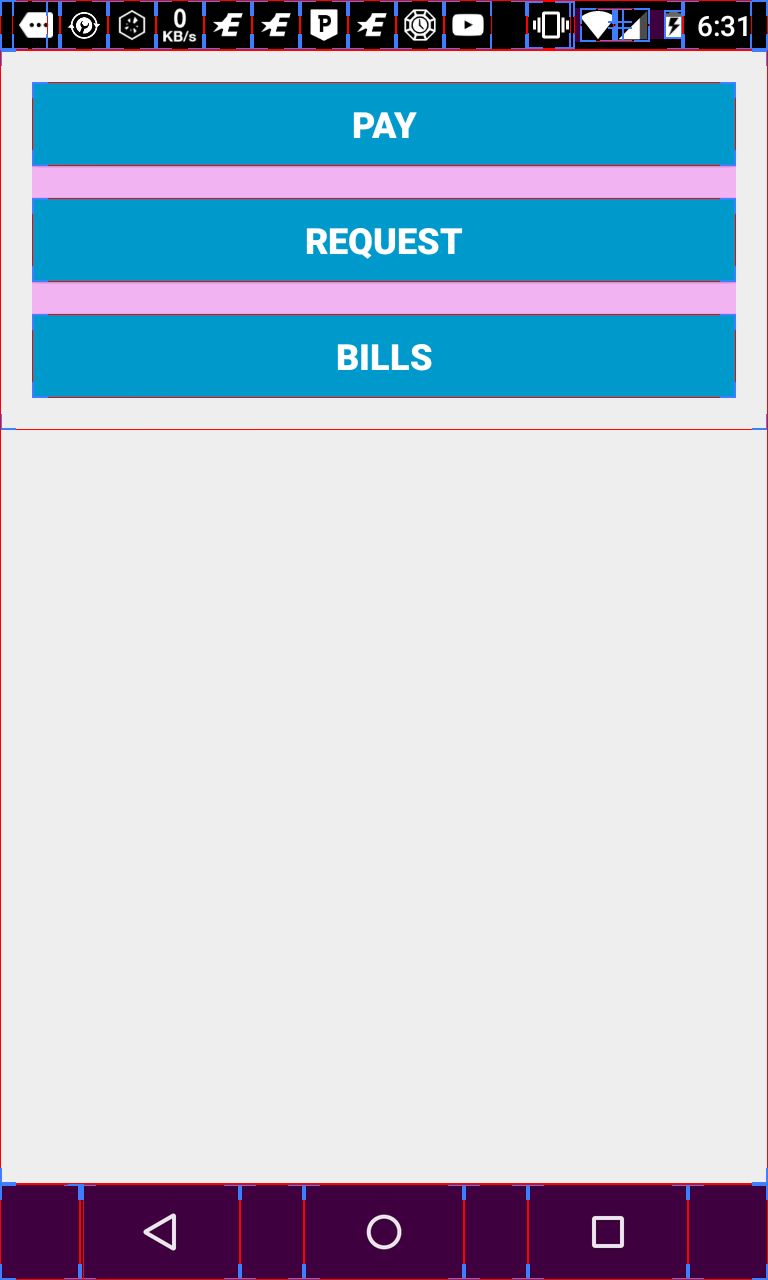
我使用棒棒糖5.1和覆盖模式来测试布局。
有人知道为什么它不起作用,我能做些什么来解决这类问题。
顺便说一句:片段非常简单:
/**
 * Created by laurentmeyer on 15/03/15.
 */
public class PayOrRequestFragment extends BaseFragment {
    @Override
    public View onCreateView(LayoutInflater inflater, @Nullable ViewGroup container, @Nullable Bundle savedInstanceState) {
        View toReturn = inflater.inflate(R.layout.fragment_pay_request, container, false);
        Button pay = (Button) toReturn.findViewById(R.id.fragment_pay_request_pbutton);
        Button request = (Button) toReturn.findViewById(R.id.fragment_pay_request_rbutton);
        configureButton(request, pay);
        return toReturn;
    }

    private void configureButton(Button request, Button pay) {
        request.setOnClickListener(new View.OnClickListener() {
            @Override
            public void onClick(View v) {
                String[] parameters = {"com.payment.laurentmeyer.mobilepayment.fragments.ReceiveFragment", "com.payment.laurentmeyer.mobilepayment.fragments.RequestMethodsFragment"};
                mCallbacks.createSliderWithParameters(parameters);
            }
        });
        pay.setOnClickListener(new View.OnClickListener() {
            @Override
            public void onClick(View v) {
                String[] parameters = {"com.payment.laurentmeyer.mobilepayment.fragments.SendFragment", "com.payment.laurentmeyer.mobilepayment.fragments.VerificationFragment"};
                mCallbacks.createSliderWithParameters(parameters);

            }
        });
    }


}回答 1
Stack Overflow用户
回答已采纳
发布于 2015-03-21 18:36:07
您必须将片段放入活动中的视图容器中.你没有张贴你的活动的布局。视图容器有android:layout_height="wrap_content"吗?
页面原文内容由Stack Overflow提供。腾讯云小微IT领域专用引擎提供翻译支持
原文链接:
https://stackoverflow.com/questions/29185908
复制相关文章
相似问题
腾讯云开发者

Copyright © 2013 - 2026 Tencent Cloud. All Rights Reserved. 腾讯云 版权所有
深圳市腾讯计算机系统有限公司 ICP备案/许可证号:粤B2-20090059  粤公网安备44030502008569号
腾讯云计算(北京)有限责任公司 京ICP证150476号 | 京ICP备11018762号