
MKAnnotationView子视图
目前,我的项目在实现具有多个自定义MKAnnotationView的自定义UIImageViews时遇到了问题。因此,这些自定义UIImageViews在上面有一个清晰的按钮,不需要添加手势识别器。
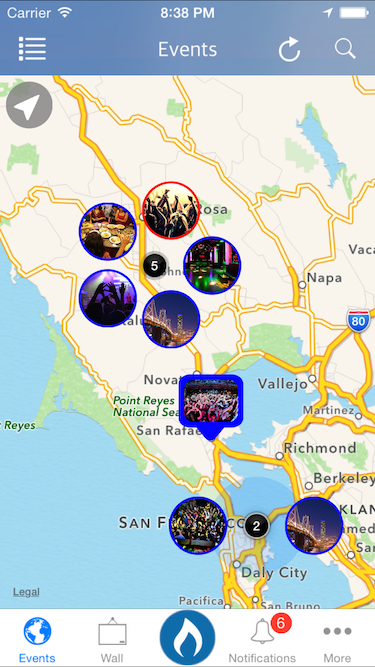
正如您所看到的,实际使用MKAnnotationView子视图并进行一些操作是有益的。
我为MKAnnotationView实现了一个协议,在该协议中,MKAnnotationView中的每个图像子视图对作为MKMapView所有者的控制器进行回调.这是密码..。
PHProfileImageView *image = [[PHProfileImageView alloc] initWithFrame:CGRectMake(newX - radius / 5.0f, newY - radius / 5.0f, width, height)];
        [image setFile:[object objectForKey:kPHEventPictureKey]];
        [image.layer setCornerRadius:image.frame.size.height/2];
        [image.layer setBorderColor:[[UIColor whiteColor] CGColor]];
        [image.layer setBorderWidth:2.0f];
        [image.layer setMasksToBounds:YES];
        [image.profileButton setTag:i];
        [image.profileButton addTarget:self action:@selector(didTapEvent:) forControlEvents:UIControlEventTouchUpInside];
        [self addSubview:image];


- (void)didTapEvent:(UIButton *)button
{
    NSLog(@"%@", [self.pins objectAtIndex:button.tag]);
    if (self.delegate && [self.delegate respondsToSelector:@selector(didTapEvent:)]) {
        [self.delegate JSClusterAnnotationView:self didTapEvent:[self.pins objectAtIndex:button.tag]];
    }
}
因此,正如您所看到的,我已经尝试记录被点击的图像的结果,但是没有:我实现这一目标的方式是不是不合适呢?我应该有CAShapeLayers之类的吗?现在还不太确定。有人有什么想法吗?
编辑
我想我可能需要实现一个定制的标注视图。由于标注视图实际上向视图添加了按钮,并且可以响应触摸事件.但不完全确定,因为标注只显示一次注释视图。在这种情况下,实际的注释视图是中间标签。
因此,我将to注释视图的框架调整为更大的框架,显然所有的子视图实际上都不在MKAnnotationView的范围内,因此子视图实际上没有被挖掘。现在我在考虑这个解决方案,它可能不是最好的解决方案。
如果有人有任何建议而不是向MKAnnotationView添加子视图来创建我目前拥有的视图,那就太好了!
回答 1
Stack Overflow用户
发布于 2015-03-21 06:47:24
对于带有可单击按钮的自定义AnnotationView,必须在项目中创建自定义AnnotationView SubClass。为此创建一个新文件。
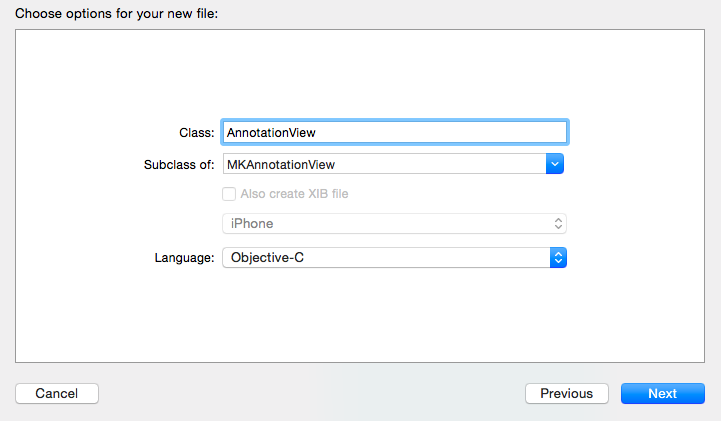
并将这两个方法添加到实现文件中。
- (UIView*)hitTest:(CGPoint)point withEvent:(UIEvent*)event
{
    UIView* hitView = [super hitTest:point withEvent:event];
    if (hitView != nil)
    {
        [self.superview bringSubviewToFront:self];
    }
    return hitView;
}

- (BOOL)pointInside:(CGPoint)point withEvent:(UIEvent*)event
{
    CGRect rect = self.bounds;
    BOOL isInside = CGRectContainsPoint(rect, point);
    if(!isInside)
    {
        for (UIView *view in self.subviews)
        {
            isInside = CGRectContainsPoint(view.frame, point);
            if(isInside)
                break;
        }
    }
    return isInside;
}
然后再转到ViewController.m文件,并按如下方式修改viewDidLoad方法。
- (void)viewDidLoad {
    [super viewDidLoad];

    self.mapKit.delegate = self;

    //Set Default location to zoom
    CLLocationCoordinate2D noLocation = CLLocationCoordinate2DMake(51.900708, -2.083160); //Create the CLLocation from user cordinates
    MKCoordinateRegion viewRegion = MKCoordinateRegionMakeWithDistance(noLocation, 50000, 50000); //Set zooming level
    MKCoordinateRegion adjustedRegion = [self.mapKit regionThatFits:viewRegion]; //add location to map
    [self.mapKit setRegion:adjustedRegion animated:YES]; // create animation zooming

    // Place Annotation Point
    MKPointAnnotation *annotation1 = [[MKPointAnnotation alloc] init]; //Setting Sample location Annotation
    [annotation1 setCoordinate:CLLocationCoordinate2DMake(51.900708, -2.083160)]; //Add cordinates
    [self.mapKit addAnnotation:annotation1];
}
现在将自定义视图添加到ViewController.xib中。
现在创建这个委托方法,如下所示。
#pragma mark : MKMapKit Delegate

-(MKAnnotationView *)mapView:(MKMapView *)mV viewForAnnotation:(id <MKAnnotation>)annotation
{
    AnnotationView *pinView = nil; //create MKAnnotationView Property

    static NSString *defaultPinID = @"com.invasivecode.pin"; //Get the ID to change the pin
    pinView = (AnnotationView *)[self.mapKit dequeueReusableAnnotationViewWithIdentifier:defaultPinID]; //Setting custom MKAnnotationView to the ID
    if ( pinView == nil )
        pinView = [[AnnotationView alloc]
                   initWithAnnotation:annotation reuseIdentifier:defaultPinID]; // init pinView with ID

    [pinView addSubview:self.customView];
    addSubview:self.customView.center = CGPointMake(self.customView.bounds.size.width*0.1f, -self.customView.bounds.size.height*0.5f);

    pinView.image = [UIImage imageNamed:@"Pin"]; //Set the image to pinView

    return pinView;
}
几个月前,我也从Stackoverflow上发布的人那里得到了这个答案。我把它修改成我想要的项目。希望这能做好你的工作。
https://stackoverflow.com/questions/29179473
复制相似问题
腾讯云开发者

Copyright © 2013 - 2026 Tencent Cloud. All Rights Reserved. 腾讯云 版权所有
深圳市腾讯计算机系统有限公司 ICP备案/许可证号:粤B2-20090059  粤公网安备44030502008569号
腾讯云计算(北京)有限责任公司 京ICP证150476号 | 京ICP备11018762号