
如何一次触摸多个按钮
如何一次触摸多个按钮
提问于 2015-03-20 17:10:24
我有5个按钮;每个按钮都允许通过tapGestureRecognizers进行触屏操作和触屏操作.以及双击操作和长按操作。
我也想让用户开始从任何UIButton和的任何附加的,滑动触摸,这些按钮(包括第一次触摸)执行他们的@IBAction func Swipe。
所以像这样不停地滑动
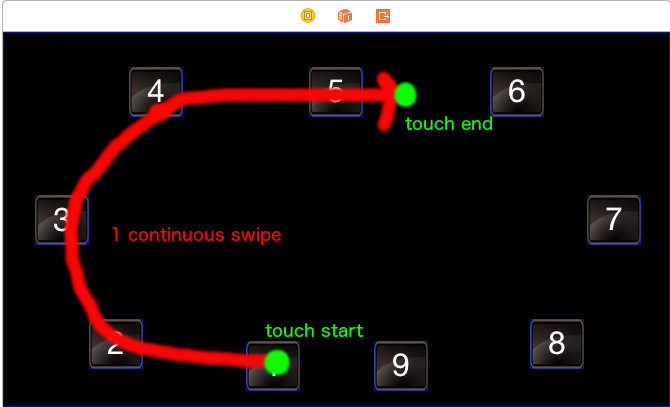
将为UIButtons 1、2、3、4和5执行UIButtons。
回答 1
Stack Overflow用户
回答已采纳
发布于 2015-03-20 19:16:14
你可以试试这样的东西:
// Create an array to hold the buttons you've swiped over
var buttonArray:NSMutableArray!

override func viewDidLoad() {
    super.viewDidLoad()

    // Make your view's UIPanGestureRecognizer call panGestureMethod:
    // (don't use a UISwipeGestureRecognizer since it's a discrete gesture)
    panGesture.addTarget(self, action: "panGestureMethod:")
}

func panGestureMethod(gesture:UIPanGestureRecognizer) {

    // Initialize and empty array to hold the buttons at the
    // start of the gesture
    if gesture.state == UIGestureRecognizerState.Began {
        buttonArray = NSMutableArray()
    }

    // Get the gesture's point location within its view
    // (This answer assumes the gesture and the buttons are
    // within the same view, ex. the gesture is attached to
    // the view controller's superview and the buttons are within
    // that same superview.)
    let pointInView = gesture.locationInView(gesture.view)

    // For each button, if the gesture is within the button and
    // the button hasn't yet been added to the array, add it to the
    // array. (This example uses 4 buttons instead of 9 for simplicity's
    // sake
    if !buttonArray.containsObject(button1) && CGRectContainsPoint(button1.frame, pointInView){
        buttonArray.addObject(button1)
    }
    else if !buttonArray.containsObject(button2) && CGRectContainsPoint(button2.frame, pointInView){
        buttonArray.addObject(button2)
    }
    else if !buttonArray.containsObject(button3) && CGRectContainsPoint(button3.frame, pointInView){
        buttonArray.addObject(button3)
    }
    else if !buttonArray.containsObject(button4) && CGRectContainsPoint(button4.frame, pointInView){
        buttonArray.addObject(button4)
    }

    // Once the gesture ends, trigger the buttons within the
    // array using whatever control event would otherwise trigger
    // the button's method.
    if gesture.state == UIGestureRecognizerState.Ended && buttonArray.count > 0 {
        for button in buttonArray {
            (button as UIButton).sendActionsForControlEvents(UIControlEvents.TouchUpInside)
        }
    }
}(编辑:这是我在过去写过的几个答案,解释了UISwipeGestureRecognizer是一个离散的手势是什么意思:stackoverflow.com/a/27072281/2274694,stackoverflow.com/a/25253902/2274694)
页面原文内容由Stack Overflow提供。腾讯云小微IT领域专用引擎提供翻译支持
原文链接:
https://stackoverflow.com/questions/29172160
复制相关文章
相似问题
腾讯云开发者

Copyright © 2013 - 2026 Tencent Cloud. All Rights Reserved. 腾讯云 版权所有
深圳市腾讯计算机系统有限公司 ICP备案/许可证号:粤B2-20090059  粤公网安备44030502008569号
腾讯云计算(北京)有限责任公司 京ICP证150476号 | 京ICP备11018762号