
Android Studio中的Gradle :未能解决第三方库
我一直试图将我的项目从Intellij切换到Android,这要求我创建一个build.gradle文件。我知道我可以将其中的每一个添加为库依赖项,但理想情况下,我希望能够使maven存储库依赖项工作。
每次我同步时,我的支持库都是同步的,但是对于每个第三方库,我得到了类似的内容。
“错误:(30,13)未能解决: com.facebook.android:facebook-android-sdk:3.23.1”
每个图书馆。
buildscript {
repositories {
    mavenCentral()
}
dependencies {
    classpath 'com.android.tools.build:gradle:1.1.0'
}
}
apply plugin: 'com.android.application'

dependencies {

compile fileTree(dir: 'libs', include: '*.jar')

// Google Play Services
compile 'com.google.android.gms:play-services:6.5.87'

// Support Libraries
compile 'com.android.support:appcompat-v7:22.0.0'
compile 'com.android.support:cardview-v7:21.0.3'
compile 'com.android.support:gridlayout-v7:21.0.3'
compile 'com.android.support:mediarouter-v7:21.0.3'
compile 'com.android.support:palette-v7:21.0.3'
compile 'com.android.support:recyclerview-v7:21.0.3'
compile 'com.android.support:support-annotations:21.0.3'
compile 'com.android.support:support-v13:21.0.3'
compile 'com.android.support:support-v4:22.0.0'

// third-party libraries
compile 'com.amazonaws:aws-java-sdk:1.9.24'
compile 'com.facebook.android:facebook-android-sdk:3.23.1'
compile 'com.github.markushi:android-ui:1.2'
compile 'de.hdodenhof:circleimageview:1.2.2'
compile 'it.neokree:MaterialNavigationDrawer:1.3.2'

}

android {
compileSdkVersion 21
buildToolsVersion "21.1.2"

sourceSets {
    main {
        manifest.srcFile 'AndroidManifest.xml'
        java.srcDirs = ['src']
        resources.srcDirs = ['src']
        aidl.srcDirs = ['src']
        renderscript.srcDirs = ['src']
        res.srcDirs = ['res']
        assets.srcDirs = ['assets']
    }

    // Move the tests to tests/java, tests/res, etc...
    instrumentTest.setRoot('tests')

    // Move the build types to build-types/<type>
    // For instance, build-types/debug/java, build-types/debug/AndroidManifest.xml, ...
    // This moves them out of them default location under src/<type>/... which would
    // conflict with src/ being used by the main source set.
    // Adding new build types or product flavors should be accompanied
    // by a similar customization.
    debug.setRoot('build-types/debug')
    release.setRoot('build-types/release')
}
}回答 8
Stack Overflow用户
发布于 2015-03-18 09:44:02
添加:
repositories {
   mavenCentral()
}给build.gradle。现在您只在构建脚本中定义了repositories,它只解决buildscript本身的依赖关系,而不是项目的依赖关系。
Stack Overflow用户
发布于 2015-08-11 14:05:59
为了分享信息,我遇到了同样的问题,解决方案也不一样。
在我的例子中,使用了代理服务器并导致了问题。我需要配置https代理设置,正如在Android Studio 1.3中的gradle后台代理中讨论的那样。
Stack Overflow用户
发布于 2016-02-05 22:50:41
如果您在您的系统上使用了VPN \\ Proxy,那么在您的项目中的gradle.properties文件中使用代理信息,如下所示:
# HTTP Proxy
systemProp.http.proxyHost={Host Address}
systemProp.http.proxyPort={Port Number}
systemProp.http.proxyUser={Proxy Username}
systemProp.http.proxyPassword={Proxy Password}
systemProp.http.nonProxyHosts={NonProxy Hosts Address} # like: 127.0.0.1,localhost

# HTTPS Proxy
systemProp.https.proxyHost={Host Address}
systemProp.https.proxyPort={Port Number}
systemProp.https.proxyUser={Proxy Username}
systemProp.https.proxyPassword={Proxy Password}
systemProp.https.nonProxyHosts={NonProxy Hosts Address} # like: 127.0.0.1,localhost现在,只需用适当的数据替换上面代码中的{.....}即可。
此外,您还可以在File>Settings中通过代理信息设置Android代理程序,如下面的图像
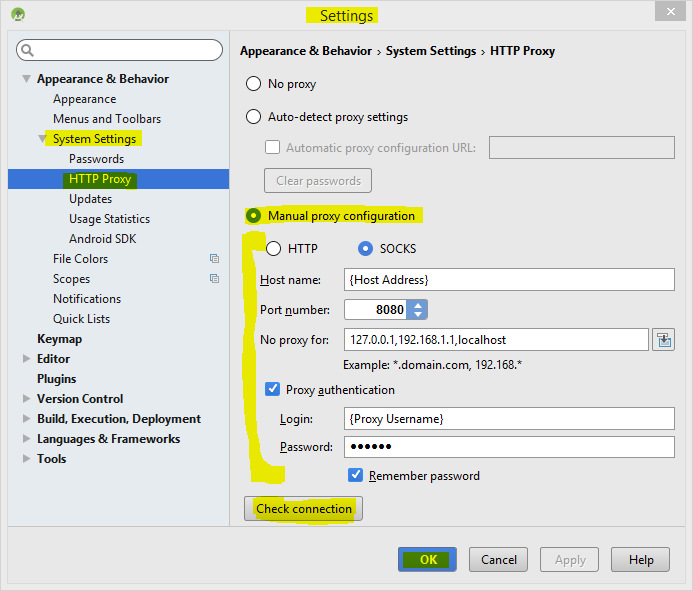
再试一次.!
https://stackoverflow.com/questions/29118606
复制相似问题
腾讯云开发者

Copyright © 2013 - 2026 Tencent Cloud. All Rights Reserved. 腾讯云 版权所有
深圳市腾讯计算机系统有限公司 ICP备案/许可证号:粤B2-20090059  粤公网安备44030502008569号
腾讯云计算(北京)有限责任公司 京ICP证150476号 | 京ICP备11018762号