
大窗体的布局控件,按每一行大小分别以中心为中心。
我有一个表单,其中包含一个用户必须填写的大量字段。
我想把他们连成2-4组。每个控件可能有不同的大小,标签应该出现在控件的左边。
控件应该是水平居中的,不应该占用未占用的空间,而应该占用所需的空间。
下面是我需要的一个例子:
/T1559.2-1988自愿性、中转率、目标值等
/T1585.2-1988产品价格、产品价格、产品价格等
▓/T1559.2-1988商品、商业、金融、金融、商业、金融、商业、商业、金融等行业的产品、商品、金融、金融、商业、金融、金融、商业、金融、金融等行业的产品、商业产品、工业产品等
我尝试使用form-inline和不结合container,但我无法使它工作。
下面是我的表单的一些片段,不幸的是它是剃须刀,我无法在jsFiddle上测试它,但是这里是一个示例输出。
<div class="container center-block">
  <h4>Patient</h4>
  <hr />
  @Html.ValidationSummary(true, "", new { @class = "text-danger" })
  @Html.HiddenFor(model => model.Id)

  <div class="row">

    <div class="form-group">
      @Html.LabelFor(model => model.FirstName, htmlAttributes: new { @class = "control-label col-md-3" })
      <div class="col-md-3">
        @Html.EditorFor(model => model.FirstName, new { htmlAttributes = new { @class = "form-control" } })
        @Html.ValidationMessageFor(model => model.FirstName, "", new { @class = "text-danger" })
      </div>
    </div>

    <div class="form-group">
      @Html.LabelFor(model => model.LastName, htmlAttributes: new { @class = "control-label col-md-3" })
      <div class="col-md-3">
        @Html.EditorFor(model => model.LastName, new { htmlAttributes = new { @class = "form-control" } })
        @Html.ValidationMessageFor(model => model.LastName, "", new { @class = "text-danger" })
      </div>
    </div>

    <div class="form-group">
      @Html.LabelFor(model => model.Gender, htmlAttributes: new { @class = "control-label col-md-3" })
      <div class="col-md-3">
        @Html.EnumDropDownListFor(model => model.Gender, htmlAttributes: new { @class = "form-control" })
        @Html.ValidationMessageFor(model => model.Gender, "", new { @class = "text-danger" })
      </div>
    </div>
  </div>

  <div class="row">
    <div class="form-group">
      @Html.LabelFor(model => model.Passport, htmlAttributes: new { @class = "control-label col-md-3" })
      <div class="col-md-3">
        @Html.EditorFor(model => model.Passport, new { htmlAttributes = new { @class = "form-control" } })
        @Html.ValidationMessageFor(model => model.Passport, "", new { @class = "text-danger" })
      </div>
    </div>

    <div class="form-group">
      @Html.LabelFor(model => model.BirthDate, htmlAttributes: new { @class = "control-label col-md-3" })
      <div class="col-md-3">
        @Html.EditorFor(model => model.BirthDate, new { htmlAttributes = new { @class = "form-control" } })
        @Html.ValidationMessageFor(model => model.BirthDate, "", new { @class = "text-danger" })
      </div>
    </div>
  </div>
</div>
以下是它的渲染方式:
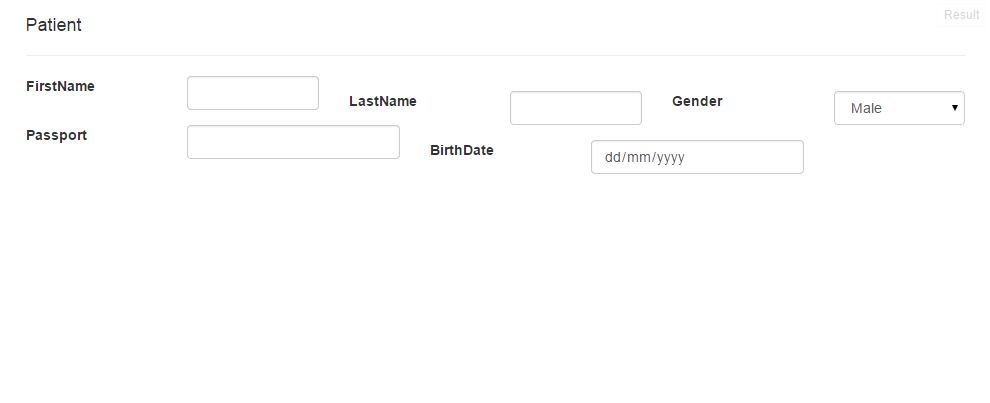
我已经尝试了很少的事情,但是我不知道什么是解锁秘密,它使一个单独的行在其他行中独立,并将以下规则应用到它的控件中,而忽略了表单设置:
- 水平形式,以便每个控件的标签位于其右侧。
- 每行多个
form-groups - 将控件堆栈水平地居中,而不是扩大控件以占用所有可用空间。
- 根据最宽的行调整外部宽度,然后将窗体对齐到左边。
- 使行内的列完全独立于其他行
任何对深度教程的参考都将受到欢迎!
回答 2
Stack Overflow用户
发布于 2015-03-25 04:25:59
我唯一没有完全完成的部分是将表单与左边对齐。我想我得到了你要的一切。http://www.minimit.com/demos/bootstrap-3-responsive-centered-columns将为理解以中心为中心的列提供一个基础。祝好运!
将此复制到新Plunk中的style.css中。
.row-centered {
    text-align:center;
}
.control-label{padding: 20px;}
form  { display: table;
}
h1 {
    margin:40px 40px 20px 40px;
      color:#95c500;
    font-size:28px;
    line-height:34px;
    text-align:left;
}
然后将其复制到Index.html:
<!DOCTYPE html>
<html>

<head>
  <script data-require="jquery@*" data-semver="2.1.3" src="http://code.jquery.com/jquery-2.1.3.min.js"></script>
  <link data-require="bootstrap@*" data-semver="3.3.2" rel="stylesheet" href="//maxcdn.bootstrapcdn.com/bootstrap/3.3.2/css/bootstrap.min.css" />
  <script data-require="bootstrap@*" data-semver="3.3.2" src="//maxcdn.bootstrapcdn.com/bootstrap/3.3.2/js/bootstrap.min.js"></script>

  <script data-require="angular.js@*" data-semver="1.4.0-beta.6" src="https://code.angularjs.org/1.4.0-beta.6/angular.js"></script>
  <link rel="stylesheet" href="style.css" />
  <script src="script.js"></script>
</head>

<body ng-controller="ExampleController">
  <h1>Patient</h1>
  <div class="container" align="left">
    <form class="form-inline row-centered">

      <input data-val="true" data-val-number="The field Id must be a number." data-val-required="The Id field is required." id="Id" name="Id" type="hidden" value="" />

      <div class="row">
        <div class="form-group">
          <label class="control-label " for="  FirstName">FirstName</label>
          <input class=" form-control text-box single-line" data-val="true" data-val-length="The field FirstName must be a string with a minimum length of 2 and a maximum length of 32." data-val-length-max="32" data-val-length-min="2" data-val-required="The FirstName field is required."
          id="FirstName" name="FirstName" type="text" value="" /> <span class="field-validation-valid text-danger" data-valmsg-for="FirstName" data-valmsg-replace="true"></span>
        </div>

        <div class="form-group">
          <label class="control-label" for="  LastName">LastName</label>
          <input class="form-control text-box single-line" data-val="true" data-val-length="The field LastName must be a string with a minimum length of 2 and a maximum length of 32." data-val-length-max="32" data-val-length-min="2" data-val-required="The LastName field is required."
          id="LastName" name="LastName" type="text" value="" /> <span class="field-validation-valid text-danger" data-valmsg-for="LastName" data-valmsg-replace="true"></span>
        </div>
        <div class="form-group">
          <label class="control-label" for="  Gender">Gender</label>
          <select class="form-control" data-val="true" data-val-required="The Gender field is required." id="Gender" name="Gender">
            <option selected="selected" value="0">Male</option>
            <option value="1">Female</option>
          </select> <span class="field-validation-valid text-danger" data-valmsg-for="Gender" data-valmsg-replace="true"></span>
        </div>

        <div class="form-group">
          <label class="control-label" for="  Passport">Passport</label>
          <input class="form-control text-box single-line" data-val="true" data-val-length="The field Passport must be a string with a minimum length of 5 and a maximum length of 12." data-val-length-max="12" data-val-length-min="5" id="Passport" name="Passport"
          type="text" value="" /> <span class="field-validation-valid text-danger" data-valmsg-for="Passport" data-valmsg-replace="true"></span>
        </div>

        <div class="form-group">
          <label class="control-label" for="  BirthDate">BirthDate</label>
          <input class="form-control text-box single-line" data-val="true" data-val-date="The field BirthDate must be a date." data-val-range="The field BirthDate must be between 01/01/1915 12:00:00 AM and 01/01/2035 12:00:00 AM." data-val-range-max="01/01/2035 00:00:00"
          data-val-range-min="01/01/1915 00:00:00" data-val-required="The BirthDate field is required." id="BirthDate" name="BirthDate" type="date" value="" /> <span class="field-validation-valid text-danger" data-valmsg-for="BirthDate" data-valmsg-replace="true"></span>
        </div>
      </div>

    </form>
  </div>


</body>

</html>
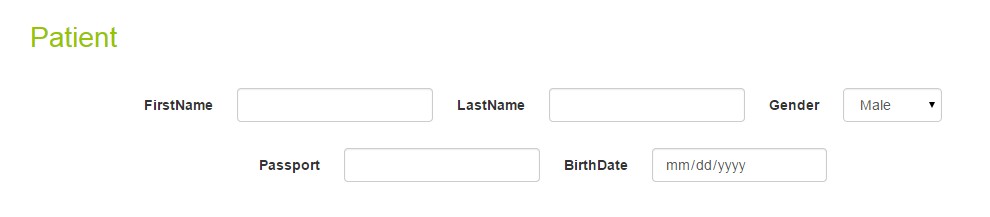
- 水平形式,以便每个控件的标签都在其左侧:(您说左在一个地方,右边在另一个地方)。这很容易改变。
- 每行多个表单组:将整个表单放入一个“行”类,并让页面宽度响应地确定适合多少个表单组。
- 将控件堆栈水平地居中,而不是将它们扩大到占用所有可用空间:请参阅上面的输出,或将我的代码复制到plunk中,然后在那里看到输出。
- 使行内的列完全独立于其他行
- 任何对深度教程的参考都将受到欢迎!请查看以下内容:http://www.minimit.com/demos/bootstrap-3-responsive-centered-columns
Stack Overflow用户
发布于 2015-03-23 10:13:54
您可以查看下面的页面,了解一些不错的设计和示例:
http://code.tutsplus.com/tutorials/html-5-and-css-3-the-techniques-youll-soon-be-using--net-5708
http://css.maxdesign.com.au/floatutorial/introduction.htm
http://tympanus.net/Development/TextInputEffects/index2.html
http://getbootstrap.com/components/
希望这能帮上忙。
https://stackoverflow.com/questions/29068009
复制相似问题
腾讯云开发者

Copyright © 2013 - 2026 Tencent Cloud. All Rights Reserved. 腾讯云 版权所有
深圳市腾讯计算机系统有限公司 ICP备案/许可证号:粤B2-20090059  粤公网安备44030502008569号
腾讯云计算(北京)有限责任公司 京ICP证150476号 | 京ICP备11018762号