
MATLAB图形用户界面中与2位图形的同时交互
我正在写一个图形用户界面在MATLAB (指南),用户将显示2幅图像(这两幅图像是并列在一个GUI窗口)从一系列的图像(但每个漂移的一点点),并将被允许选择感兴趣的领域。
我希望用户在图像1中选择工作,同时在图像2中突出显示所选区域,这样就更容易判断感兴趣的特征是否已偏离选定区域。怎么做?
我使用以下答案来选择感兴趣的作物和作物区域( FYI):固定x/y比的作物图像
回答 1
Stack Overflow用户
发布于 2015-03-13 13:00:12
下面是一种使用imrect及其addNewPositionCallback方法来实现它的方法。检查这里以获得可用方法的列表。
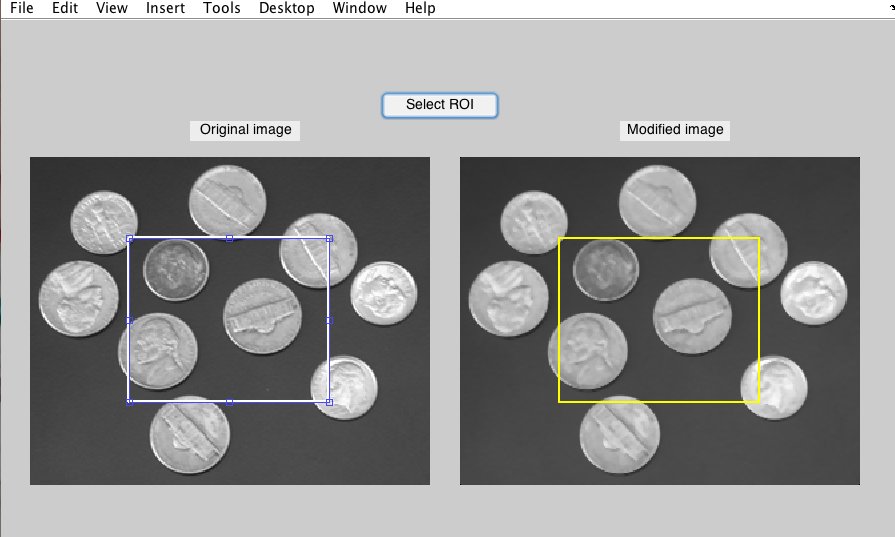
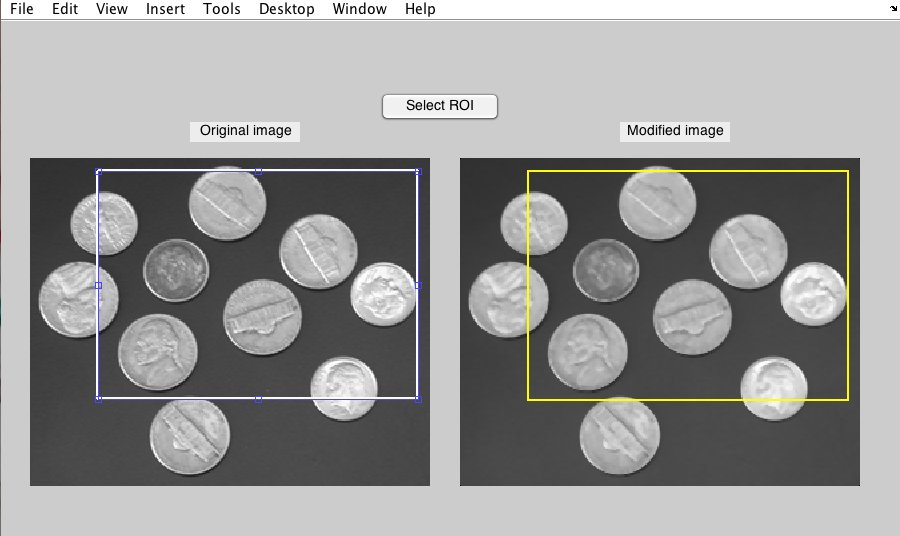
在下面的图中,我创建了两个轴。左边是原始图像,右边是“修改”图像。通过按下按钮,调用imrect,addNewPositionCallback方法执行一个名为GetROIPosition的函数,该函数用于获取由imrect定义的矩形的位置。同时,在第二轴上,用与第一轴相同的位置绘制矩形。更别提的是,您可以使用setConstrainedPosition强制将矩形包围在给定的轴中。我让您这么做:)下面是包含两个屏幕截图的整个代码:
function SelectROIs(~)
%clc
clear
close all

%//=========================
%// Create GUI components

hfigure = figure('Position',[300 300 900 600],'Units','Pixels');

handles.axesIm1 = axes('Units','Pixels','Position',[30,100,400 400],'XTick',[],'YTIck',[]);
handles.axesIm2 = axes('Units','Pixels','Position',[460,100,400,400],'XTick',[],'YTIck',[]);

handles.TextaxesIm1 = uicontrol('Style','Text','Position',[190 480 110 20],'String','Original image','FontSize',14);
handles.TextaxesIm2 = uicontrol('Style','Text','Position',[620 480 110 20],'String','Modified image','FontSize',14);

%// Create pushbutton and its callback
handles.SelectROIColoring_pushbutton = uicontrol('Style','pushbutton','Position',[380 500 120 30],'String','Select ROI','FontSize',14,'Callback',@(s,e) SelectROIListCallback);

%// ================================
%/ Read image and create 2nd image by taking median filter
handles.Im = imread('coins.png');

[Height,Width,~] = size(handles.Im);
handles.ModifIm = medfilt2(handles.Im,[3 3]);

imshow(handles.Im,'InitialMagnification','fit','parent',handles.axesIm1);
imshow(handles.ModifIm,'InitialMagnification','fit','parent',handles.axesIm2);


guidata(hfigure,handles);
%%
%// Pushbutton's callback. Create a draggable rectangle in the 1st axes and
%a rectangle in the 2nd axes. Using the addNewPositionCallback method of
%imrect, you can get the position in real time and update that of the
%rectangle.

    function SelectROIListCallback(~)

        hfindROI = findobj(handles.axesIm1,'Type','imrect');
        delete(hfindROI);

        hROI = imrect(handles.axesIm1,[Width/4  Height/4 Width/2 Height/2]); % Arbitrary size for initial centered ROI.

        axes(handles.axesIm2)
        rectangle('Position',[Width/4  Height/4 Width/2 Height/2],'EdgeColor','y','LineWidth',2);

        id = addNewPositionCallback(hROI,@(s,e) GetROIPosition(hROI));

    end

%// Function to fetch current position of the moving rectangle.
    function ROIPos = GetROIPosition(hROI)

        ROIPos = round(getPosition(hROI));

        axes(handles.axesIm2)

        hRect = findobj('Type','rectangle');
        delete(hRect)
        rectangle('Position',ROIPos,'EdgeColor','y','LineWidth',2);
    end

end
按下按钮后的数字:
在移动矩形之后:
耶!希望这能帮上忙!注意,由于您使用的是指南,回调的语法看起来会有点不同,但想法完全相同。
https://stackoverflow.com/questions/29026416
复制相似问题
腾讯云开发者

Copyright © 2013 - 2026 Tencent Cloud. All Rights Reserved. 腾讯云 版权所有
深圳市腾讯计算机系统有限公司 ICP备案/许可证号:粤B2-20090059  粤公网安备44030502008569号
腾讯云计算(北京)有限责任公司 京ICP证150476号 | 京ICP备11018762号