
如何从原始区域填充线性梯度刷区域?
我使用LinearGradient画笔填充该区域,并使用起始点和结束点“颜色”创建了linearGradient画笔。
  Rectangle linearGradientregion= new Rectangl(20,-50,30,30);
  LinearGradientBrush linearGradientBrush = new LinearGradientBrush(new PointF(20, -20), new PointF(50, -50), Color.Green, Color.Red);


  Rectangle pathRegion= new Rectangl(-50,-25,50,50);
  GraphicsPath path = new GraphicsPath();
  path.AddRectangle(pathRegion);
  graphics.FillPath(linearGradientBrush, path);
区域大小大于linearGradientBrush边界面积。
现在,我想知道如何使用linearGradientBrush边界区域填充区域,只使用linearGradientBrush,其余区域填充另一种颜色。
下面的图像是期望输出。
http://i.stack.imgur.com/B4CHB.png但我得到了这样的结果
http://i.stack.imgur.com/Pxwiw.png在第一幅图像中,填充绿色颜色的圆圈超出了线性梯度刷的边界。
在第二幅图像中,梯度刷再次来填充该区域。
我想停止渐变刷填充在结束点的线性梯度刷,并填补剩余的区域与另一种颜色。
提前谢谢你,
帕蒂
回答 2
Stack Overflow用户
发布于 2015-03-13 10:15:51
完成这一任务有几种方法:
- 您可以分两步完成,首先填充圆圈,然后用设置为
ClippingPath(Graphics.SetClip(path))的Graphics对象填充三角形。 - 您可以分两步完成,首先按角度旋转Graphics对象,然后填充圆,然后填充
Rectangle,再将圆形设置为Graphics对象的ClippingPath。终于向后旋转了。 - 或者您可以在一个步骤中完成:创建一个multicolored
LinearGradientBrush,并设置位置,这样绿色区域就开始于无转换。
以下是使用第三种方法(左图像)和第二种方法(右图像)的两种解决方案:
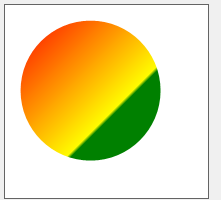
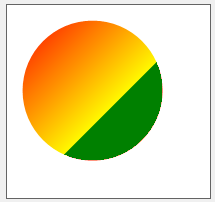
使用具有多色梯度的第三种方法的解决方案一个:
private void panel1_Paint(object sender, PaintEventArgs e)
{
    e.Graphics.Clear(Color.White);
    e.Graphics.SmoothingMode = SmoothingMode.HighQuality;
    Rectangle linearGradientregion = new Rectangle(10, 10, 150, 150);
    Rectangle pathRegion = new Rectangle(15, 15, 140, 140);
    GraphicsPath path = new GraphicsPath();
    path.AddEllipse(pathRegion);
    LinearGradientBrush linearGradientBrush =
       new LinearGradientBrush(linearGradientregion, Color.Red, Color.Yellow, 45);

    ColorBlend cblend = new ColorBlend(4);
    cblend.Colors = new Color[4]  { Color.Red, Color.Yellow, Color.Green, Color.Green };
    cblend.Positions = new float[4] { 0f, 0.65f, 0.65f, 1f };

    linearGradientBrush.InterpolationColors = cblend;

    e.Graphics.FillPath(linearGradientBrush, path);
}
请注意,我没有使用您的坐标设置。我相信你可以调整数字。
还请注意,构造函数中的Colors不被Brush使用!
使用第二种方法解决了两个问题。请注意向绿色的急剧过渡:
private void panel3_Paint(object sender, PaintEventArgs e)
{
    e.Graphics.Clear(Color.White);
    e.Graphics.SmoothingMode = SmoothingMode.HighQuality;
    Rectangle linearGradientregion = new Rectangle(10, 10, 95, 95);
    Rectangle pathRegion = new Rectangle(15, 15, 140, 140);
    int centerX = pathRegion.X + pathRegion.Width / 2;
    int centerY = pathRegion.Y + pathRegion.Height / 2;

    GraphicsPath path = new GraphicsPath();
    path.AddEllipse(pathRegion);
    LinearGradientBrush linearGradientBrush =
        new LinearGradientBrush(linearGradientregion, Color.Red, Color.Yellow, 45);
    e.Graphics.FillPath(linearGradientBrush, path);
    e.Graphics.SetClip(path);

    e.Graphics.TranslateTransform(centerX, centerY);
    e.Graphics.RotateTransform(45f);
    e.Graphics.FillRectangle(Brushes.Green, 25, -90, 240, 240);
    e.Graphics.ResetTransform();
}
再一次,这取决于你去找出最好的数字。
Stack Overflow用户
发布于 2015-03-13 04:57:50
要填充梯度,必须指定要填充的确切区域。在你的情况下,我相信这是linearGradientregion
graphics.FillRectangle(linearGradientBrush, linearGradientregion);若要填充剩余区域,请在GraphicsPath中使用交替填充模式 (默认值)。将这两个矩形添加到路径中,则外部形状将被填充,内部形状将位于裁剪区域之外,从而保持单独。例如:
using(var externalPath = new GraphicsPath(FillMode.Alternate))
{
    externalPath.AddRectangle(pathRegion);
    externalPath.AddRectangle(linearGradientregion);

    graphics.FillPath(Brushes.Black, externalPath);
}https://stackoverflow.com/questions/29025026
复制相似问题
腾讯云开发者

Copyright © 2013 - 2026 Tencent Cloud. All Rights Reserved. 腾讯云 版权所有
深圳市腾讯计算机系统有限公司 ICP备案/许可证号:粤B2-20090059  粤公网安备44030502008569号
腾讯云计算(北京)有限责任公司 京ICP证150476号 | 京ICP备11018762号