
彩色DataGridCell
彩色DataGridCell
提问于 2015-03-12 12:52:46
我有一个WPF DataGrid,具有不同的列计数。我想用这个值来给单细胞着色。例如:如果单元格值为0,则为红色。
这些是我的实验:
<DataGrid Grid.Row="0" Grid.Column="0" Grid.ColumnSpan="2" x:Name="DataGrid"  SelectionUnit="Cell">
        <DataGrid.CellStyle>
            <Style TargetType="{x:Type DataGridCell}">
                <Style.Triggers>
                  <!--experiment 1 -->
                    <DataTrigger Binding="{Binding RelativeSource={RelativeSource Self}, Path=Value, NotifyOnSourceUpdated=True, NotifyOnTargetUpdated=True}" Value="0">
                        <Setter Property="Background" Value="LimeGreen"/>
                    </DataTrigger>
                   <!--experiment 2 -->
                    <DataTrigger Binding="{Binding RelativeSource={RelativeSource Self}, Path=Content, NotifyOnSourceUpdated=True, NotifyOnTargetUpdated=True}" Value="0">
                        <Setter Property="Background" Value="LimeGreen"/>
                    </DataTrigger>
                    </Style.Triggers>
            </Style>
        </DataGrid.CellStyle>
</DataGrid>回答 2
Stack Overflow用户
回答已采纳
发布于 2015-03-12 13:48:58
只需使用一个值转换器(以单元格值作为参数),返回所需的颜色。
<DataGrid>
    <DataGridCell Background="{Binding CellValueField, Converter={StaticResource YourDefinedValueToColorConverter}}" />
</DataGrid>
编辑:终于让它开始工作了。
转换器和样式定义:
<Window.Resources>
    <c:ValueToColorConverter x:Key="ValueToColorConverter"/>
    <Style x:Key="CellStyle" TargetType="DataGridCell">
        <Setter Property="Background" Value="{Binding RelativeSource={RelativeSource Self}, Converter={StaticResource ValueToColorConverter}}" />
    </Style>
</Window.Resources>
DataGrid:
<DataGrid HorizontalAlignment="Left"
              Margin="10,10,0,0"
              VerticalAlignment="Top"
              Loaded="DataGrid_Loaded">
        <DataGrid.CellStyle>
            <Style TargetType="DataGridCell">
                <Setter Property="Background" Value="{Binding Converter={StaticResource ValueToColorConverter}}" />
            </Style>
        </DataGrid.CellStyle>
    </DataGrid>
转换器:
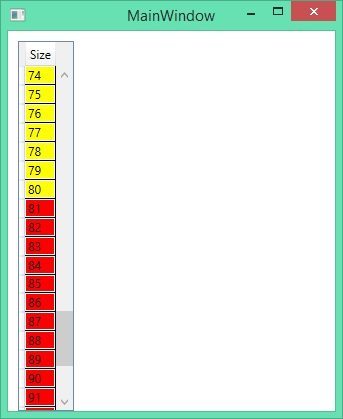
public object Convert(object value, Type targetType, object parameter, System.Globalization.CultureInfo culture)
    {
        var cell = value as Order;
        if (cell != null && cell.Size > 80)
            return new SolidColorBrush(Colors.Red);
        else return new SolidColorBrush(Colors.Yellow);
}我使用DataGrid_Loaded方法将封装在示例类中的一些随机数据填充到DataGrid中:
class Order
{
    public int Size { get; set; }
}
其结果是:
Stack Overflow用户
发布于 2015-03-12 14:01:28
使用值转换器,如下所示:
<DataGridCell Background="{Binding CellValueField, Converter={StaticResource IntegerToColorValueConverter}}" />和:
public class IntegerToColorValueConverter : IValueConverter
{
    public object Convert(object value, Type targetType, object parameter,
          System.Globalization.CultureInfo culture)
    {
        switch ((int)value)
        {
            case 1: return Color.Red; break;
            case 2: return Color.Yellow; break;
            Default: return Color.White; break;
        }
    }

}页面原文内容由Stack Overflow提供。腾讯云小微IT领域专用引擎提供翻译支持
原文链接:
https://stackoverflow.com/questions/29010317
复制相关文章
相似问题
腾讯云开发者

Copyright © 2013 - 2026 Tencent Cloud. All Rights Reserved. 腾讯云 版权所有
深圳市腾讯计算机系统有限公司 ICP备案/许可证号:粤B2-20090059  粤公网安备44030502008569号
腾讯云计算(北京)有限责任公司 京ICP证150476号 | 京ICP备11018762号