
simctl + state构建变化的模拟器状态
我正在尝试自动化我在项目中的功能测试。为此,我使用Jenkins并使用钩子运行测试任务。作业被正确地调用,但是在测试运行之前,我需要擦除模拟器,以便测试应用程序的第一次启动。我所做的工作如下:
#!/bin/bash --login

# simulator we want
sim="iPhone 6"

# close the iOS simulator if open
echo "Trying to close iOS Simulator"
osascript -e 'tell app "iOS Simulator" to quit'

# find all booted devices
booted=( $(xcrun simctl list | sed -n 's/.*(\(.*\)) (Booted)/\1/p') )
if [ ${#booted[@]} != 0 ]; then
    echo 'Found the following booted devices:'
    for device in ${booted[@]}
    do
        echo $device
    done
else
    echo 'There are no booted devices, skipping'
fi

# shutdown all of them to be able to erase them
for device in ${booted[@]}
do
    echo "Trying to shutdown $device"
    xcrun simctl shutdown $device
    echo "Done"
done

# sanity check, all devices should be shutdown
booted=( $(xcrun simctl list | sed -n 's/.*(\(.*\)) (Booted)/\1/p') )
if [ ${#booted[@]} != 0 ]; then
    echo 'Even though we shut down all the devices, some devices are still booted:'
    for device in ${booted[@]}
    do
        echo $device
    done
    exit 1
fi

# erase the device so we can test index page and tutorial
allDevices=( $(xcrun simctl list | sed -En 's/.* \((.*)\) \((Shutdown)\)/\1/p') )
for device in ${allDevices[@]}
do
    echo "Erasing device $device"
    xcrun simctl erase $device
    echo
done

# sanity check, all devices should be shutdown
booted=( $(xcrun simctl list | sed -n 's/.*(\(.*\)) (Booted)/\1/p') )
if [ ${#booted[@]} != 0 ]; then
    echo 'Even though we shut down all the devices, some devices are still booted:'
    for device in ${booted[@]}
    do
        echo $device
    done
    exit 1
fi

echo device list:
echo $(xcrun simctl list)

dev=( $(xcrun simctl list | sed -En 's/'"$sim"' \((.*)\) \((Shutdown)\)/\1/p') )
echo Booting the device $dev
xcrun simctl boot $dev

# clean is not good enough, need to remove DerivedData contents manually
rm -rf ~/Library/Developer/Xcode/DerivedData

/usr/local/bin/xctool -workspace MyApp.xcworkspace -scheme MyApp_QA2 clean

xcodebuild -workspace MyApp.xcworkspace -scheme MyApp_QA2 -destination 'platform=iOS Simulator,name=iPhone 6,OS=8.1' test | xcpretty -c -r html
当我运行这个时,我得到:
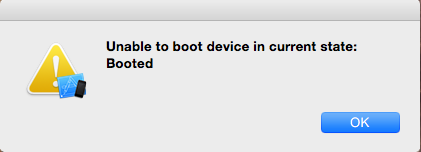
这些线路负责引导:
dev=( $(xcrun simctl list | sed -En 's/'"$sim"' \((.*)\) \((Shutdown)\)/\1/p') )
echo Booting the device $dev
xcrun simctl boot $dev
因此,我对它们进行评论,但是构建失败的原因如下:
2015-03-10 09:56:13.036 xcodebuild84840:4008451 iPhoneSimulator:无法连接到iPhoneSimulator(错误Domain=com.apple.CoreSimulator.SimError Code=146“在当前状态下无法查找:关机”UserInfo=0x7fbcb2f00af0 {NSLocalizedDescription=Unable在当前状态下查找:关机})
在我看来,Xcode和simctl不同意哪个人应该负责引导正确的sim。有什么想法吗?
回答 2
Stack Overflow用户
发布于 2015-06-19 14:46:05
在Xcode 6和Xcode 7中,Simulator.app负责引导它使用的设备。如果您使用simctl引导设备,Simulator.app将无法在该状态下使用它,因为它将被引导到无头状态。
Stack Overflow用户
发布于 2015-08-06 09:26:09
您可以使用xcrun instruments -w "iPhone 5 (8.4 Simulator)"启动模拟器,并使用killall "iOS Simulator"关闭模拟器
https://stackoverflow.com/questions/28959754
复制相似问题
腾讯云开发者

Copyright © 2013 - 2026 Tencent Cloud. All Rights Reserved. 腾讯云 版权所有
深圳市腾讯计算机系统有限公司 ICP备案/许可证号:粤B2-20090059  粤公网安备44030502008569号
腾讯云计算(北京)有限责任公司 京ICP证150476号 | 京ICP备11018762号