
用硬纸片填充整个屏幕
用硬纸片填充整个屏幕
提问于 2015-03-10 07:19:22
我尝试使用这教程制作一个应用程序(示例2)。我创建了一个导航抽屉活动。
我的主要片段xml (添加了卡片):
<RelativeLayout xmlns:android="http://schemas.android.com/apk/res/android"
    xmlns:tools="http://schemas.android.com/tools"
    xmlns:card="http://schemas.android.com/apk/res-auto"
    android:layout_width="fill_parent"
    android:layout_height="fill_parent" android:paddingLeft="@dimen/activity_horizontal_margin"
    android:paddingRight="@dimen/activity_horizontal_margin"
    android:paddingTop="@dimen/activity_vertical_margin"
    android:paddingBottom="@dimen/activity_vertical_margin"
    tools:context=".MainActivity$PlaceholderFragment"
    android:id="@+id/mainfragment">

    <ScrollView
        android:layout_width="fill_parent"
        android:layout_height="fill_parent"
        android:id="@+id/scrollView" >

        <LinearLayout
            android:layout_width="fill_parent"
            android:layout_height="fill_parent"
            android:id="@+id/abovecards">


            <it.gmariotti.cardslib.library.view.CardListView
                android:id="@+id/myList"
                android:layout_width="fill_parent"
                android:layout_height="fill_parent"
                card:list_card_layout_resourceID="@layout/list_card_thumbnail_layout"
                style="@style/list_card.thumbnail"/>

        </LinearLayout>

    </ScrollView>

</RelativeLayout>
在我的主要活动中,我补充道:
@Override
        public void onActivityCreated(@Nullable Bundle savedInstanceState) {
            super.onActivityCreated(savedInstanceState);
            cardthingy();

        }

        public void cardthingy(){

            int listImages[] = new int[]{R.mipmap.ic_launcher, R.mipmap.ic_launcher1,
                    R.mipmap.ic_launcher, R.mipmap.ic_launcher1, R.mipmap.ic_launcher};

            ArrayList<Card> cards = new ArrayList<Card>();

            for (int i = 0; i<5; i++) {
                // Create a Card
                Card card = new Card(this.getActivity());
                // Create a CardHeader
                CardHeader header = new CardHeader(this.getActivity());
                // Add Header to card
                header.setTitle("Test: " + i);
                card.setTitle("Some text here");
                card.addCardHeader(header);

                CardThumbnail thumb = new CardThumbnail(this.getActivity());
                thumb.setDrawableResource(listImages[i]);
                card.addCardThumbnail(thumb);

                cards.add(card);
            }

            CardArrayAdapter mCardArrayAdapter = new CardArrayAdapter(this.getActivity(), cards);

            CardListView listView = (CardListView) getActivity().findViewById(R.id.myList);
            if (listView != null) {
                listView.setAdapter(mCardArrayAdapter);

                //this I tried from googling possible solutions
                FrameLayout mainy = (FrameLayout) getActivity().findViewById(R.id.container);
                mainy.setLayoutParams(new DrawerLayout.LayoutParams(LinearLayout.LayoutParams.MATCH_PARENT,LinearLayout.LayoutParams.MATCH_PARENT));

                RelativeLayout fragy = (RelativeLayout) getActivity().findViewById(R.id.mainfragment);
                fragy.setLayoutParams(new FrameLayout.LayoutParams(LinearLayout.LayoutParams.MATCH_PARENT,LinearLayout.LayoutParams.MATCH_PARENT));

                ScrollView feed = (ScrollView) getActivity().findViewById(R.id.scrollView);
                feed.setLayoutParams(new RelativeLayout.LayoutParams(LinearLayout.LayoutParams.MATCH_PARENT,LinearLayout.LayoutParams.MATCH_PARENT));

                LinearLayout rLGreen = (LinearLayout) getActivity().findViewById(R.id.abovecards);
                rLGreen.setLayoutParams(new FrameLayout.LayoutParams(LinearLayout.LayoutParams.MATCH_PARENT,LinearLayout.LayoutParams.MATCH_PARENT));

                listView.setLayoutParams(new LinearLayout.LayoutParams(LinearLayout.LayoutParams.MATCH_PARENT,LinearLayout.LayoutParams.MATCH_PARENT));

            }


        }
问题是,它显示的是一个可滚动的屏幕,它只填充了1张卡的空间,而不是整个屏幕:
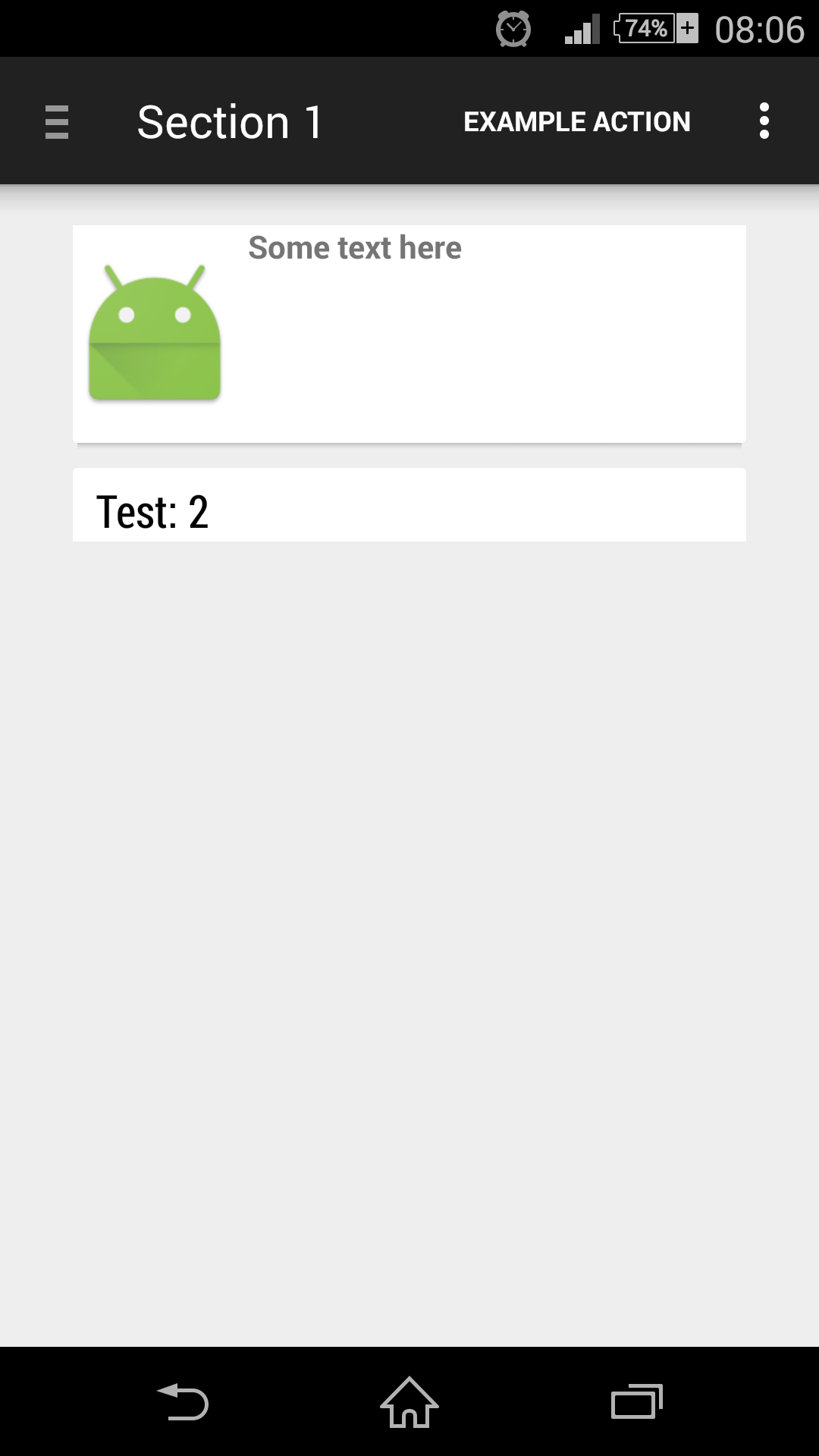
正如您在我的xml和java中看到的那样,我尝试了一些方法来修复这个问题,但不幸的是,我没有什么想法了。
回答 2
Stack Overflow用户
回答已采纳
发布于 2015-03-11 15:01:54
好的。解决办法很简单。通过从xml中删除滚动视图解决了该问题。
<ScrollView
    android:layout_width="fill_parent"
    android:layout_height="fill_parent"
    android:id="@+id/scrollView" >
</ScrollView>
卡片列表视图在一定数量的项目之后自动变为可滚动的。
以下几行不再有必要了:
            //this I tried from googling possible solutions
            FrameLayout mainy = (FrameLayout) getActivity().findViewById(R.id.container);
            mainy.setLayoutParams(new DrawerLayout.LayoutParams(LinearLayout.LayoutParams.MATCH_PARENT,LinearLayout.LayoutParams.MATCH_PARENT));

            RelativeLayout fragy = (RelativeLayout) getActivity().findViewById(R.id.mainfragment);
            fragy.setLayoutParams(new FrameLayout.LayoutParams(LinearLayout.LayoutParams.MATCH_PARENT,LinearLayout.LayoutParams.MATCH_PARENT));

            ScrollView feed = (ScrollView) getActivity().findViewById(R.id.scrollView);
            feed.setLayoutParams(new RelativeLayout.LayoutParams(LinearLayout.LayoutParams.MATCH_PARENT,LinearLayout.LayoutParams.MATCH_PARENT));

            LinearLayout rLGreen = (LinearLayout) getActivity().findViewById(R.id.abovecards);
            rLGreen.setLayoutParams(new FrameLayout.LayoutParams(LinearLayout.LayoutParams.MATCH_PARENT,LinearLayout.LayoutParams.MATCH_PARENT));

listView.setLayoutParams(new LinearLayout.LayoutParams(LinearLayout.LayoutParams.MATCH_PARENT,LinearLayout.LayoutParams.MATCH_PARENT));Stack Overflow用户
发布于 2015-03-10 08:12:47
试着改变
LinearLayout.LayoutParams.MATCH_PARENT,LinearLayout.LayoutParams.MATCH_PARENT至
LinearLayout.LayoutParams.WRAP_CONTENT,LinearLayout.LayoutParams.MATCH_PARENT页面原文内容由Stack Overflow提供。腾讯云小微IT领域专用引擎提供翻译支持
原文链接:
https://stackoverflow.com/questions/28958054
复制相关文章
相似问题
腾讯云开发者

Copyright © 2013 - 2026 Tencent Cloud. All Rights Reserved. 腾讯云 版权所有
深圳市腾讯计算机系统有限公司 ICP备案/许可证号:粤B2-20090059  粤公网安备44030502008569号
腾讯云计算(北京)有限责任公司 京ICP证150476号 | 京ICP备11018762号