
如何在QEMU上模拟树莓Pi 2?
回答 3
Stack Overflow用户
发布于 2016-01-21 18:29:34
如果您喜欢构建qemu,您可以在这里找到对pi2系统仿真的支持:https://github.com/0xabu/qemu。它并不特别快速,设备仿真也不完整,但是您可以调整RAM和帧缓冲区的大小。
有关于在https://github.com/0xabu/qemu/wiki结束时引导Raspbian的简要说明
Stack Overflow用户
发布于 2017-08-22 10:15:03
Ubuntu 16.04,QEMU 2.9.0 -M raspi2,Raspbian 2016-05-27,香草内核
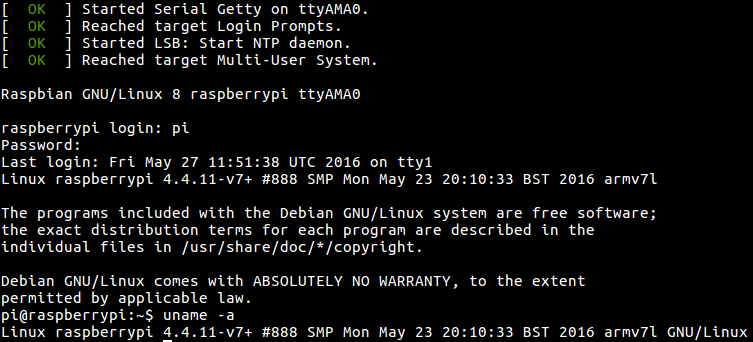
- 从源代码编译QEMU 2.9.0:
sudo apt-get build-dep qemu-system-arm git克隆-递归git://git.qemu-project.org/qemu.git cd git签出v2.9.0 ./
nproc配置 - 下载映像并从其中提取内核和dts:
1. Download the image and unzip it:wget http://downloads.raspberrypi.org/raspbian/images/raspbian-2016-05-31/2016-05-27-raspbian-jessie.zip解压缩2016-05-27-raspbian-jessie.zip
2.安装分区的第二个图像。最简单的方法是:
sudo losetup -f --显示-P 2016-05-27-raspbian jessie.img
这只适用于Ubuntu16.04上的最新losetup,其他方法在:https://askubuntu.com/questions/69363/mount-single-partition-from-image-of-entire-disk-device/496576#496576
这将打印一个循环设备,例如:
/dev/loop0 0
所以我们会:
sudo mkdir /mnt/rpi sudo挂载/dev/lu0p1 /mnt/rpi cp /mnt/rpi/kernel7.img。cp /mnt/rpi/mnt 2709-rpi-2-b.dtb.sudo /mnt/rpi sudo losetup -d /dev/loop0 0
- 运行: ./arm-softmmu/qemu-system-arm \ -m raspi2 \ -append "rw earlyprintk loglevel=8 console=ttyAMA0,115200 dwc_otg.lpm_enable=0 root=/dev/mmcblk0p2“\ -cpu arm1176 \ -dtb arm 2709-rpi-2-b.dtb\ -sd 2016-05-27-raspbian-jessie.img \ -kernel kernel7.img \ -M 1G \ -smp 4\ -serial stdio;
然后,您可以在主机终端上显示的终端上登录。
目前的限制:
-M raspi2是在QEMU2.6.0中添加的,Ubuntu16.04只有QEMU2.5.0,所以我们必须从源代码编译QEMU。但这并不难。- GUI显示但没有响应鼠标/键盘,在SDL和VNC上都进行了测试。但是CLI工作得很好。所以,您最好使用Lite映像,它现在已经具有GUI了。
- 不联网
Ubuntu16.04,QEMU2.5.0,Raspbian2016-05-27,修改后的内核
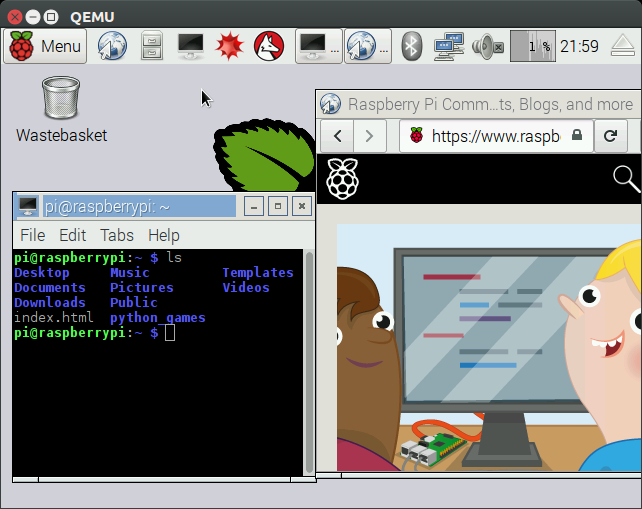
该方法使用了-M versatilepb,它存在于Ubuntu16.04的QEMU2.5.0上。
缺点是您必须下载修改过的内核(请参阅https://raspberrypi.stackexchange.com/questions/47124/emulating-with-qemu-why-the-extra-kernel)并修改映像,因此它不太能代表实际系统。
- 下载:https://github.com/dhruvvyas90/qemu-rpi-kernel/blob/36ede073f4ccb64f60200ede36c231afe9502070/kernel-qemu-4.4.12-jessie
我们选择
4.4.12,因为这是Raspbian映像中的内核版本。 生成内核blob的过程在存储库中描述为:https://github.com/dhruvvyas90/qemu-rpi-kernel/tree/36ede073f4ccb64f60200ede36c231afe9502070/tools 为什么需要这个额外的内核映像:https://raspberrypi.stackexchange.com/questions/47124/emulating-with-qemu-why-the-extra-kernel - 修改Raspbian映像,如:https://github.com/dhruvvyas90/qemu-rpi-kernel/wiki/Emulating-Jessie-image-with-4.x.xx-kernel/0068f0c21d942b0f331e18014ff8e22c20cada5c中提到的那样 摘要:
1. Mount the image just as we did for the `-M raspi2`, but use the second partition instead of the first:sudo挂载/dev/环0p2 /mnt/rpi
2.编辑图像:用# sudo vim /mnt/rpi/etc/ld.so.preload #注释掉类型行:"/dev/mmcblk*“sudo vim /mnt/rpi/etc/fstab
- 运行: sudo apt-获取安装qemu-system-arm qemu-system-arm \ -kernel内核-QEMU-4.4.12-jessie\ -cpu arm1176 \ -M 256 \ -m多才多用表\-没有-重启\ -serial stdio \ -append =/dev/sda2 2 panic=1 rootfstype=ext4 rw“\ -hda 2016-05-27-raspbian-jessie.img
失败Ubuntu 17.04,QEMU 2.8.0 -M raspi2,Raspbian 2016-05-27,香草内核
在这个更新的Ubuntu上,QEMU2.8.0是默认的,因此我们不需要从-M raspi2的源代码编译QEMU。但是,在消息之后,2.8.0挂起:
Console: switching to colour frame buffer device 100x30这表明-M raspi2仍然是多么的不稳定。
失败Ubuntu 16.04,QEMU 2.9.0 -M raspi2,Raspbian2017-08-16,香草内核
在这个更新的映像中,使用了与2016-05-27相同的方法,内核在引导时惊慌失措:
Please append a correct "root=" boot option; here are the available partitions:
...
[ 4.138114] ---[ end Kernel panic - not syncing: VFS: Unable to mount root fs on unknown-block(0,0)TODO:斯考夫 rootdelay=1解决了这个问题,我必须试一试。
bztsrc/raspi3-tutorial RPI3裸金属在QEMU上
https://github.com/bztsrc/raspi3-tutorial是一组很好的示例,只适用于QEMU,超高速入门于:https://raspberrypi.stackexchange.com/questions/34733/how-to-do-qemu-emulation-for-bare-metal-raspberry-pi-images/85135#85135。
Stack Overflow用户
发布于 2015-03-17 15:52:04
如果你想运行一个Raspberry 2构建机器人或类似的东西,你应该看看运行用户/静态模式下的Qemu。我在虚拟机中使用Linux进行了尝试,与Qemu系统仿真相比,它速度相当快。不幸的是,它只模拟CPU,所以您将无法测试游戏或Wayland/Weston。
使用这种方法,我能够在大约一个小时内为我的Pi 2构建一个内核。
https://stackoverflow.com/questions/28880833
复制相似问题
腾讯云开发者

Copyright © 2013 - 2026 Tencent Cloud. All Rights Reserved. 腾讯云 版权所有
深圳市腾讯计算机系统有限公司 ICP备案/许可证号:粤B2-20090059  粤公网安备44030502008569号
腾讯云计算(北京)有限责任公司 京ICP证150476号 | 京ICP备11018762号