
用鼠标提高Excell值的变化速度
我想提高只使用鼠标更改Excel单元格值的速度。我分享我的工具,希望有人会喜欢它,并希望改进它。
这是一个例子。单击包含值的已定义单元格后,滚动条将显示在单元格的右侧。您可以通过鼠标平稳地更改它的值。
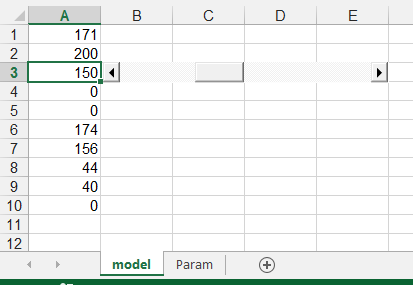
该工具用于动态更改单元格值和观察公式值。您可以简化代码,但是不应该禁用某些功能。它应该始终保持动态,即移动滚动条应该立即影响其他单元格的公式。滚动条不应闪烁(改变颜色,灰色和黑色)。
您可以简单地 file here并查看其中的VBA代码。
或者,您可以将此代码放入工作表中,以便在其中显示拼贴条。你的工作表的名字并不重要。右键单击工作表的名称,然后单击View Code。这里是:
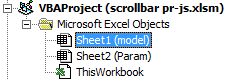
在那里插入以下代码:
Option Explicit
Dim previousRow, c
Const scrlName As String = "scrlSh" ' the name of the scrollbar


Private Sub scrlSh_GotFocus()
    ActiveSheet.Range(ActiveSheet.OLEObjects(scrlName).TopLeftCell.Offset(0, -1).Address).Activate
End Sub

Private Sub scrlSh_Scroll()
Dim rngCell As Range

Set rngCell = Sheets("Param").Range(ActiveSheet.OLEObjects(scrlName).LinkedCell)

    ActiveSheet.OLEObjects(scrlName).TopLeftCell.Offset(0, -1).Value = _
        rngCell.Offset(0, 1).Value + (ActiveSheet.OLEObjects(scrlName).Object.Value * rngCell.Offset(0, 3).Value)

Set rngCell = Nothing
End Sub

Private Sub Worksheet_SelectionChange(ByVal Target As Range)
' Macro concept by Przemyslaw Remin, VBA code written by Jaroslaw Smolinski
' The Sub Worksheet_SelectionChange and function SearchAdr have to be on each sheet where scrollbars are to appear
' Sheet Param is one for all sheets, only the columns A-G are used, othre columns can be used for something else
' Do not change the layout of A-G columns unless you want to modify the code
' Addresses in Param have to be with dollars (i.e. $A$3) or it may be named ranges of single cells
' (if it starts with $ it is a cell, otherwise it is a named range)
' the lower or upper case in addresses does not matter


Dim SheetFly As String, adr As String
Dim cCell As Range
Dim actSheet As Worksheet
Dim shScroll As Object

    Set actSheet = ActiveSheet

    ' checks if scrollbar exists
    If actSheet.Shapes.Count > 0 Then
        For Each shScroll In actSheet.Shapes
            If shScroll.Type = msoOLEControlObject And shScroll.Name = scrlName Then
                Exit For ' scrollbar found, and the variable is set
            End If
        Next shScroll
    End If
    ' if scrollbar does not exists then it is created
    If shScroll Is Nothing Then
        Set shScroll = ActiveSheet.OLEObjects.Add(ClassType:="Forms.ScrollBar.1", Link:=False, _
            DisplayAsIcon:=False, Left:=0, Top:=0, Width:=64 * 3, Height:=15)
            ' scrollbar length is set as three adjesent columns
        shScroll.Visible = False
        shScroll.Name = scrlName
        shScroll.Placement = xlMoveAndSize
    End If

    shScroll.Visible = False
    adr = Target.AddressLocal
    SheetFly = actSheet.Name


    ' here we set up in which cells the scrollbar has to appear. We set up only the number of rows
    Set cCell = SearchAdr(SheetFly, adr, Sheets("Param").Range("B2:B40")) ' If needed it can be longer i.e. B2:B400
    If Not cCell Is Nothing Then
        With ActiveSheet.OLEObjects(scrlName)
            .LinkedCell = "" ' temporary turn off of the link to the cell to avoid stange behaviour
            .Object.Min = 0 ' the scale begins from 0, not negative
            .Object.Max = Abs((cCell.Offset(0, 4).Value - cCell.Offset(0, 3).Value) / cCell.Offset(0, 5).Value)
            .Object.SmallChange = 10   ' single change by one step
            .Object.LargeChange = 10   ' change by jumps after clicking on scrollbar bar ("page up", "page down")
            If Target.Value <> cCell.Offset(0, 2).Value And Target.Value >= cCell.Offset(0, 3).Value And Target.Value <= cCell.Offset(0, 4).Value Then
                ' setting up the cells value as close as possible to the value of input by hand
                ' rounded by step
                ' if value is out of defined range then the last value will be used
                cCell.Offset(0, 2).Value = Abs((Target.Value - cCell.Offset(0, 3).Value) / cCell.Offset(0, 5).Value)
            End If
            'Protection in case the value is out of min and max range
            If cCell.Offset(0, 2).Value > .Object.Max Then
                cCell.Offset(0, 2).Value = .Object.Max
            ElseIf cCell.Offset(0, 2).Value < .Object.Min Then
                cCell.Offset(0, 2).Value = .Object.Min
            End If
            Target.Value = cCell.Offset(0, 3).Value + (cCell.Offset(0, 5).Value * cCell.Offset(0, 2).Value)
            .Object.Value = cCell.Offset(0, 2).Value
            .LinkedCell = "Param!" & cCell.Offset(0, 2).Address 'setting up linked cell
        End With
        ' Setting up the position and width of scrollbar with reference to the cell
        shScroll.Top = Target.Top
        shScroll.Left = Target.Offset(0, 1).Left + 2 'position to the right + small margin
        shScroll.Width = Target.Offset(0, 5).Left - Target.Offset(0, 1).Left - 2 'width of 5 columns
        shScroll.Visible = True
    End If

    Set actSheet = Nothing
    Set shScroll = Nothing
    Set cCell = Nothing
End Sub

Private Function SearchAdr(SheetFly As String, SearchCell As String, rng As Range) As Range
Dim cCell As Range
Dim oOOo As Name

' Searching for the row with parameter for chosen cell
' The parameter have to be in one, continouse range

For Each cCell In rng
    If cCell.Text = "" Then ' check if parameters have not finished
        Set SearchAdr = Nothing
        Exit Function ' stop if you find first empty cell for speeding
    ElseIf Left(cCell.Text, 1) = "$" Then ' normal address
        If cCell.Offset(0, 1).Text & "!" & UCase(cCell.Text) = SheetFly & "!" & UCase(SearchCell) Then
            Set SearchAdr = cCell
            Exit Function   ' exit if find proper row with parameters
        End If
    Else ' means that found is a name
        For Each oOOo In ActiveWorkbook.Names
            If (oOOo.RefersTo = "=" & SheetFly & "!" & UCase(SearchCell)) And (UCase(oOOo.Name) = UCase(cCell.Text)) Then
                Set SearchAdr = cCell
                Exit Function   ' exit if find proper row with parameters
            End If
        Next oOOo
    End If
Next cCell

End Function在工作簿中,必须生成名为Param的工作表,其中存储滚动条的参数。在A和C列中,将工作表的名称放在希望滚动条出现的位置。这张纸是这样的:
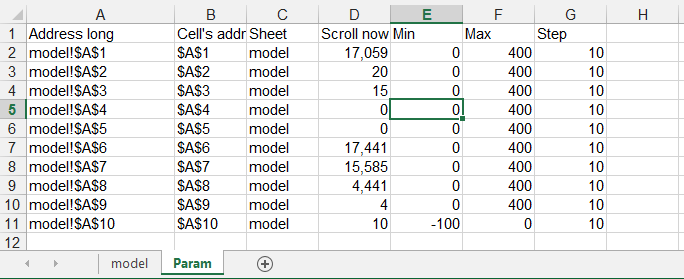
现在,您可以在单击model工作表中的单元格后享受滚动条。
请注意,您可以为每个单元格分别定义不同的min、最大范围和滚动条更改步骤。此外,最小和最大范围可以是负的。
回答 2
Stack Overflow用户
发布于 2015-03-10 14:01:15
我更喜欢:
Private Sub Worksheet_SelectionChange(ByVal Target As Range)
 If Intersect(Target, Range("A1:A10")) Is Nothing Then Exit Sub

 If OLEObjects.Count = 0 Then OLEObjects.Add "Forms.ScrollBar.1", , , , , , , Target.Offset(, 1).Left, Target.Top, 199, 15

 With OLEObjects(1)
   .Top = Target.Top
   .object.max=200
   Target = Application.Max(Target, .Object.Min)
   Target = Application.Min(Target, .Object.Max)
   .LinkedCell = Target.Address
 End With
End SubStack Overflow用户
发布于 2015-03-09 10:35:52
要使值在单击左/右箭头或在滚动条内更改时,我宁愿添加:
Private Sub scrlSh_Change()
If ActiveSheet.OLEObjects(scrlName).LinkedCell <> "" Then
    scrlSh_Scroll
End If
End Sub我更喜欢使用类型化的函数,比如UCase$,Left$,.而不是它们的变体等价物(UCase,Left,.),但是对于这个宏来说,“真”性能并不是真正需要的。
在您的Worksheet_SelectionChange子程序中,我已经将actSheet、SheetFly和adr变量替换为它们的原始值(因为只有一次使用)。还没有真正的重大改进。
https://stackoverflow.com/questions/28855156
复制相似问题
腾讯云开发者

Copyright © 2013 - 2026 Tencent Cloud. All Rights Reserved. 腾讯云 版权所有
深圳市腾讯计算机系统有限公司 ICP备案/许可证号:粤B2-20090059  粤公网安备44030502008569号
腾讯云计算(北京)有限责任公司 京ICP证150476号 | 京ICP备11018762号