
excel vba宏将信息从一本书导入到另一本书
excel vba宏将信息从一本书导入到另一本书
提问于 2015-03-04 07:34:57
我有两本工作簿,第一册和第二册。
第一本书有三个填充栏。
- 行号
- 样式编号
- PO数
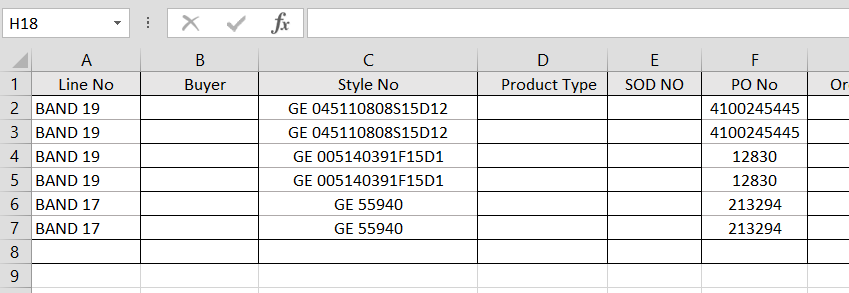
第二本书有两个填充栏。
- 样式编号
- PO数
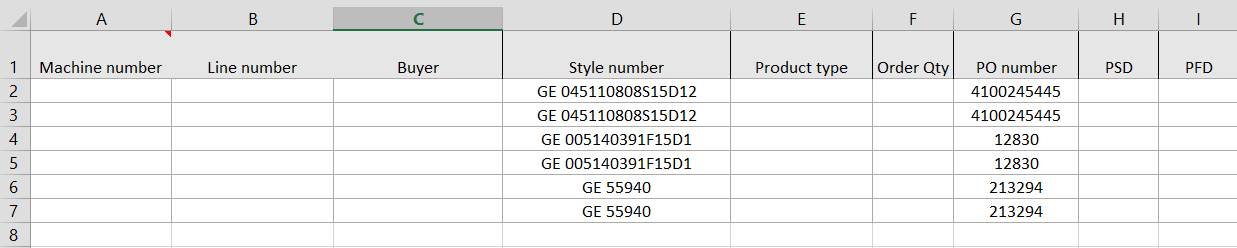
一开始,我通过比较两本书的风格编号,从第一本到第二本,输入了乐队号的信息。
当两本书中的样式编号匹配时,就会将书1中的带号导入到第2本书中。
这是代码:
Sub procedure2()
Dim key As Variant, oCell As Range, i&, z%
    Dim w1 As Worksheet, w2 As Worksheet
    Dim Dic As Object: Set Dic = CreateObject("Scripting.Dictionary")
    Dim Dic2 As Object: Set Dic2 = CreateObject("Scripting.Dictionary")


    'source
    Set w1 = Workbooks("book1.xlsm").Worksheets(1)

    'destination
    Set w2 = Workbooks("book2.xlsm").Worksheets(1)

    '-------------------------------------------------------------------------
    'get the last row for w1
    i = w1.Cells.SpecialCells(xlCellTypeLastCell).Row
    '-------------------------------------------------------------------------
    ' fill dictionary with data for searching
    For Each oCell In w1.Range("C2:C" & i)
        'row number for duplicates
        z = 1: While Dic.exists(oCell.Value & "_" & z): z = z + 1: Wend
        'add data with row number to dictionary
        If Not Dic.exists(oCell.Value & "_" & z) Then
            Dic.Add oCell.Value & "_" & z, oCell.Offset(, -2).Value
        End If
    Next
    '-------------------------------------------------------------------------
    'get the last row for w2
    i = w2.Cells.SpecialCells(xlCellTypeLastCell).Row
    '-------------------------------------------------------------------------
    'fill "B" with results
    For Each oCell In w2.Range("D2:D" & i)
        'determinate row number for duplicated values
        z = 1: While Dic2.exists(oCell.Value & "_" & z): z = z + 1: Wend
        'search
        For Each key In Dic
            If oCell.Value & "_" & z = key Then
                oCell.Offset(, -2).Value = Dic(key)
            End If
        Next
        'correction of the dictionary in case
        'when sheet "A" has less duplicates than sheet "B"
        If oCell.Offset(, -2).Value = "" Then
            Dic2.RemoveAll: z = 1
            For Each key In Dic
                If oCell.Value & "_" & z = key Then
                    oCell.Offset(, -2).Value = Dic(key)
                End If
            Next
        End If
        'add to dictionary already passed results for
        'the next duplicates testing
        If Not Dic2.exists(oCell.Value & "_" & z) Then
            Dic2.Add oCell.Value & "_" & z, ""
        End If
    Next
End Sub
成功地发挥了作用。
,但现在我想通过比较书1和书2.中包含的样式号和PO号来导入信息,即带号。
如果两本书的样式编号和两本书的PO号匹配,那么就应该导入相关的带号。。
如何修改代码才能做到这一点?
回答 2
Stack Overflow用户
发布于 2015-03-04 08:57:26
我希望这是你要找的东西吗?您需要匹配这两列,因此将这两列都放到字典中。
'.......
'-------------------------------------------------------------------------
'get the last row for w1
i = w1.Cells.SpecialCells(xlCellTypeLastCell).Row
'-------------------------------------------------------------------------
' fill dictionary with data for searching
For Each oCell In w1.Range("C2:C" & i)
    'row number for duplicates
    z = 1: While Dic.exists(oCell.Value & "_" & oCell.Offset(, 3).Value & "_" & z): z = z + 1: Wend
    'add data with row number to dictionary
    If Not Dic.exists(oCell.Value & "_" & oCell.Offset(, 3).Value & "_" & z) Then
        Dic.Add oCell.Value & "_" & oCell.Offset(, 3).Value & "_" & z, oCell.Offset(, -2).Value
    End If
Next
'-------------------------------------------------------------------------
'get the last row for w2
i = w2.Cells.SpecialCells(xlCellTypeLastCell).Row
'-------------------------------------------------------------------------
'fill "B" with results
For Each oCell In w2.Range("D2:D" & i)
    'determinate row number for duplicated values
    z = 1: While Dic2.exists(oCell.Value & "_" & oCell.Offset(, 3).Value & "_" & z): z = z + 1: Wend
    'search
    For Each key In Dic
        If oCell.Value & "_" & oCell.Offset(, 3).Value & "_" & z = key Then
            oCell.Offset(, -2).Value = Dic(key)
        End If
    Next
    'correction of the dictionary in case
    'when sheet "A" has less duplicates than sheet "B"
    If oCell.Offset(, -2).Value = "" Then
        Dic2.RemoveAll: z = 1
        For Each key In Dic
            If oCell.Value & "_" & oCell.Offset(, 3).Value & "_" & z = key Then
                oCell.Offset(, -2).Value = Dic(key)
            End If
        Next
    End If
    'add to dictionary already passed results for
    'the next duplicates testing
    If Not Dic2.exists(oCell.Value & "_" & oCell.Offset(, 3).Value & "_" & z) Then
        Dic2.Add oCell.Value & "_" & oCell.Offset(, 3).Value & "_" & z, ""
    End If
Next
顺便说一句,当我测试您的代码时:
Set w1 = Workbooks("book1.xlsm").Worksheets(1)这给了我一个错误。应该是这样吗?w2也一样
Set w1 = Workbooks.open(FULL_PATH_TO_WORKBOOK).Worksheets(1)其中,FULL_PATH_TO_WORKBOOK可以由
Thisworkbook.path & Application.PathSeparator & "book1.xlsm"如果您将宏放在book1中
Stack Overflow用户
发布于 2015-03-04 08:59:37
如果新代码不是强制性的,您只需重新运行这个Sub,这次比较PO编号,然后删除那些比较不适合的行。
页面原文内容由Stack Overflow提供。腾讯云小微IT领域专用引擎提供翻译支持
原文链接:
https://stackoverflow.com/questions/28848860
复制相关文章
相似问题
腾讯云开发者

Copyright © 2013 - 2026 Tencent Cloud. All Rights Reserved. 腾讯云 版权所有
深圳市腾讯计算机系统有限公司 ICP备案/许可证号:粤B2-20090059  粤公网安备44030502008569号
腾讯云计算(北京)有限责任公司 京ICP证150476号 | 京ICP备11018762号