
如何用RippleDrawable (API 21)编程设置按钮背景
如何用RippleDrawable (API 21)编程设置按钮背景
提问于 2015-02-25 02:29:14
我是Button的子类。在该类中,我尝试以编程方式更改颜色。
RippleDrawable draw = (RippleDrawable) getContext().getApplicationContext()
    .getResources().getDrawable(R.drawable.raised_btn);
this.setBackground(draw);
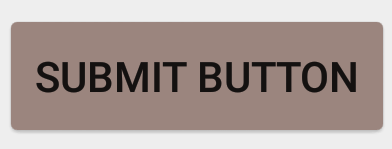
到目前为止看起来还不错..。
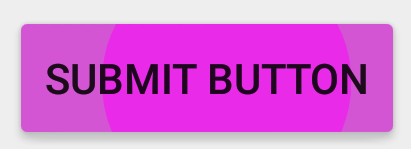
但我按下按钮,这是最随意的颜色。我从来没有指定过这些粉红色的颜色。如果我通过XML (android:background="@drawable/raised_btn")将这个可绘图设置为背景,那么我就没有问题。不过,我需要以编程的方式设置它。
我的RippleDrawable - raised_btn.xml
<ripple xmlns:android="http://schemas.android.com/apk/res/android"
    android:color="?attr/colorControlHighlight">
    <inset xmlns:android="http://schemas.android.com/apk/res/android"
        android:insetLeft="@dimen/button_inset_horizontal_material"
        android:insetTop="@dimen/button_inset_vertical_material"
        android:insetRight="@dimen/button_inset_horizontal_material"
        android:insetBottom="@dimen/button_inset_vertical_material">
        <shape android:shape="rectangle">
            <corners android:radius="@dimen/control_corner_material" />
            <solid android:color="@color/tan"/>
            <padding android:left="@dimen/button_padding_horizontal_material"
                android:top="@dimen/button_padding_vertical_material"
                android:right="@dimen/button_padding_horizontal_material"
                android:bottom="@dimen/button_padding_vertical_material" />
        </shape>
    </inset>
</ripple>如何在以编程方式设置RippleDrawable背景时实现正确的波纹效应?
回答 1
Stack Overflow用户
回答已采纳
发布于 2015-02-26 00:24:10
Resources对象不知道活动主题。为了解决主题属性,您需要从Context获得可绘制的图形,或者将一个Theme传递到Resources.getDrawable(int,Theme)。
Context ctx = getContext();

// The simplest use case:
RippleDrawable dr1 = (RippleDrawable) ctx.getDrawable(R.drawable.raised_btn);

// Also valid:
Resources res = ctx.getResources();
RippleDrawable dr2 =
    (RippleDrawable) res.getDrawable(R.drawable.raised_btn, ctx.getTheme());

// If you're using support lib:
Drawable dr3 = ContextCompat.getDrawable(ctx, R.drawable.raised_btn);
此外,没有理由在这里使用应用程序上下文。如果有的话,这就给了您更高的机会,您将使用的主题解析属性将不匹配的主题,是用来膨胀任何视图,您要传递的绘图。
页面原文内容由Stack Overflow提供。腾讯云小微IT领域专用引擎提供翻译支持
原文链接:
https://stackoverflow.com/questions/28710106
复制相关文章
相似问题
腾讯云开发者

Copyright © 2013 - 2026 Tencent Cloud. All Rights Reserved. 腾讯云 版权所有
深圳市腾讯计算机系统有限公司 ICP备案/许可证号:粤B2-20090059  粤公网安备44030502008569号
腾讯云计算(北京)有限责任公司 京ICP证150476号 | 京ICP备11018762号