
清单和设置问题使Robolectric与AndroidStudio1.1.0一起工作
我正试着在我们目前的项目中进行测试和工作,却没有太多的运气。我更喜欢让这些系统在Android 1.1.0+中运行。这是我的项目结构:
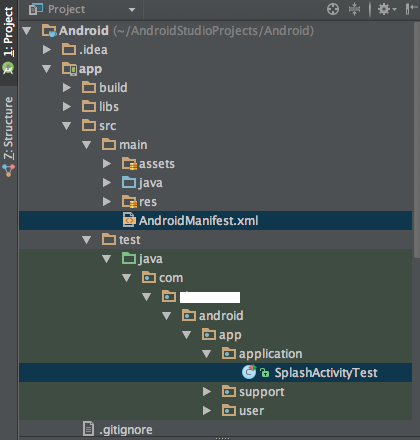
这是我的测试:
import android.widget.Button;

import com.mycompany.android.app.R;

import org.junit.Before;
import org.junit.Test;
import org.junit.runner.RunWith;
import org.robolectric.Robolectric;
import org.robolectric.RobolectricTestRunner;
import org.robolectric.annotation.Config;

import static org.junit.Assert.assertNotNull;

@Config(manifest = "AndroidManifest.xml")
@RunWith(RobolectricTestRunner.class)
public class SplashActivityTest {

    private SplashActivity splashActivity;

    @Before
    public void setup() {
        splashActivity = Robolectric.buildActivity(SplashActivity.class).create().start().resume().get();
    }

    @Test
    public void shouldNotBeNull() {
        Button signUpButton = (Button) splashActivity.findViewById(R.id.sign_up_button);
        assertNotNull(signUpButton);

        Button loginButton = (Button) splashActivity.findViewById(R.id.login_button);
        assertNotNull(loginButton);
    }

}无论我如何尝试通过更改清单的路径来获得框架来查找测试,它都找不到它--要么我得到WARNING: No manifest file found at ./AndroidManifest.xml.Falling back to the Android OS resources only.消息,要么我得到API Level XX is not supported - Sorry!消息。最后,我认为这就是测试运行时出现以下错误的原因:
android.content.res.Resources$NotFoundException: unknown resource 2130903074我确实打开了实验选项,配置了正确的Gradle插件(单元测试很好),但我不确定我缺少什么来启动和运行测试。
应用程序级构建文件:
apply plugin: 'org.robolectric'

testCompile 'junit:junit:4.12'
testCompile 'org.mockito:mockito-core:1.9.5'
testCompile 'org.robolectric:robolectric:2.4'
testCompile 'org.hamcrest:hamcrest-core:1.1'
testCompile 'org.hamcrest:hamcrest-library:1.1'
testCompile 'org.hamcrest:hamcrest-integration:1.1'
顶级构建文件:
dependencies {
    classpath 'com.android.tools.build:gradle:1.1.0'
    classpath 'org.robolectric:robolectric-gradle-plugin:1.0.0'
}回答 6
Stack Overflow用户
发布于 2015-02-24 17:45:15
我一步一步地写了一个指南,如何在AndroidStudio1.1.0 http://nenick-android.blogspot.de/2015/02/android-studio-110-beta-4-and.html中启用频域,我想你会找到一个解决问题的方法。和一个例子https://github.com/nenick/AndroidStudioAndRobolectric
Stack Overflow用户
发布于 2015-02-24 19:39:22
在您的例子中,下一个更改可能会有所帮助:
@Config(manifest = "src/main/AndroidManifest.xml", emulateSdk = 18, reportSdk = 18)但也请阅读@nenick指南
Stack Overflow用户
发布于 2015-07-17 06:23:36
经过几天的挣扎,我终于找到了你问题的根源:
WARNING: No manifest file found at ./AndroidManifest.xml.Falling back to the Android OS resources only. messages, or API Level XX is not supported - Sorry!我在stackOverFlow上找到的许多答案告诉我将Manifest文件的路径添加到@Config中,如下所示:
@Config(manifest = "src/main/AndroidManifest.xml")它确实适用于我的一个项目,但当我打开一个新项目并设置测试环境时,会弹出相同的错误消息。
这背后的原因可能是项目的不同工作目录。您应该首先定位您的工作目录,然后在@Config(maniest =“.”)中指定指向它的相对路径。
在哪里可以找到Android中的工作目录?
Run -> Edit Configurations -> Junit -> Your Test
-> Configuration Tab -> **Working directory:**
以我的工作目录为例,我的工作目录是
"/Users/Bible/AndroidstudioProjects/MVP"所以通往我的AndroidManifest.xml的路径应该是
@Config(manifest = "app/src/main/AndroidManifest.xml")这就是你要的!希望这个答案能让你的生活更轻松。
https://stackoverflow.com/questions/28700379
复制相似问题
腾讯云开发者

Copyright © 2013 - 2026 Tencent Cloud. All Rights Reserved. 腾讯云 版权所有
深圳市腾讯计算机系统有限公司 ICP备案/许可证号:粤B2-20090059  粤公网安备44030502008569号
腾讯云计算(北京)有限责任公司 京ICP证150476号 | 京ICP备11018762号