
DHTMLX:如何将格式设置到<afterInit>部分,以便在所有浏览器中获得相同的结果?
DHTMLX:如何将格式设置到<afterInit>部分,以便在所有浏览器中获得相同的结果?
提问于 2015-02-23 19:41:45
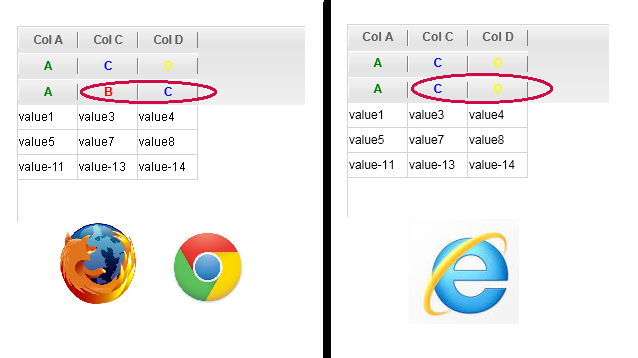
如果我有以下my.xml文件:
<rowset>

  <head>
    <column width="60" hidden="false" type="ro">Col A</column>
    <column width="60" hidden="true" type="ro">Col B</column>
    <column width="60" hidden="false" type="ro">Col C</column>
    <column width="60" hidden="false" type="ro">Col D</column>

    <afterInit>
      <call command="attachHeader">
        <param>A,B,C,D</param>
        <param>color:green;,color:red;,color:blue;,color:yellow;</param>
      </call>
    </afterInit>

  </head>

  <row id="1">
    <cell>value1</cell>
    <cell>value2</cell>
    <cell>value3</cell>
    <cell>value4</cell>
  </row>
  <row id="2">
    <cell>value5</cell>
    <cell>value6</cell>
    <cell>value7</cell>
    <cell>value8</cell>
  </row>
  <row id="3">
    <cell>value-11</cell>
    <cell>value-12</cell>
    <cell>value-13</cell>
    <cell>value-14</cell>
  </row>

</rowset>和下面的.html文件
<body>
    <div id="myGridContainer" width="799px" height="799px"></div>
</body>
<script>
    myGrid = new dhtmlXGridObject('myGridContainer');
    myGrid.setSkin("xp");
    myGrid.xml.top="rowset";
    myGrid.attachHeader("A,B,C,D",["color:green","color:red;","color:blue;","color:yellow;"]);
    myGrid.load("my.xml");
</script>然后我会收到火狐和Chrome的坏输出。工作得很好。我将手动创建.xml,因此我将不使用.attachHeader()。但是,如何创建具有颜色定义的<afterInit>部分以获得相同的结果?
回答 2
Stack Overflow用户
回答已采纳
发布于 2015-03-15 21:33:36
应该使用<afterInit>而不是<beforeInit>
Stack Overflow用户
发布于 2015-02-25 14:55:10
您提供的代码应该运行良好。如果问题仍然发生,请提供给我们一个演示链接或一个完整的演示,在那里问题可以重建。
页面原文内容由Stack Overflow提供。腾讯云小微IT领域专用引擎提供翻译支持
原文链接:
https://stackoverflow.com/questions/28682005
复制相关文章
相似问题
腾讯云开发者

Copyright © 2013 - 2026 Tencent Cloud. All Rights Reserved. 腾讯云 版权所有
深圳市腾讯计算机系统有限公司 ICP备案/许可证号:粤B2-20090059  粤公网安备44030502008569号
腾讯云计算(北京)有限责任公司 京ICP证150476号 | 京ICP备11018762号