
只有子景才会出现,因为iOS 7上的肖像在IOS 8上工作得很好。
只有子景才会出现,因为iOS 7上的肖像在IOS 8上工作得很好。
提问于 2015-02-21 04:49:47
我正在尝试添加一个只在景观模式下的景观应用程序的子视图。这在较新的iPads上似乎很好,但是当在iPad 2上测试时,子视图似乎只出现在纵向模式中。我在这里做错了什么?
编辑:此UIView在IOS 8及以上版本显示良好,但在IOS7.1上没有正确显示
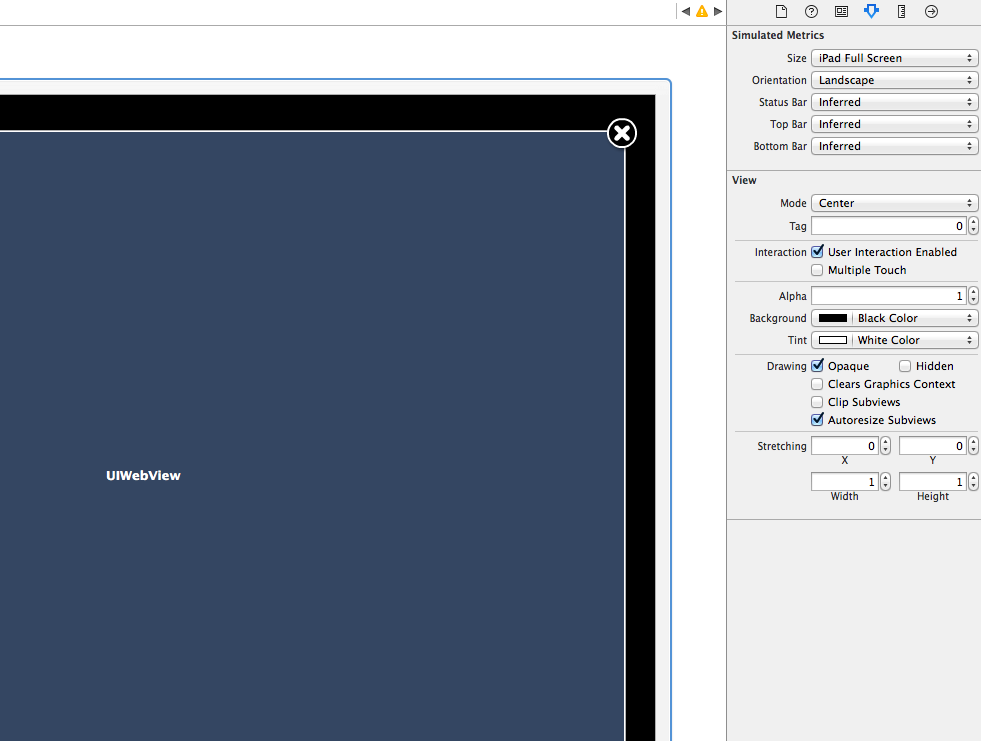
我添加子视图的位置:
 MobileWebViewController *mobileViewController = [[MobileWebViewController alloc]
                initWithNibName:@"MobileWebViewFrame"
                bundle:[NSBundle mainBundle]];
 [mobileViewController setUrlAddress:@"http://www.stackoverflow.com"];  //user defined function
 [[UIApplication sharedApplication].keyWindow addSubview: mobileViewController.view];
现在,在我的MobileWebViewController中,我有这样的内容:
- (id)initWithNibName:(NSString *)nibNameOrNil bundle:(NSBundle
*)nibBundleOrNil
{
    self = [super initWithNibName:nibNameOrNil bundle:nibBundleOrNil];
    return self;
}

- (UIInterfaceOrientation)preferredInterfaceOrientationForPresentation
{
   return [[UIApplication sharedApplication] statusBarOrientation];
}

- (NSUInteger)supportedInterfaceOrientations
{
    return UIInterfaceOrientationMaskLandscape;
}

- (BOOL)shouldAutorotate
{
    return YES;
}

//For Older versions
- (BOOL)shouldAutorotateToInterfaceOrientation:
(UIInterfaceOrientation)interfaceOrientation
{
    return (interfaceOrientation == UIInterfaceOrientationPortrait);
}

- (void)didRotateFromInterfaceOrientation:
(UIInterfaceOrientation)fromInterfaceOrientation
{
    [UIViewController attemptRotationToDeviceOrientation];
}


- (void) setUrlAddress:(NSString *)url
{
    self.urlAddress = url;
}

- (void)viewDidLoad
{
    [super viewDidLoad];
    self.view.autoresizingMask = UIViewAutoresizingFlexibleHeight |
    UIViewAutoresizingFlexibleWidth;
    [self setNeedsStatusBarAppearanceUpdate];
    [[NSUserDefaults standardUserDefaults] synchronize];

    self.MobileWebView.delegate = self;
    self.MobileWebView.scalesPageToFit = NO;
    self.MobileWebView.multipleTouchEnabled = NO;
    self.MobileWebView.frame = CGRectMake(0,
    self.MobileWebView.frame.origin.y,self.view.frame.size.width,
    self.view.frame.size.height - self.MobileWebView.frame.origin.y);
    self.MobileWebView.transform = CGAffineTransformIdentity;
}
其中MobileWebView是:
@property (strong, nonatomic) IBOutlet UIWebView *MobileWebView;从xib文件。
从我可以调试和看到的。屏幕方向似乎仍然是景观,但这个特殊的视图出现在肖像,可能是因为一个不同的协调系统。
回答 1
Stack Overflow用户
回答已采纳
发布于 2015-02-22 03:28:32
我意识到在IOS 8之前,返回的屏幕大小值并没有根据应用程序的方向而改变,但是从IOS8开始就改变了。
基本上,无论我在哪里调用CGRectMake来创建矩形,我都使用了错误的高度和宽度值来创建我的webview框架。
我现在用这个:
CGRect screenRect = [MobileAppHelper boundsForOrientation:[[UIApplication sharedApplication] statusBarOrientation]];其中boundsForOrientation是:
 + (CGRect) boundsForOrientation:(UIInterfaceOrientation)orientation
 {
     CGFloat width   = [[UIScreen mainScreen] bounds].size.width;
     CGFloat height  = [[UIScreen mainScreen] bounds].size.height;

     CGRect bounds = CGRectZero;
     if (UIInterfaceOrientationIsLandscape(orientation))
     {
         bounds.size = CGSizeMake(MAX(width, height), MIN(width, height));
     }
     else
     {
         bounds.size = CGSizeMake(MIN(width, height), MAX(width, height));
     }
     return bounds;
 }
这将根据屏幕的方向获得屏幕的新宽度和高度。每当我手动绘制框架和视图时,我都会使用这些屏幕高度和宽度值。
页面原文内容由Stack Overflow提供。腾讯云小微IT领域专用引擎提供翻译支持
原文链接:
https://stackoverflow.com/questions/28642214
复制相关文章
相似问题
腾讯云开发者

Copyright © 2013 - 2026 Tencent Cloud. All Rights Reserved. 腾讯云 版权所有
深圳市腾讯计算机系统有限公司 ICP备案/许可证号:粤B2-20090059  粤公网安备44030502008569号
腾讯云计算(北京)有限责任公司 京ICP证150476号 | 京ICP备11018762号