
在Elasticsearch从1.4.1升级到1.4.4之后无法启动服务
我已经成功地在Windows7版本的x64上安装了Elasticsearch,使用ELS 1.4.1。在升级到Kibana 4 RTM之后,它需要ELS 1.4.4。
为了执行升级,我执行了以下步骤:
- 下载ELS 1.4.4
- 停止并删除ELS 1.4.1服务
- 将当前安装目录重命名为elasticsearch_bak
- 将1.4.4 zip解压缩到elasticsearch目录
- 比较/config/弹性搜索. and和config/logging.yml并应用这些更改(在底部包含以下附加设置)
# Helps Chrome work properly
http.cors.allow-origin: "/.*/"
http.cors.enabled: true
启动服务后,它将在几秒钟内停止。日志如下:
Java版本
(注:这是为发展而设)
java version "1.8.0_31"
Java(TM) SE Runtime Environment (build 1.8.0_31-b13)
Java HotSpot(TM) Client VM (build 25.31-b07, mixed mode, sharing)
事件日志
The Elasticsearch 1.4.4 (elasticsearch) service terminated with service-specific error Incorrect function..elasticsearch-stderr-2015.05.20.log
2015-02-20 08:49:13 Commons Daemon procrun stderr initialized
Exception in thread "main" ror: Could not initialize class org.elasticsearch.Version
    at org.elasticsearch.bootstrap.Bootstrap.buildErrorMessage(Bootstrap.java:254)
    at org.elasticsearch.bootstrap.Bootstrap.main(Bootstrap.java:238)
    at org.elasticsearch.bootstrap.Elasticsearch.main(Elasticsearch.java:32)
The data area passed to a system call is too small.

Failed to start service
elasticsearch-stdout-2015.05.20.log
2015-02-20 08:46:03 Commons Daemon procrun stdout initializedelasticsearch.2015-02-20.log
[2015-02-20 08:49:14] [info]  ( prunsrv.c:1284) [ 8560] Service started in 1198 ms.
[2015-02-20 08:49:14] [debug] ( prunsrv.c:844 ) [ 8560] reportServiceStatusE: 4, 0, 0, 0
[2015-02-20 08:49:14] [debug] ( prunsrv.c:1528) [ 8560] Waiting for worker to finish...
[2015-02-20 08:49:14] [debug] ( prunsrv.c:1533) [ 8560] Worker finished.
[2015-02-20 08:49:14] [debug] ( prunsrv.c:1559) [ 8560] Waiting for all threads to exit
[2015-02-20 08:49:14] [debug] ( prunsrv.c:844 ) [ 8560] reportServiceStatusE: 3, 0, 0, 0
[2015-02-20 08:49:14] [debug] ( prunsrv.c:1563) [ 8560] JVM destroyed.
[2015-02-20 08:49:14] [debug] ( prunsrv.c:844 ) [ 8560] reportServiceStatusE: 1, 1066, 0, 1
[2015-02-20 08:49:14] [info]  ( prunsrv.c:1598) [10064] Run service finished.
[2015-02-20 08:49:14] [info]  ( prunsrv.c:1764) [10064] Commons Daemon procrun finished
[2015-02-20 08:49:14] [info]  ( prunsrv.c:1764) [10064] Commons Daemon procrun finished
[2015-02-20 08:49:16] [error] ( prunsrv.c:746 ) [10116] Failed to start 'elasticsearch' service
[2015-02-20 08:49:16] [error] ( prunsrv.c:746 ) [10116] The data area passed to a system call is too small.
[2015-02-20 08:49:16] [info]  ( prunsrv.c:754 ) [10116] Start service finished.
[2015-02-20 08:49:16] [error] ( prunsrv.c:1755) [10116] Commons Daemon procrun failed with exit value: 5 (Failed to start service)
[2015-02-20 08:49:16] [error] ( prunsrv.c:1755) [10116] The data area passed to a system call is too small.
如果从命令提示符运行elasticsearch,则会得到以下错误:
c:\elk\elasticsearch\bin>elasticsearch
Exception in thread "main" java.lang.NoClassDefFoundError: Could not initialize class org.elasticsearch.Version
        at org.elasticsearch.bootstrap.Bootstrap.buildErrorMessage(Bootstrap.java:254)
        at org.elasticsearch.bootstrap.Bootstrap.main(Bootstrap.java:238)
at org.elasticsearch.bootstrap.Elasticsearch.main(Elasticsearch.java:32)回答 6
Stack Overflow用户
发布于 2015-02-27 13:18:23
,我也有同样的问题,下面是我是如何解决的。
这是我的装置
我正在使用Windows Server 2008 R2 Enterprise -64位版本.在Java (JRE)版本1.8.0_25中,一切都很好。弹性搜索被安装为Windows服务。
在这个问题发生之前,我将1.8.0_31更新为版本,并重新启动了机器。
这是我采取的步骤的历史。
首先,在重新启动机器之后,我注意到ElasticSearch服务停止了。在试着启动它之后,它又停止了。
下面是我在事件日志中看到的问题:
Elasticsearch 1.4.1 (elasticsearch- service -x64)服务以特定于服务的错误函数终止。
以下是我在我的elasticsearch-service-x64.2015-02-27.log中所拥有的
[2015-02-27 14:38:29] [info]  [ 4948] Commons Daemon procrun (1.0.15.0 64-bit) started
[2015-02-27 14:38:29] [info]  [ 4948] Running 'elasticsearch-service-x64' Service...
[2015-02-27 14:38:29] [info]  [ 3048] Starting service...
[2015-02-27 14:38:29] [error] [ 3048] Failed creating java C:\Program Files\Java\jre1.8.0_25\bin\server\jvm.dll
[2015-02-27 14:38:29] [error] [ 3048] The system cannot find the path specified.
[2015-02-27 14:38:29] [error] [ 3048] ServiceStart returned 1
[2015-02-27 14:38:29] [error] [ 3048] The system cannot find the path specified.
[2015-02-27 14:38:29] [info]  [ 4948] Run service finished.
[2015-02-27 14:38:29] [info] [ 4948] Commons Daemon procrun finished然后,我将JAVA_HOME C:\Program Files\Java\jre1.8.0_31系统变量的值改为
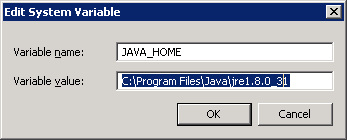
当时的问题是:
Exception in thread "main" java.lang.NoClassDefFoundError: Could not initialize class org.elasticsearch.Version
        at org.elasticsearch.bootstrap.Bootstrap.buildErrorMessage(Bootstrap.java:254)
        at org.elasticsearch.bootstrap.Bootstrap.main(Bootstrap.java:238)
        at org.elasticsearch.bootstrap.Elasticsearch.main(Elasticsearch.java:32)
是什么解决了这个问题
- 我已经从
bin文件夹中完全删除了文件夹config、lib和plugins。data确保不删除目录,因为有您的索引! - 从
bin、config和lib中解压相同的文件夹。 - 在命令提示符中以管理员身份运行
SC DELETE elasticsearch-service-x64(删除已安装的服务) - Ran
F:\Services\elasticsearch\bin>service.bat install安装服务:“elasticsearch-servic-x64”使用JAVA_HOME (64位):"C:\Program Files\Java\jre1.8.0_31“服务'elasticsearch- service -x64‘已经安装。 - 开始服务
,然后一切都开始正常工作了,。

Stack Overflow用户
发布于 2016-03-18 18:48:55
这一问题是由service.bat与弹性分布的问题引起的,后者依赖于Apache Common Procrun,并使用环境变量%JAVA_HOME%设置JVM,这一问题没有得到正确的解决。
因此,我通过在service.bat manager中出现的图形用户界面上设置“默认JVM”来解决这个问题。
另一种通过命令行解决问题的方法是
elasticsearch-service-x64.exe //US//YOUR_SERVICE_NAME --Jvm auto即
elasticsearch-service-x64.exe //US//elasticsearch-service-x64 --Jvm autoStack Overflow用户
发布于 2016-04-02 02:16:49
将JDK从jdk1.7.0_21更新为jdk1.8.0_77.Changed -- Java_Home,并开始正常工作。
https://stackoverflow.com/questions/28624943
复制相似问题
腾讯云开发者

Copyright © 2013 - 2026 Tencent Cloud. All Rights Reserved. 腾讯云 版权所有
深圳市腾讯计算机系统有限公司 ICP备案/许可证号:粤B2-20090059  粤公网安备44030502008569号
腾讯云计算(北京)有限责任公司 京ICP证150476号 | 京ICP备11018762号