
如何从info窗口(在KmlLayer上)删除信息
如何从info窗口(在KmlLayer上)删除信息
提问于 2015-02-19 21:30:04
我正在使用Google,我已经将一个kml层导入到我的code.My中,问题是我不知道如何从信息窗口中删除“未知点”信息。有什么建议吗?下面是我所说的截图:
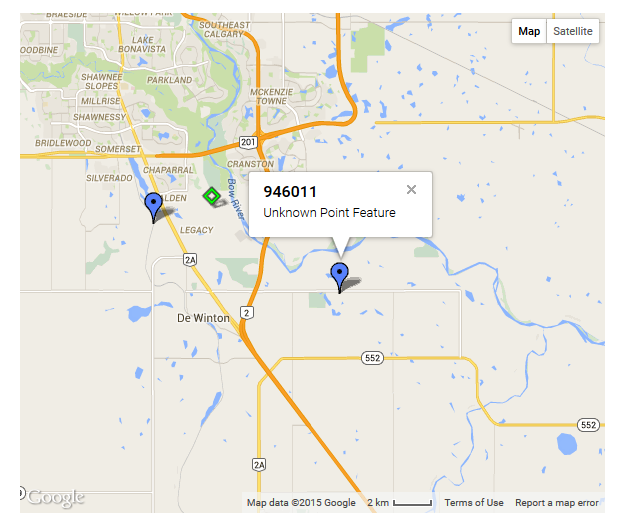
这是我导入kml文件的代码:
var AI_url = 'https://drive.google.com/uc?export=download&id=0B2KR4Lz3foYEeEtfR0laWWM0LVk'
var AI_options = {
    preserveViewport: true,
    map: map
};
var AI_layer = new google.maps.KmlLayer(AI_url, AI_options);回答 3
Stack Overflow用户
回答已采纳
发布于 2015-02-19 22:48:33
一个选项是设置suppressInfoWindows选项的KmlLayer,然后添加您自己的单击监听器,它只显示“名称”:
var AI_url = 'https://drive.google.com/uc?export=download&id=0B2KR4Lz3foYEeEtfR0laWWM0LVk'
var AI_options = {
    preserveViewport: true,
    suppressInfoWindows: true,
    map: map
};
var AI_layer = new google.maps.KmlLayer(AI_url, AI_options);
google.maps.event.addListener(AI_layer,'click',function(e) {
    infoWindow.setOptions({
      content:"<b>"+e.featureData.name+"</b>",
      pixelOffset:e.pixelOffset,
      position:e.latLng
    });
    infoWindow.open(map);
});
概念代码片段的证明:
var geocoder;
var map;
var infoWindow = new google.maps.InfoWindow();

function initialize() {
  geocoder = new google.maps.Geocoder();
  map = new google.maps.Map(
    document.getElementById("map_canvas"), {
      center: new google.maps.LatLng(37.4419, -122.1419),
      zoom: 13,
      mapTypeId: google.maps.MapTypeId.ROADMAP
    });

  var AI_url = 'https://drive.google.com/uc?export=download&id=0B2KR4Lz3foYEeEtfR0laWWM0LVk'
  var AI_options = {
    preserveViewport: true,
    suppressInfoWindows: true,
    map: map
  };
  var AI_layer = new google.maps.KmlLayer(AI_url, AI_options);
  google.maps.event.addListener(AI_layer, 'click', function(e) {
    infoWindow.setOptions({
      content: "<b>" + e.featureData.name + "</b>",
      pixelOffset: e.pixelOffset,
      position: e.latLng
    });
    infoWindow.open(map);
  });

  codeAddress("Calgary, Canada");

}
google.maps.event.addDomListener(window, "load", initialize);

function codeAddress(address) {
  geocoder.geocode({
    'address': address
  }, function(results, status) {
    if (status == google.maps.GeocoderStatus.OK) {
      map.fitBounds(results[0].geometry.viewport);
    } else {
      alert("Geocode was not successful for the following reason: " + status);
    }
  });
}html,
body,
#map_canvas {
height: 100%;
width: 100%;
margin: 0px;
padding: 0px
}<script src="https://maps.googleapis.com/maps/api/js"></script>
<div id="map_canvas" style="border: 2px solid #3872ac;"></div>
Stack Overflow用户
发布于 2015-02-19 21:33:27
信息窗口内容来自KML文件,因此您必须从那里删除它,当然,前提是您可以从它所服务的位置访问该文件。
Stack Overflow用户
发布于 2015-02-19 21:58:05
来自API:https://developers.google.com/maps/tutorials/kml/
var kmlOptions = {
  **suppressInfoWindows: true,**
  preserveViewport: false,
  map: map
};页面原文内容由Stack Overflow提供。腾讯云小微IT领域专用引擎提供翻译支持
原文链接:
https://stackoverflow.com/questions/28617292
复制相关文章
相似问题
腾讯云开发者

Copyright © 2013 - 2026 Tencent Cloud. All Rights Reserved. 腾讯云 版权所有
深圳市腾讯计算机系统有限公司 ICP备案/许可证号:粤B2-20090059  粤公网安备44030502008569号
腾讯云计算(北京)有限责任公司 京ICP证150476号 | 京ICP备11018762号