
Google模式在RecyclerView中引起jank
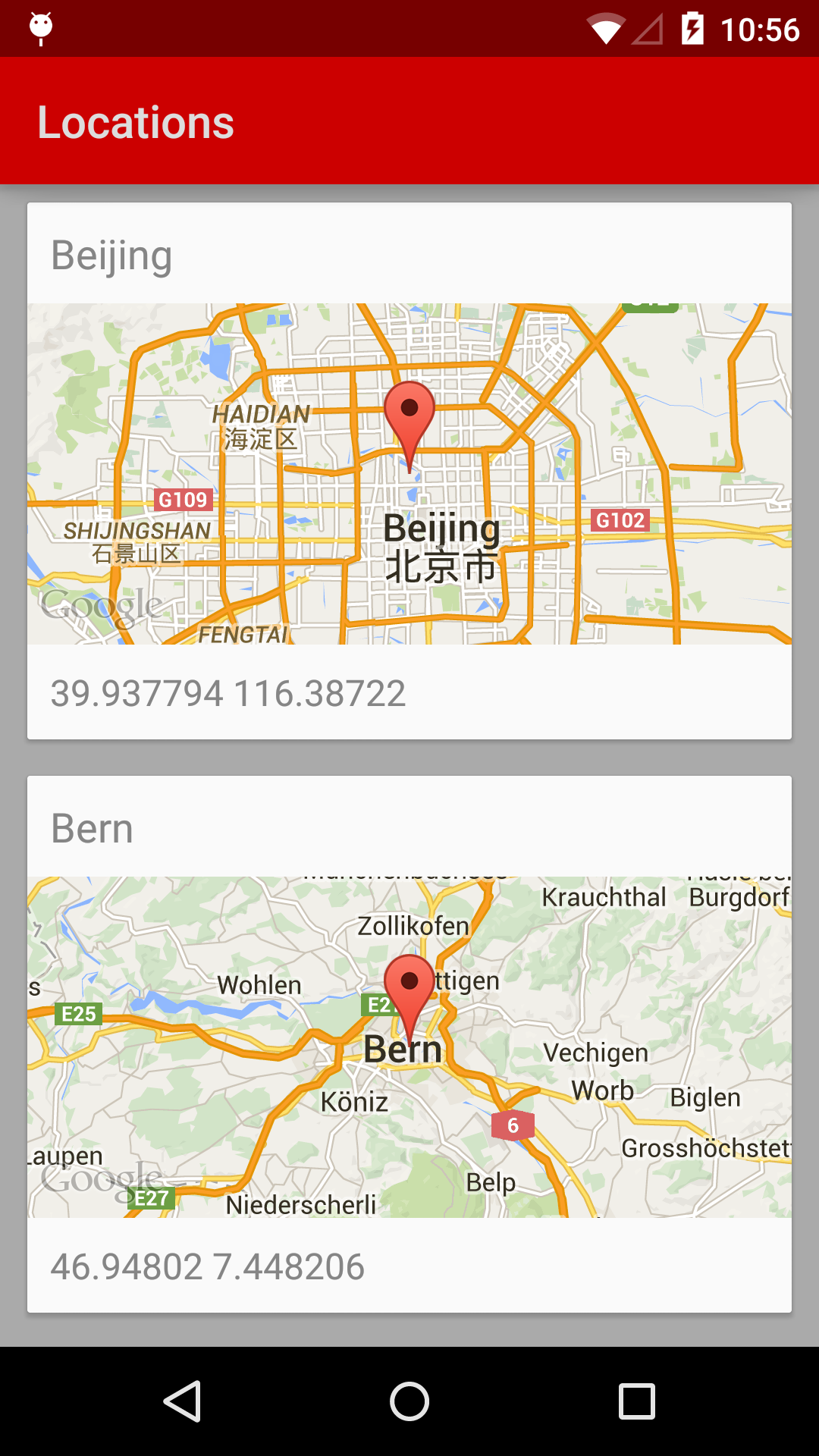
我有一个RecyclerView,它是一个垂直滚动的项目列表。每个列表项都包含一个Google V2 MapView in 轻石模。我正在利用这个新特性,它返回位图而不是完整的地图作为Google Static Maps API的替代品。
MapView要求从父活动/片段的相应方法调用onCreate()、onResume()、onPause()、onDestroy()等。从RecyclerView.Adapter和/或RecyclerView.ViewHolder调用它们的适当位置在哪里?
我如何清理可回收的MapViews,使内存不泄漏,同时保持列表的自由?
..。‘’lite模式‘映射选项,理想的情况下,您想提供许多较小的地图,或地图是如此小,有意义的互动是不切实际的,如一个缩略图在一个列表。
ListItem.xml
<RelativeLayout xmlns:android="http://schemas.android.com/apk/res/android"
                android:layout_width="fill_parent"
                android:layout_height="fill_parent">

    <com.google.android.gms.maps.MapView
        android:id="@+id/mapImageView"
        xmlns:map="http://schemas.android.com/apk/res-auto"
        android:layout_width="80dp"
        android:layout_height="100dp"
        map:liteMode="true"
        map:mapType="normal"
        map:cameraZoom="15"/>

<!-- ... -->

</RelativeLayout>
RecyclerView.Adapter和ViewHolder
public class NearbyStopsAdapter extends RecyclerView.Adapter<NearbyStopsAdapter.ViewHolder> {

    private final Context mContext;

    public class ViewHolder extends RecyclerView.ViewHolder implements View.OnClickListener {

        MapView map;

        public ViewHolder(View view) {
            super(view);
            map = (MapView) view.findViewById(R.id.mapImageView);
            // Should this be created here?
            map.onCreate(null);
            map.onResume();
        }
    }

    public NearbyStopsAdapter(Context c) {
        this.mContext = c;
    }

    @Override public ViewHolder onCreateViewHolder(ViewGroup viewGroup, int position) {
        View itemView = LayoutInflater.from(viewGroup.getContext()).inflate(R.layout.list_item_nearby_stop, viewGroup, false);
        return new ViewHolder(itemView);
    }

    @Override public void onBindViewHolder(ViewHolder holder, int position) {
        //Call Async Map here?
        holder.map.getMapAsync(this);
    }

    @Override public void onViewRecycled(ViewHolder holder) {
        // Cleanup MapView here?
//        if (holder.map != null) {
//            holder.map.onPause();
//            holder.map.onDestroy();
//        }
    }

    @Override public void onViewAttachedToWindow(ViewHolder holder) {
        // Setup MapView here?
//            holder.map.onCreate(null);
//            holder.map.onResume();
    }

    @Override public void onViewDetachedFromWindow(ViewHolder holder) {
        // Cleanup MapView here?
//        if (holder.map != null) {
//            holder.map.onPause();
//            holder.map.onDestroy();
//        }
    }

    // ...
}
Logcat:
I/Google Maps Android API﹕ Google Play services package version: 659943
W/Google Maps Android API﹕ Map Loaded callback is not supported in Lite Mode
W/Google Maps Android API﹕ Buildings are not supported in Lite Mode
W/Google Maps Android API﹕ Indoor is not supported in Lite Mode
W/Google Maps Android API﹕ Toggling gestures is not supported in Lite Mode
W/Google Maps Android API﹕ Toggling gestures is not supported in Lite Mode
W/Google Maps Android API﹕ Toggling gestures is not supported in Lite Mode
W/Google Maps Android API﹕ Toggling gestures is not supported in Lite Mode更新:(2018年6月8日)发布了一个在ListView中使用Lite地图的代码示例。看这里
回答 6
Stack Overflow用户
发布于 2015-02-24 09:38:43
解决办法如下:
- 在
OnMapReadyCallback类中实现ViewHolder。 - 在
onMapReady中,调用MapsInitializer.initialize,就可以在获取地图之前使用这些特性。
如果需要在获取地图之前使用特性,请使用这个类初始化Google API。必须调用它,因为需要初始化一些类,如BitmapDescriptorFactory和CameraUpdateFactory。
- 从
onViewRecycled回收地图。
    public class NearbyStopsAdapter extends RecyclerView.Adapter<NearbyStopsAdapter.ViewHolder> {


       @Override
       public void onBindViewHolder(ViewHolder holder, int position)
       {
          //get 'location' by 'position' from data list
          //get GoogleMap
          GoogleMap thisMap = holder.gMap;
          //then move map to 'location'
          if(thisMap != null)
             //move map to the 'location'
             thisMap.moveCamera(...);
       }


       //Recycling GoogleMap for list item
       @Override
       public void onViewRecycled(ViewHolder holder)
       {
          // Cleanup MapView here?
          if (holder.gMap != null)
          {
              holder.gMap.clear();
              holder.gMap.setMapType(GoogleMap.MAP_TYPE_NONE);
          }
       }


       public class ViewHolder extends RecyclerView.ViewHolder implements OnMapReadyCallback {

           GoogleMap gMap;
           MapView map;
            ... ...

           public ViewHolder(View view) {
              super(view);
              map = (MapView) view.findViewById(R.id.mapImageView);

              if (map != null)
              {
                 map.onCreate(null);
                 map.onResume();
                 map.getMapAsync(this);
              }

          }


          @Override
          public void onMapReady(GoogleMap googleMap) {
              //initialize the Google Maps Android API if features need to be used before obtaining a map
              MapsInitializer.initialize(getApplicationContext());
              gMap = googleMap;

              //you can move map here to item specific 'location'
              int pos = getPosition();
              //get 'location' by 'pos' from data list
              //then move to 'location'
              gMap.moveCamera(...);

                  ... ...
         }

       }
} Stack Overflow用户
发布于 2015-08-17 05:33:09
谷歌说:
在完全交互模式下使用API时,MapView类的用户必须将所有活动生命周期方法转发到MapView类中的相应方法。生命周期方法的示例包括onCreate()、onDestroy()、onResume()和onPause()。 在lite模式下使用MapView类时,除了以下情况外,转发生命周期事件是可选的: 必须调用onCreate(),否则就不会出现任何映射。如果您希望在lite模式映射上显示My Location点,并使用默认的位置源,则需要调用onResume()和onPause(),因为位置源只会在这些调用之间更新。如果您使用自己的位置源,则没有必要调用这两个方法。
因此,在lite模式下,您不必担心onDestroy()、onResume()和onPause()
Stack Overflow用户
发布于 2015-09-26 06:38:06
https://stackoverflow.com/questions/28612782
复制相似问题
腾讯云开发者

Copyright © 2013 - 2026 Tencent Cloud. All Rights Reserved. 腾讯云 版权所有
深圳市腾讯计算机系统有限公司 ICP备案/许可证号:粤B2-20090059  粤公网安备44030502008569号
腾讯云计算(北京)有限责任公司 京ICP证150476号 | 京ICP备11018762号