
将Windows 8.1注册为开发人员设备
将Windows 8.1注册为开发人员设备
提问于 2015-02-18 23:03:34
我正在尝试调试中的示例项目,但无法让它与我的手机一起工作。我可以为Windows (通用应用程序)调试它,但是对于我的手机,我不能运行模拟器或在我的手机上运行应用程序。我想让它在我的手机上工作,因为这是默认情况下应该工作的选项。
我试着注册我的设备,但没能跑得很远:
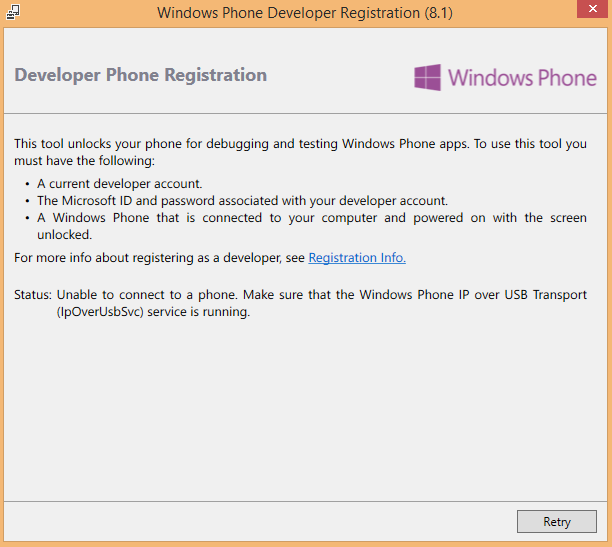
我已经通过了这个(Phone 8)其他问题,并尝试了列出的每个解决方案(重新启动、停止、启动服务,甚至禁用设备管理器中的设备),但它仍然不起作用。还有其他建议吗?
回答 1
Stack Overflow用户
回答已采纳
发布于 2015-02-19 05:35:13
在MSDN中找到解决方案。总的来说,我能够注册我的手机后,我:
- 拆下了我的手机。
- 从设备管理器中卸载“通用串行总线设备”下的四个设备(全部标记为我的手机)。
- 手动删除键“HKEY_LOCAL_MACHINE\SYSTEM\CurrentControlSet\Control\usbflags\042106610100”(号码匹配,因为我有一个诺基亚920)
- 重新连接电话
较长的版本将从MSDN复制并粘贴到下面,以防其他人出现此问题。
1. Open a command prompt and browse to this folder:

C:\Program Files (x86)\Common Files\Microsoft Shared\Phone Tools\CoreCon\11.0\Bin

Then run IpOverUsbEnum.exe (with the device unlocked!)

2.Expected results:

C:\Program Files (x86)\Common Files\Microsoft Shared\Phone Tools\CoreCon\11.0\Bi
 n>ipoverusbenum
 Partner:
   Container Id: 6C5585FD-8C32-587B-BBDE-3DB382497937
   Instance: USB\VID_0421&PID_0661&MI_01\6&2C0EBAFF&0&0001
   Name: RM-820|Nokia Lumia 920
   Guid: 00000011-6AE5-9FD1-0000-000000000000
 Partner Services listening at ports:
   Debugger 8888 -> 127.0.0.1:8888
   DeviceReg 27177 -> 127.0.0.1:27077
   Msvsmon 8016 -> 127.0.0.1:8016
   RPCSurrogate00 6610 -> 127.0.0.1:6510
   RPCSurrogate01 6611 -> 127.0.0.1:6511
   RPCSurrogate02 6612 -> 127.0.0.1:6512
   RPCSurrogate03 6613 -> 127.0.0.1:6513
   RPCSurrogate04 6614 -> 127.0.0.1:6514
   RPCSurrogate05 6615 -> 127.0.0.1:6515
   RPCSurrogate06 6616 -> 127.0.0.1:6516
   RPCSurrogate07 6617 -> 127.0.0.1:6517
   RPCSurrogate08 6618 -> 127.0.0.1:6518
   RPCSurrogate09 6619 -> 127.0.0.1:6519
   RPCSurrogate10 6620 -> 127.0.0.1:6520
   WPConManClient2Proxy 6891 -> 127.0.0.1:6791
   WPPingSirep 29819 -> 127.0.0.1:29819
   WPSirep 29917 -> 127.0.0.1:29817

If the output is as expected, most likely it’s not an IP Over USB issue.

3. If it reports RPC Server Unavailable, most likely the service is indeed not running on the PC.
 4. If it reports no connected partners found:
 - check the phone is unlocked
 - check it is available in explorer to drag and drop files
 - verify whether the USB device (i.e. the Phone) has been correctly detected and installed. This step is not trivial as it requires looking up the USB device (i.e. the phone) in the registry.

The following example is based on inspection in the registry (regedit) of an installed Nokia 920 device. If looking for a different device, the difference will be in the VID (Vendor ID, represented as VID_vvvv) and PID (Product ID, represented as PID_pppp).

1) Inspect the DeviceInterfaceGUID value in the registry key indicated below. If the device failed to install, that value may be missing. Please note this is the interface 1 (MI_01), interface 2 is used by Nokia for something different.

[HKEY_LOCAL_MACHINE\SYSTEM\CurrentControlSet\Enum\USB\VID_0421&PID_0661&MI_01\7&338e4600&1&0001\Device Parameters]
 "ExtPropDescSemaphore"=dword:00000001
 "DeviceInterfaceGUID"="{26fedc4e-6ac3-4241-9e4d-e3d4b2c5c534}"

2) Inspect the usbflags\042106610100 key below. The osvc value is the relevant thing to look for, it won’t start with 01 if the device wasn’t recognized correctly:

[HKEY_LOCAL_MACHINE\SYSTEM\CurrentControlSet\Control\usbflags\042106610100]
 "osvc"=hex:01,42
 "SkipContainerIdQuery"=hex:01,00,00,00

The long number, in this case 042106610100 was derived from the Vendor ID (0421), the Product ID (0661) and the revision number (0100) of the device.
 More USBFLAGS info:
http://msdn.microsoft.com/en-us/library/windows/hardware/jj649944(v=vs.85).aspx

The correct workaround, if these values are not correct, is to (1) uninstall the devices under “Universal Serial Bus Devices” from Device Manager, (2) remove the key “HKEY_LOCAL_MACHINE\SYSTEM\CurrentControlSet\Control\usbflags\042106610100” manually (use that number only if it is the Nokia 920), and then attach the phone again.

Mark Chamberlain Sr. Escalation Engineer | Microsoft Developer Support | Windows Phone 7页面原文内容由Stack Overflow提供。腾讯云小微IT领域专用引擎提供翻译支持
原文链接:
https://stackoverflow.com/questions/28595656
复制相关文章
相似问题
腾讯云开发者

Copyright © 2013 - 2026 Tencent Cloud. All Rights Reserved. 腾讯云 版权所有
深圳市腾讯计算机系统有限公司 ICP备案/许可证号:粤B2-20090059  粤公网安备44030502008569号
腾讯云计算(北京)有限责任公司 京ICP证150476号 | 京ICP备11018762号