
如何使用GridView中的CommandField编辑条目
如何使用GridView中的CommandField编辑条目
提问于 2015-02-13 17:03:32
我的网格视图中有以下命令字段:
<asp:CommandField ShowEditButton="True" HeaderText="EDIT" CausesValidation="false"
    HeaderStyle-BackColor="#CCCCCC" HeaderStyle-CssClass="infoBoldBlueSmall">
    <HeaderStyle BackColor="#CCCCCC"></HeaderStyle>
</asp:CommandField>
条目如下:

单击“编辑”按钮时,会看到“更新取消”:

对于某些条目,当我单击“编辑”按钮时,会得到以下错误:
Server Error in '/' Application.
--------------------------------------------------------------------------------

'Ddl_c' has a SelectedValue which is invalid because it does not exist in the list of items.
Parameter name: value
Description: An unhandled exception occurred during the execution of the current web request. Please review the stack trace for more information about the error and where it originated in the code.

Exception Details: System.ArgumentOutOfRangeException: 'Ddl_c' has a SelectedValue which is invalid because it does not exist in the list of items.
Parameter name: value

Source Error:

An unhandled exception was generated during the execution of the current web request. Information regarding the origin and location of the exception can be identified using the exception stack trace below.

Stack Trace:


[ArgumentOutOfRangeException: 'Ddl_c' has a SelectedValue which is invalid because it does not exist in the list of items.
Parameter name: value]
   System.Web.UI.WebControls.ListControl.PerformDataBinding(IEnumerable dataSource) +2732917
   System.Web.UI.WebControls.ListControl.PerformSelect() +49
   System.Web.UI.Control.DataBindChildren() +11143343
   System.Web.UI.Control.DataBind(Boolean raiseOnDataBinding) +182
   System.Web.UI.Control.DataBindChildren() +11143343
   System.Web.UI.Control.DataBind(Boolean raiseOnDataBinding) +182
   System.Web.UI.WebControls.GridView.CreateRow(Int32 rowIndex, Int32 dataSourceIndex, DataControlRowType rowType, DataControlRowState rowState, Boolean dataBind, Object dataItem, DataControlField[] fields, TableRowCollection rows, PagedDataSource pagedDataSource) +267
   System.Web.UI.WebControls.GridView.CreateChildControls(IEnumerable dataSource, Boolean dataBinding) +3340
   System.Web.UI.WebControls.CompositeDataBoundControl.PerformDataBinding(IEnumerable data) +72
   System.Web.UI.WebControls.GridView.PerformDataBinding(IEnumerable data) +18
   System.Web.UI.WebControls.DataBoundControl.OnDataSourceViewSelectCallback(IEnumerable data) +147
   System.Web.UI.WebControls.DataBoundControl.PerformSelect() +261
   System.Web.UI.WebControls.BaseDataBoundControl.EnsureDataBound() +82
   System.Web.UI.WebControls.GridView.OnPreRender(EventArgs e) +46
   System.Web.UI.Control.PreRenderRecursiveInternal() +108
   System.Web.UI.Control.PreRenderRecursiveInternal() +224
   System.Web.UI.Control.PreRenderRecursiveInternal() +224
   System.Web.UI.Control.PreRenderRecursiveInternal() +224
   System.Web.UI.Control.PreRenderRecursiveInternal() +224
   System.Web.UI.Page.ProcessRequestMain(Boolean includeStagesBeforeAsyncPoint, Boolean includeStagesAfterAsyncPoint) +3394

--------------------------------------------------------------------------------
Version Information: Microsoft .NET Framework Version:2.0.50727.5485; ASP.NET Version:2.0.50727.5483
如果需要更多的信息,请告诉我。
网格视图是填充的,所以我知道数据在那里,我还检查了表,它也在那里。
我如何解决这个问题?
更新:
该代码张贴在这里:
http://pastebin.com/ezr9uNMc图像,它显示GridView:
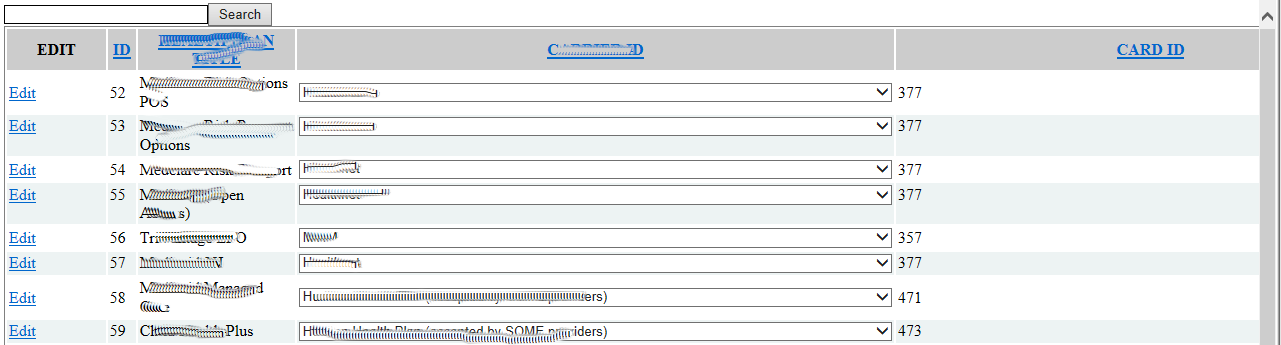
当单击每一行的Edit时,触发的是什么?如果我单击Edit 52,它可以工作,但对57,58和59,我会得到上面的堆栈跟踪错误。
请帮我解决这个问题。
回答 2
Stack Overflow用户
回答已采纳
发布于 2015-02-13 18:49:30
拥有代码会有所帮助,但我以前可能遇到过这种情况。有可能在绑定行中的数据之前设置所选项,因此可能需要在RowDataBound事件中设置最初选定的项。
如果这样做做不到,请确保您正在处理的情况下,您没有在列表中得到任何项目,所以您不想设置选定的项目。
Stack Overflow用户
发布于 2015-02-13 18:44:00
问题必须是为每一行填充的下拉列表。
单击“编辑”按钮时,下拉列表的选定值不存在。
确保在下拉列表的项中存在绑定值。
页面原文内容由Stack Overflow提供。腾讯云小微IT领域专用引擎提供翻译支持
原文链接:
https://stackoverflow.com/questions/28504841
复制相关文章
相似问题
腾讯云开发者

Copyright © 2013 - 2026 Tencent Cloud. All Rights Reserved. 腾讯云 版权所有
深圳市腾讯计算机系统有限公司 ICP备案/许可证号:粤B2-20090059  粤公网安备44030502008569号
腾讯云计算(北京)有限责任公司 京ICP证150476号 | 京ICP备11018762号