
如何使用Swift设置所选片段的文本颜色?
如何使用Swift设置所选片段的文本颜色?
提问于 2015-02-13 10:33:04
我使用了以下代码来设置UISegmentedControl的背景。
homeSegment.setDividerImage(UIImage(named: "seperator.png"), forLeftSegmentState: UIControlState.Normal, rightSegmentState: UIControlState.Normal, barMetrics: UIBarMetrics.Default)


homeSegment.setBackgroundImage(UIImage(named: "squareSegment.png"), forState: UIControlState.Selected, barMetrics: UIBarMetrics.Default)
homeSegment.setBackgroundImage(UIImage(named: "squareSegment.png"), forState: UIControlState.Normal, barMetrics: UIBarMetrics.Default)
如何设置选定段的文本颜色?
回答 4
Stack Overflow用户
回答已采纳
发布于 2015-04-20 03:47:22
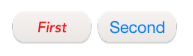
我通过使用setTitleTextAttributes来完成这个任务。下面的示例使用字典来设置属性,因为您很可能希望同时设置字体类型和大小。尝试此设置,将选定的段文本颜色设置为红色:
let segAttributes: NSDictionary = [
       NSForegroundColorAttributeName: UIColor.redColor(),
                  NSFontAttributeName: UIFont(name: "Avenir-MediumOblique", size: 20)!
]

homeSegment.setTitleTextAttributes(segAttributes as [NSObject : AnyObject], forState: UIControlState.Selected)
示例:
Stack Overflow用户
发布于 2017-12-12 15:33:13
适用于SWIFT4.0
let fontAttribute = [NSAttributedStringKey.font: UIFont(name: "Montserrat-Regular", size: 12)!,
                       NSAttributedStringKey.foregroundColor: UIColor.red]

segmentedControl.setTitleTextAttributes(fontAttribute, for: .normal)Stack Overflow用户
发布于 2017-03-17 20:43:02
@“波特兰跑步者”的答案是更老版本的Swift。
斯威夫特3.0,这是有效的。
逻辑与@波特兰Runner相同,但语法是根据SWIFT3.0修改和更新的
在这里,我实现的这段代码是分段控件的扩展,可以用于应用程序中的所有段控件,其中必须在应用程序类中定义代码集。
extension UISegmentedControl {
func setSegmentStyle() {
    setBackgroundImage(imageWithColor(color: backgroundColor!), for: .normal, barMetrics: .default)
    setBackgroundImage(imageWithColor(color: tintColor!), for: .selected, barMetrics: .default)
    setDividerImage(imageWithColor(color: UIColor.clear), forLeftSegmentState: .normal, rightSegmentState: .normal, barMetrics: .default)


     let segAttributes: NSDictionary = [
            NSForegroundColorAttributeName: UIColor.gray,
            NSFontAttributeName: UIFont(name: "System-System", size: 14)!
        ]

        setTitleTextAttributes(segAttributes as [NSObject : AnyObject], for: UIControlState.selected)
    }

    // create a 1x1 image with this color
    private func imageWithColor(color: UIColor) -> UIImage {
        let rect = CGRect(x: 0.0, y: 0.0, width:  1.0, height: 1.0)
        UIGraphicsBeginImageContext(rect.size)
        let context = UIGraphicsGetCurrentContext()
        context!.setFillColor(color.cgColor);
        context!.fill(rect);
        let image = UIGraphicsGetImageFromCurrentImageContext();
        UIGraphicsEndImageContext();
        return image!
    }
}
对于分段,可以在任何地方使用下面的代码
self.mySegment.setSegmentStyle()

页面原文内容由Stack Overflow提供。腾讯云小微IT领域专用引擎提供翻译支持
原文链接:
https://stackoverflow.com/questions/28497563
复制相关文章
相似问题
腾讯云开发者

Copyright © 2013 - 2026 Tencent Cloud. All Rights Reserved. 腾讯云 版权所有
深圳市腾讯计算机系统有限公司 ICP备案/许可证号:粤B2-20090059  粤公网安备44030502008569号
腾讯云计算(北京)有限责任公司 京ICP证150476号 | 京ICP备11018762号