
如何正确布局家庭/名胜古迹?
如何正确布局家庭/名胜古迹?
提问于 2015-02-11 15:33:59
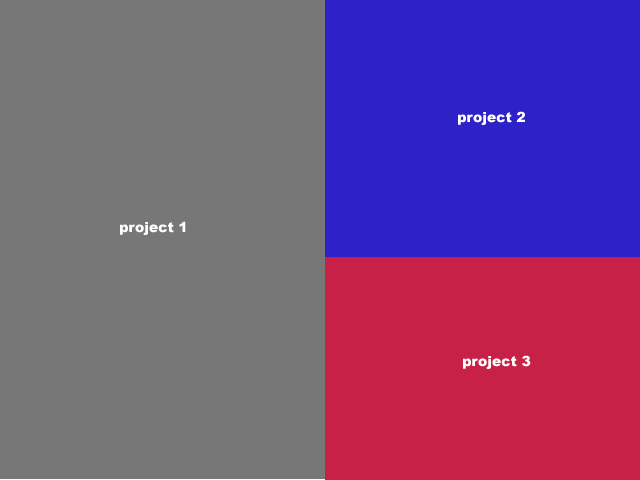
我使用的是meteor.js以及gadicohen:famous-views和mjn:famous包。
我想列出要在上面的布局模式中显示的项目。第一个项目的高度是后面两个项目的两倍,占屏幕的一半。随后的两个分割了第一个屏幕的高度,并取了屏幕的另一半。
解决这个问题的最好方法是创建一个自定义网格视图,并添加具有显式大小、原点和对齐属性的曲面吗?表面是否可以通过CSS第n个子规则进行样式设计?
回答 2
Stack Overflow用户
回答已采纳
发布于 2015-02-11 22:15:01
你可以使用两个GridLayout。一个在外部有两个水平单元格,一个在第二个单元上有两个垂直单元格。如下所示:
var horzGrid = new GridLayout({
    dimensions: [2, 1]
});
var vertGrid = new GridLayout({
    dimensions: [1, 2]
});
vertGrid.sequenceFrom([
    new Surface({properties: {backgroundColor: 'blue'}}),
    new Surface({properties: {backgroundColor: 'red'}})
]);
horzGrid.sequenceFrom([
    new Surface({properties: {backgroundColor: 'gray'}}),
    vertGrid
]);
this.add(horzGrid); // add to parent viewStack Overflow用户
发布于 2015-02-12 21:16:56
基于名为nestedGridProjectLayout的模板的工作代码
Template.nestedGridProjectLayout.rendered = function() {
    var Engine = famous.core.Engine;
    var Surface = famous.core.Surface;
    var GridLayout = famous.views.GridLayout;

    var context = Engine.createContext();

    var innerGrid = new GridLayout({
        dimensions: [1, 2]
    });

    innerGrid.sequenceFrom([
        new Surface({
            properties: {
                backgroundColor: 'blue'
            }
        }),
        new Surface({
            properties: {
                backgroundColor: 'red'
            }
        })
    ]);

    var outerGrid = new GridLayout({
        dimensions: [2, 1]
    });

    outerGridContents = [];
    outerGridContents.push(new Surface({
            properties: {
                backgroundColor: 'gray'
            }
        })
);
    outerGrid.sequenceFrom(outerGridContents);

    outerGridContents[1] = innerGrid;

    context.add(outerGrid);
}页面原文内容由Stack Overflow提供。腾讯云小微IT领域专用引擎提供翻译支持
原文链接:
https://stackoverflow.com/questions/28458219
复制相关文章
相似问题
腾讯云开发者

Copyright © 2013 - 2026 Tencent Cloud. All Rights Reserved. 腾讯云 版权所有
深圳市腾讯计算机系统有限公司 ICP备案/许可证号:粤B2-20090059  粤公网安备44030502008569号
腾讯云计算(北京)有限责任公司 京ICP证150476号 | 京ICP备11018762号