
HTML到NSAttributedString,NSAttributedString转到HTML
我希望将html字符串转换为NSAttributedString,然后像这样处理字符串(更改颜色、字体大小、字体系列、背景颜色、前景颜色.)然后将字符串从NSAttributedString转换回纯html。
转换并不是一个问题,,但每次我将html转换成NSAS,并支持fontsize变得越来越大.
样本游乐场:
// Playground - noun: a place where people can play
// NSAS: - NSAttributedString
import UIKit
class Wrapper {
//MARK: fields
let apiHtml = "<div style='font-size: 18px'><span style='font-family:'andale mono', times;'>Dies</span> <span style='font-family:'comic sans ms', sans-serif;'>ist</span> <strong><span style='font-family:'andale mono', sans-serif;';>eine</span></strong> <em>formatierte</em> <span style='text-decoration:underline;'>Karte</span> <span style='font-size:16px;'>die</span> <span style='background-color:#ffff00;'>es</span> zu Übernehmen gilt</div>"
var newGeneratedHtml = ""
var textView : UITextView!
//MARK: constructor
init() {
//init textview
textView = UITextView(frame: CGRectMake(0, 0, 500, 300))
//convert html into NSAS and set it to textview
if let attributedText = getAttributedTextFromApiHtmlString(apiHtml) {
textView.attributedText = attributedText
}
//get html text from textfields NSAS
if let htmlText = getHtmlTextFromTextView() {
newGeneratedHtml = htmlText
println(htmlText)
}
//set the converted html from textfields NSAS
if let attributedText = getAttributedTextFromApiHtmlString(newGeneratedHtml) {
textView.attributedText = attributedText
}
//get html text from textfields NSAS
if let htmlText = getHtmlTextFromTextView() {
newGeneratedHtml = htmlText
println(htmlText)
}
}
//MARK: methods
func getAttributedTextFromApiHtmlString(text : String) -> NSAttributedString? {
if let attributedText = NSAttributedString(data: text.dataUsingEncoding(NSUTF8StringEncoding, allowLossyConversion: true)!, options: [NSDocumentTypeDocumentAttribute : NSHTMLTextDocumentType], documentAttributes: nil, error: nil) {
return attributedText
}
return nil
}
func getHtmlTextFromTextView() -> String? {
let attributedTextFromTextView = textView.attributedText
if let htmlData = attributedTextFromTextView.dataFromRange(NSMakeRange(0, attributedTextFromTextView.length), documentAttributes: [NSDocumentTypeDocumentAttribute : NSHTMLTextDocumentType], error: nil) {
if let htmlString = NSString(data: htmlData, encoding: NSUTF8StringEncoding) {
return htmlString
}
}
return nil
}
}
var w = Wrapper()这是操场的结果。您可以看到,第二个文本是较大的第一个文本,但我没有改变字体大小的任何地方。
这是一个错误,还是我必须设置一个固定字体大小?
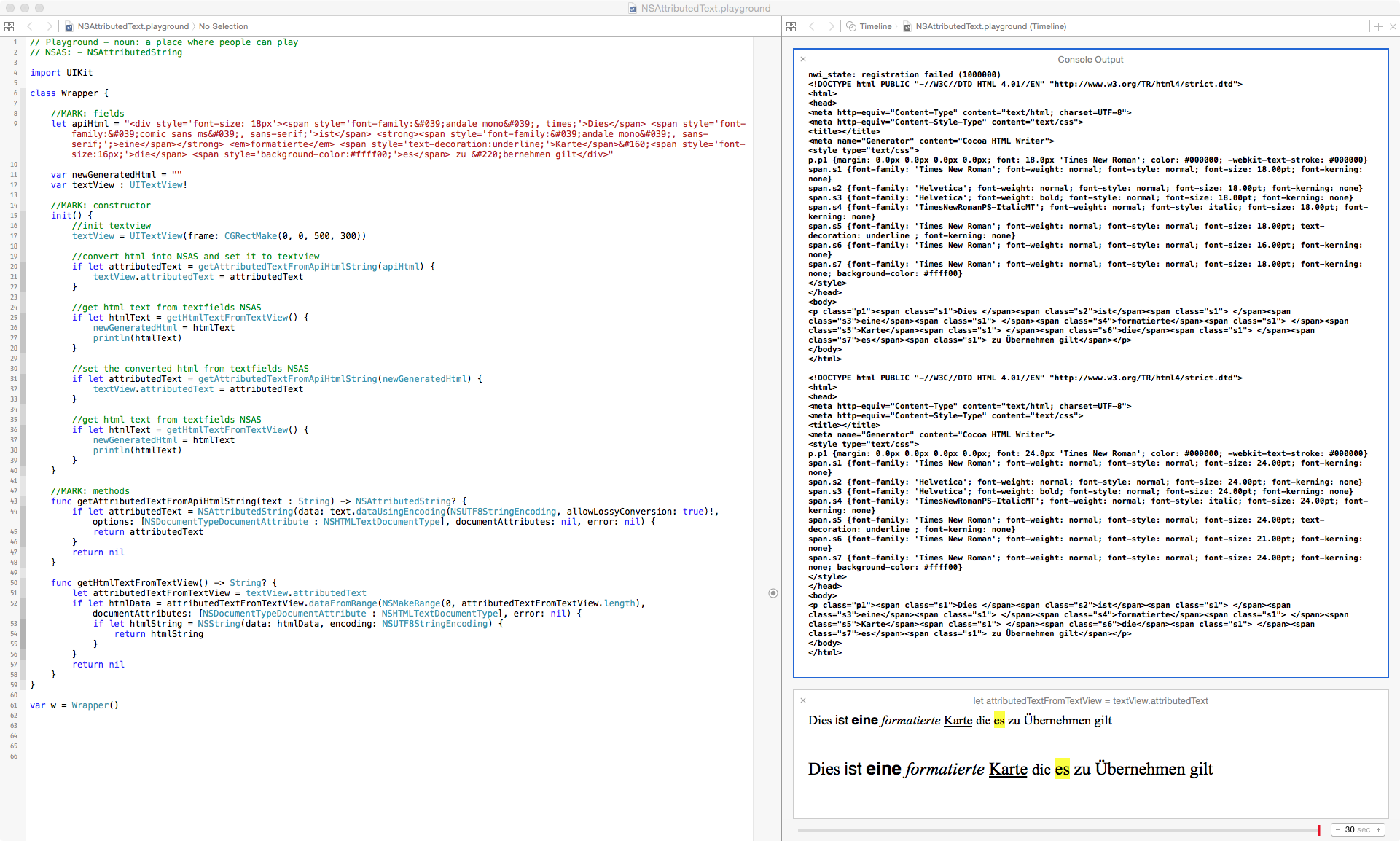
更新:
“我接受”卢·佛朗哥的回答。我不知道为什么消极安全保证会将px转换为pt并返回,但这是我的解决办法:
func getAttributedTextFromApiHtmlString(text : String) -> NSAttributedString? {
        if let attributedText = NSAttributedString(data: text.dataUsingEncoding(NSUTF8StringEncoding, allowLossyConversion: false)!, options: [NSDocumentTypeDocumentAttribute : NSHTMLTextDocumentType], documentAttributes: nil, error: nil) {

            var res : NSMutableAttributedString = attributedText.mutableCopy() as NSMutableAttributedString
            res.beginEditing()
            var found : Bool = false;
            res.enumerateAttribute(NSFontAttributeName, inRange:NSMakeRange(0, res.length) ,options:NSAttributedStringEnumerationOptions.allZeros, usingBlock: {(value:AnyObject!, range:NSRange, stop:UnsafeMutablePointer<ObjCBool>) -> Void in
                if ((value) != nil) {
                    let oldFont = value as UIFont;
                    let newFont = oldFont.fontWithSize(15)
                    res.removeAttribute(NSFontAttributeName, range:range)
                    res.addAttribute(NSFontAttributeName, value: newFont, range: range)
                    found = true
                    }
                })
            if !found {
                // No font was found - do something else?
            }
            res.endEditing()
            return res
        }
        return nil
}唯一的缺点是你失去了不同的文本高度在你的消极安全保证.
如果有人有解决方案或更好的工作,请随意张贴您的答案。
回答 2
Stack Overflow用户
发布于 2017-06-19 19:12:28
我解决了这个问题,对你的字符串中的每个大小都应用了0.75的比例。假设您在属性化字符串中有多个字体,当您遍历所有这些字体时,只需简单地应用比率,然后您就都设置好了。以下是我在“迅捷3.0”中的代码:
yourAttrStr.beginEditing()
yourAttrStr.enumerateAttribute(NSFontAttributeName, in: NSMakeRange(0, yourAttrStr.length), options: .init(rawValue: 0)) {
        (value, range, stop) in
        if let font = value as? UIFont {
            let resizedFont = font.withSize(font.pointSize * 0.75)
            yourAttrStr.addAttribute(NSFontAttributeName, value: resizedFont, range: range)
        }
}
yourAttrStr.endEditing()//yourAttrStr will be the same size as html string
这是在我的应用程序中运行的代码段。
extension String {
    func htmlAttributedString() -> NSAttributedString? {
        guard let data = self.data(using: String.Encoding.utf16, allowLossyConversion: false) else { return nil }
        guard let html = try? NSMutableAttributedString(
            data: data,
            options: [NSDocumentTypeDocumentAttribute: NSHTMLTextDocumentType],
            documentAttributes: nil) else { return nil }
        html.beginEditing()
        html.enumerateAttribute(NSFontAttributeName, in: NSMakeRange(0, html.length), options: .init(rawValue: 0)) {
            (value, range, stop) in
            if let font = value as? UIFont {
                let resizedFont = font.withSize(font.pointSize * 0.75)
                html.addAttribute(NSFontAttributeName,
                                         value: resizedFont,
                                         range: range)
            }
        }
        html.endEditing()
        return html
    }
}
使用它:
let htmlStr: String = "<font size=\"6\">font a</font><font size=\"16\">Font b</font>"
let attriStr: NSAttributedString? = htmlStr.htmlAttributedString()Stack Overflow用户
发布于 2018-06-14 07:22:12
在采取@fangming的解决方案的Swift 3中,这对我起了作用:
func newAttrSize(blockQuote: NSAttributedString) -> NSAttributedString
{
    let yourAttrStr = NSMutableAttributedString(attributedString: blockQuote)
    yourAttrStr.enumerateAttribute(.font, in: NSMakeRange(0, yourAttrStr.length), options: .init(rawValue: 0)) {
        (value, range, stop) in
        if let font = value as? UIFont {
            let resizedFont = font.withSize(font.pointSize * 0.75)
            yourAttrStr.addAttribute(.font, value: resizedFont, range: range)
        }
    }

    return yourAttrStr
}https://stackoverflow.com/questions/28441486
复制相似问题
腾讯云开发者

Copyright © 2013 - 2026 Tencent Cloud. All Rights Reserved. 腾讯云 版权所有
深圳市腾讯计算机系统有限公司 ICP备案/许可证号:粤B2-20090059  粤公网安备44030502008569号
腾讯云计算(北京)有限责任公司 京ICP证150476号 | 京ICP备11018762号