
Android TextToSpeech初始化-将默认TTS引擎设置为"android.speech.tts“。
Android TextToSpeech初始化-将默认TTS引擎设置为"android.speech.tts“。
提问于 2015-02-09 17:56:16
我正在研究安卓的TextToSpeech引擎。初始化代码是
TextToSpeech mTTS;
mTTS=new TextToSpeech(this, this, "android.speech.tts");
mTTS.setEngineByPackageName("android.speech.tts");

Intent checkTTSIntent = new Intent();

checkTTSIntent.setAction(TextToSpeech.Engine.ACTION_CHECK_TTS_DATA);

startActivityForResult(checkTTSIntent, MY_DATA_CHECK_CODE);
但这段代码是我手机上的一个选择对话框,用于选择b/w谷歌的TextToSpeech引擎或三星TextToSpeech引擎。现在我要移除这个
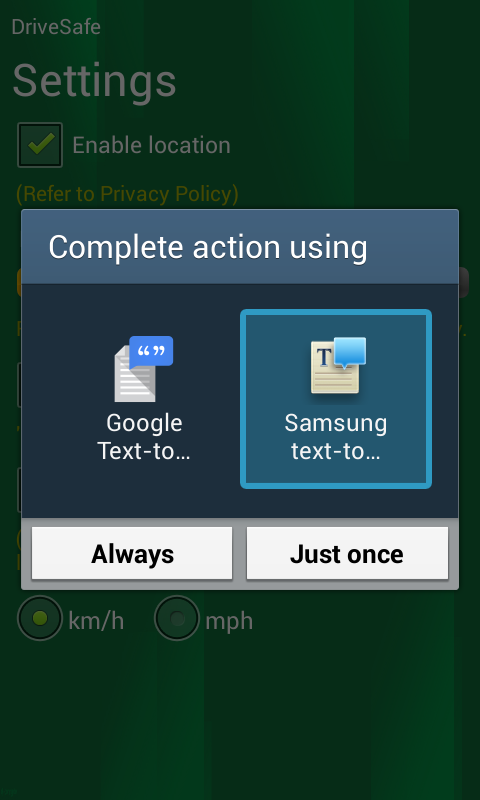
选择框并直接加载Google的TTS引擎,无需用户交互。请帮我一把:
回答 1
Stack Overflow用户
回答已采纳
发布于 2016-05-30 15:16:27
出于意图(TextToSpeech.Engine.ACTION_CHECK_TTS_DATA),我相信您正在尝试检查TTS数据是否安装在设备上。顺便说一句,这将检查默认的设备语言,如果没有安装,它将给出TextToSpeech.Engine.ACTION_INSTALL_TTS_DATA onActivityResult()的resultCode。
请在下面找到初始化TTS和处理错误的适当方法。
system = SpeechRecognizer.createSpeechRecognizer(getApplicationContext());
system.setRecognitionListener(this);
speech = new TextToSpeech(getApplicationContext(), new TextToSpeech.OnInitListener() {

        @Override
        public void onInit(int status) {
            if (status == TextToSpeech.SUCCESS) {
                    result = speech.setLanguage(Locale.US);
                    if (result == TextToSpeech.LANG_MISSING_DATA || result == TextToSpeech.LANG_NOT_SUPPORTED) {
                        Log.e("TTS", "This Language is not available, attempting download");
                        Intent installIntent = new Intent();
                        installIntent.setAction(TextToSpeech.Engine.ACTION_INSTALL_TTS_DATA);
                        startActivity(installIntent);
                    }
            }
            else {
                Log.e("TTS", "Initialization Failed!");
            }
        }
    }, "com.google.android.tts");
请注意以下3点:
- 包名为"com.google.android.tts“,用于使用Google进行语音。
- 您不需要检查意图"ACTION_CHECK_TTS_DATA",这将在onInit()中处理。
- 文本到语音设置语言是一个昂贵的操作,它冻结UI线程;如果您希望使用默认语言,请删除它。
使用这种方法,您将不会获得任何弹出的对话框和tts将被初始化。如果有帮助请告诉我!
页面原文内容由Stack Overflow提供。腾讯云小微IT领域专用引擎提供翻译支持
原文链接:
https://stackoverflow.com/questions/28416203
复制相关文章
相似问题
腾讯云开发者

Copyright © 2013 - 2026 Tencent Cloud. All Rights Reserved. 腾讯云 版权所有
深圳市腾讯计算机系统有限公司 ICP备案/许可证号:粤B2-20090059  粤公网安备44030502008569号
腾讯云计算(北京)有限责任公司 京ICP证150476号 | 京ICP备11018762号