
在GUI中创建多个不同图像的实例
我需要用GUI创建一个模拟器,我需要使用自定义的图像来实现这一点。我花了两个多小时试图找出如何使用多个不同图像的多个实例,并将它们全部添加到显示中,但我还没有设法使其工作。下面我发布了这些类,因为它们已经被修改了,但是我在这个过程中尝试了许多不同的实现。我知道我的代码可能在这个过程中搞砸了,但是即使在重新开始之后,我也找不到解决方案。
这个概念很简单:我将有一个关于酒厂的模拟器,我需要模拟一个特定的配置,在下面的图像中可视化:(这不是最后的可视化)
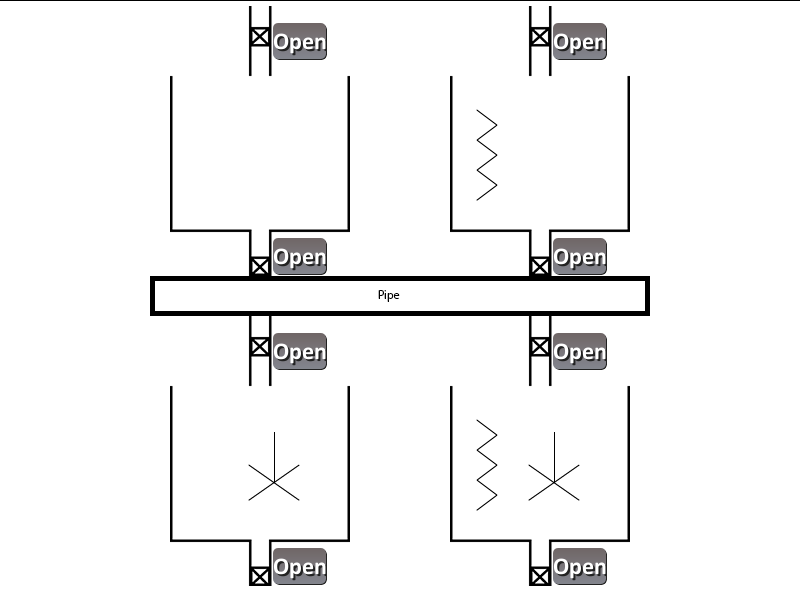
到目前为止,我只是尝试添加筒仓(大事情:P)。下面是我的LiqPlantSim类,它最终将是模拟器GUI处理程序。最终,将有另一个类将按钮定位,作为模拟器的控制面板。
import java.awt.Color;
import java.awt.Font;
import java.awt.Frame;
import java.awt.event.WindowAdapter;
import java.awt.event.WindowEvent;
import javax.swing.*;

public class LiqPlantSim extends JFrame{

    public static Silo silo,silo2,silo3,silo4;

    public LiqPlantSim(){
        super("Liq Plant Simulator");
        this.setFont(new Font("Helvetica", Font.PLAIN, 14));
        this.setBackground(Color.red);

        silo = new Silo(160,0);
        this.add(silo);
        silo2 = new Silo(440,0);
        this.add(silo2);
        silo3 = new Silo(160,310);
        this.add(silo3);
        silo4 = new Silo(440,310);
        this.add(silo4);

        this.setSize(800,600);
        this.setLocation(100,100);
        this.setVisible(true);
        this.toFront();
        this.setResizable(false);
        this.addWindowListener(new WindowAdapter(){
            public void windowClosing(WindowEvent e){
                System.exit(0);
            }
        });
    }


}
下面是我的筒仓课。
import java.awt.*;
import java.awt.event.*;
import java.awt.image.*;
import java.io.*;

import javax.imageio.*;
import javax.swing.*;

public class Silo extends Component{

    BufferedImage img;
    int x,y;
    public Silo(int x,int y) {
        this.x=x;
        this.y=y;
        try {
            img = ImageIO.read(new File("img/EmptySilo.png"));
        }
        catch (IOException e) {
            System.out.println("ERROR");
        }
    }

    public void paint(Graphics g) {
        g.drawImage(img, x, y, null);
    }

    public Dimension getPreferredSize() {
        if (img == null) {
           return new Dimension(100,100);
        }
        else {
           return new Dimension(img.getWidth(null), img.getHeight(null));
        }
    }

}
仅供参考,这里是我的主要功能,我尝试创建LiqPlantSim的一个实例,它最终将成为模拟器;还有另一个窗口,其中包含处理模拟器的按钮。
public class Simulator {

    public static void main(String [] args){

        LiqPlantSim sim = new LiqPlantSim();
    }
}
我正在为任何需要的人添加筒仓文件。
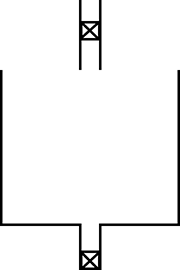
回答 1
Stack Overflow用户
发布于 2015-02-05 21:24:12
基本上,你是在和布局经理做斗争。组件绘制是从组件的上下文中执行的,也就是说,0x0位置是组件的左上角。
首先,关注Silo类的各个需求
public class Silo extends JComponent {

    BufferedImage img;

    public Silo() throws IOException {
        img = ImageIO.read(new File("img/EmptySilo.png"));
    }

    @Override
    protected void paintComponent(Graphics g) {
        super.paintComponent(g);
        g.drawImage(img, 0, 0, this);
    }

    @Override
    public Dimension getPreferredSize() {
        if (img == null) {
            return new Dimension(100, 100);
        } else {
            return new Dimension(img.getWidth(), img.getHeight());
        }
    }

    @Override
    public Dimension getMinimumSize() {
        return getPreferredSize();
    }

}
这还包括你可能想要渲染的任何东西,以及你如何改变状态,但我将把它留给你.
接下来,您需要决定如何最好地布局每个组件。我的直觉是,您要么需要使用GridBagLayout,要么甚至会想出一个最符合您要求的定制布局管理器。
对于这个演示,我只使用了一个GridLayout,但是我认为您需要更复杂和更灵活的东西来满足您的总体需求
public class LiqPlantSim extends JFrame{

    public Silo silo,silo2,silo3,silo4;

    public LiqPlantSim(){
        super("Liq Plant Simulator");
        this.setFont(new Font("Helvetica", Font.PLAIN, 14));
        this.setBackground(Color.red);

        setLayout(new GridLayout(2, 2));

        silo = new Silo();
        this.add(silo);
        silo2 = new Silo();
        this.add(silo2);
        silo3 = new Silo();
        this.add(silo3);
        silo4 = new Silo();
        this.add(silo4);

        setDefaultCloseOperation(EXIT_ON_CLOSE);
        this.setResizable(false);
        this.pack();
        this.setLocation(100,100);
        this.setVisible(true);
        this.toFront();
    }


}
更新的
有许多方法可以布局最终视图,所有这些都将归结为实现特定的细节,而这些细节通过您的问题是无法获得的。
我通常试着坚持使用预定义的布局,比如GridBagLayout,只要有可能,这种方式通常更简单,但有时,您可能需要构建自己的布局管理器才能得到您想要的东西。
在一天结束时,你想要做你能做的一切来分离和隔离责任区域,例如,不要被诱惑去尝试在一个容器中布局所有的东西,它会让你发疯
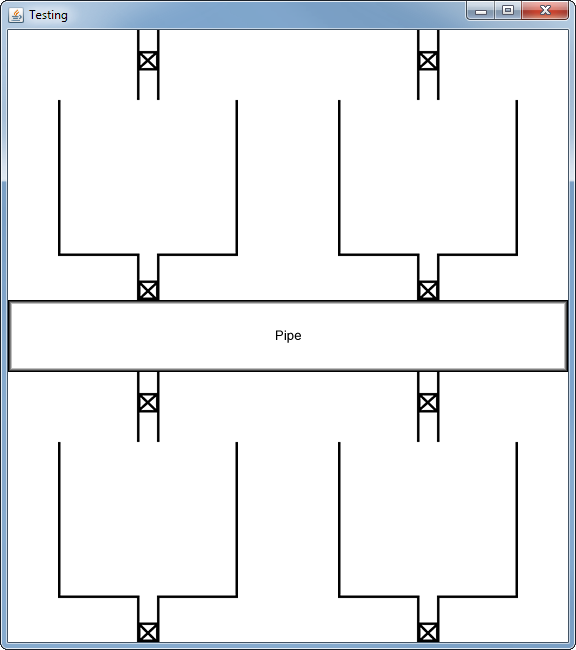
下面使用了一种通常称为复合布局的技术,使用两个不同的布局管理器来完成最终目标。
import java.awt.Color;
import java.awt.Dimension;
import java.awt.EventQueue;
import java.awt.Graphics;
import java.awt.GridBagConstraints;
import java.awt.GridBagLayout;
import java.awt.GridLayout;
import java.awt.Insets;
import java.awt.image.BufferedImage;
import java.io.File;
import java.io.IOException;
import javax.imageio.ImageIO;
import javax.swing.JComponent;
import javax.swing.JFrame;
import javax.swing.JPanel;
import javax.swing.UIManager;
import javax.swing.UnsupportedLookAndFeelException;
import javax.swing.border.CompoundBorder;
import javax.swing.border.EmptyBorder;
import javax.swing.border.LineBorder;

public class Test {

    public static void main(String[] args) {
        new Test();
    }

    public Test() {
        EventQueue.invokeLater(new Runnable() {
            @Override
            public void run() {
                try {
                    UIManager.setLookAndFeel(UIManager.getSystemLookAndFeelClassName());
                } catch (ClassNotFoundException | InstantiationException | IllegalAccessException | UnsupportedLookAndFeelException ex) {
                    ex.printStackTrace();
                }

                JFrame frame = new JFrame("Testing");
                frame.setDefaultCloseOperation(JFrame.EXIT_ON_CLOSE);
                frame.add(new Brewery());
                frame.pack();
                frame.setLocationRelativeTo(null);
                frame.setVisible(true);
            }
        });
    }

    public class Brewery extends JPanel {

        public Brewery() {
            setBackground(Color.WHITE);
            setLayout(new GridBagLayout());
            GridBagConstraints gbc = new GridBagConstraints();
            try {

                gbc.gridx = 0;
                gbc.gridy = 0;
                gbc.anchor = GridBagConstraints.SOUTH;
                JPanel top = new JPanel(new GridLayout(1, 2));
                top.setOpaque(false);
                top.add(new Silo());
                top.add(new Silo());
                add(top, gbc);

                gbc.gridy++;
                gbc.gridwidth = GridBagConstraints.REMAINDER;
                add(new Pipe(), gbc);

                gbc.anchor = GridBagConstraints.NORTH;
                gbc.gridy++;
                gbc.gridwidth = 1;
                JPanel bottom = new JPanel(new GridLayout(1, 2));
                bottom.setOpaque(false);
                bottom.add(new Silo());
                bottom.add(new Silo());
                add(bottom, gbc);
            } catch (IOException exp) {
                exp.printStackTrace();
            }
        }

    }

    public class Silo extends JComponent {

        BufferedImage img;

        public Silo() throws IOException {
            setBorder(new EmptyBorder(0, 50, 0, 50));
            img = ImageIO.read(new File("img/EmptySilo.png"));
        }

        @Override
        protected void paintComponent(Graphics g) {
            super.paintComponent(g);
            int x = (getWidth() - img.getWidth()) / 2;
            int y = (getHeight() - img.getHeight()) / 2;
            g.drawImage(img, x, y, this);
        }

        @Override
        public Dimension getPreferredSize() {
            Dimension dim = new Dimension(100, 100);
            if (img != null) {
                dim = new Dimension(img.getWidth(), img.getHeight());
            }
            Insets insets = getInsets();
            dim.width += insets.left + insets.right;
            dim.height += insets.top + insets.bottom;
            return dim;
        }

        @Override
        public Dimension getMinimumSize() {
            return getPreferredSize();
        }

    }


    public class Pipe extends JComponent {

        BufferedImage img;

        public Pipe() throws IOException {
            img = ImageIO.read(new File("img/Pipe.png"));
        }

        @Override
        protected void paintComponent(Graphics g) {
            super.paintComponent(g);
            int x = (getWidth() - img.getWidth()) / 2;
            int y = (getHeight() - img.getHeight()) / 2;
            g.drawImage(img, x, y, this);
        }

        @Override
        public Dimension getPreferredSize() {
            if (img == null) {
                return new Dimension(100, 100);
            } else {
                return new Dimension(img.getWidth(), img.getHeight());
            }
        }

        @Override
        public Dimension getMinimumSize() {
            return getPreferredSize();
        }

    }
}有关更多细节,请参见在容器中布局组件
https://stackoverflow.com/questions/28353766
复制相似问题
腾讯云开发者

Copyright © 2013 - 2026 Tencent Cloud. All Rights Reserved. 腾讯云 版权所有
深圳市腾讯计算机系统有限公司 ICP备案/许可证号:粤B2-20090059  粤公网安备44030502008569号
腾讯云计算(北京)有限责任公司 京ICP证150476号 | 京ICP备11018762号