
如何在Windows 8.1消息对话框中将按钮内容更改为CamelCasing
如何在Windows 8.1消息对话框中将按钮内容更改为CamelCasing
提问于 2015-02-05 11:03:01
如何在Windows 8.1消息对话框中将按钮内容更改为CamelCasing?
    private async void Button_Click(object sender, RoutedEventArgs e)
    {
        MessageDialog msg = new MessageDialog("Do you want to continue?");
        msg.Commands.Add(new UICommand("Ok", (command) => { }));
        msg.Commands.Add(new UICommand("Cancel", (command) => { }));
        await msg.ShowAsync();
    }
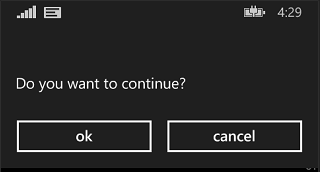
我想把“ok”改为“Ok”,“取消”作为“取消”。
回答 3
Stack Overflow用户
回答已采纳
发布于 2015-02-11 08:02:08
如果您想要一个自定义对话框,则需要使用不同的控件。MessageDialog总是将按钮小写以与系统样式相匹配,并且通常无法自定义。
如果您使用ContentDialog,您可以相当广泛地自定义它,并且它不会尝试修复其按钮的情况。您可能希望创建自己的ContentDialog类( Add.New项下有一个模板.)使用您想要的内容,但是下面是一个快速的内容免费示例:
ContentDialog cd = new ContentDialog();
cd.Title = "My Title";
cd.PrimaryButtonText = "CoNtInUe";
cd.SecondaryButtonText = "sToP";
await cd.ShowAsync();还请注意,消息对话框指南建议使用明确和特定的动词,而不是泛型OK/Cancel。
Stack Overflow用户
发布于 2015-02-16 09:30:29
使用“内容”对话框如下:
将此代码添加到xaml中。
    <ContentDialog x:Name="AlertMessage" Background="#363636" IsSecondaryButtonEnabled="True" SecondaryButtonText="Cancel"  IsPrimaryButtonEnabled="True" PrimaryButtonText="Ok" >
        <ContentDialog.Content>
            <StackPanel Name="rootStackPanel" Height="Auto"  >
                <StackPanel Margin="0">
                    <StackPanel Margin="0,0,0,10" Orientation="Horizontal">
                        <TextBlock x:Name="HeadingText" x:FieldModifier="public" Style="{StaticResource ApplicationMessageBoxHeadingStyle}" Text="Alert"  />
                        <Image Margin="10,05,0,0" Source="/Assets/Images/alert.png" Width="35"></Image>
                    </StackPanel>
                    <TextBlock x:FieldModifier="public" x:Name="ContentText" Style="{StaticResource ApplicationMessageBoxErrorStyle}" Text="Are you sure you want to log off ?" />
                </StackPanel>
            </StackPanel>
        </ContentDialog.Content>
    </ContentDialog>
然后在你的代码中这样称呼:
    private void AppBarButton_Click(object sender, RoutedEventArgs e)
    {
        MessageBox();
    }
    private async void MessageBox()
    {
        ContentDialogResult LogoutDialog = await AlertMessage.ShowAsync();

        if (LogoutDialog == ContentDialogResult.Primary)
        {
            // User pressed Ok.
        }
        else
        {
            // User pressed Cancel or the back arrow.
            // Terms of use were not accepted.
        }
}Stack Overflow用户
发布于 2015-02-05 12:02:08
以下是代码:
 CustomMessageBox messagebox = new CustomMessageBox()
 {
      Caption = "Do you want to continue?",
      LeftButtonContent = "Ok",
      RightButtonContent = "Cancel"
};页面原文内容由Stack Overflow提供。腾讯云小微IT领域专用引擎提供翻译支持
原文链接:
https://stackoverflow.com/questions/28342277
复制相关文章
相似问题
腾讯云开发者

Copyright © 2013 - 2026 Tencent Cloud. All Rights Reserved. 腾讯云 版权所有
深圳市腾讯计算机系统有限公司 ICP备案/许可证号:粤B2-20090059  粤公网安备44030502008569号
腾讯云计算(北京)有限责任公司 京ICP证150476号 | 京ICP备11018762号