
SyncFusion JS图表-工具提示行为错误
SyncFusion JS图表-工具提示行为错误
提问于 2015-02-04 13:34:07
我正在使用SyncFusion作为Javascript在我的应用程序中呈现图表。我有一个StepChart,它有几个数列,连续的X轴和数据点之间的不等间隔。当用户悬停某一点时,我想显示一个工具提示和描述。但这不像预期的那样有效。有时会为错误的点显示工具提示,而对于某些点则根本没有显示它们。
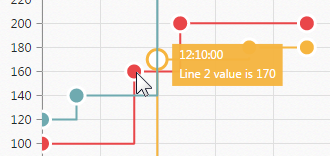
似乎有一些聪明的算法决定了每个区域应该显示什么工具提示.不幸的是,这对我不起作用。只要显示工具提示就足够了,当用户的鼠标正好在点上时(因为我的点相当大)。
$(function() {
  $("#container").ejChart({
    primaryXAxis: {
      valueType: 'datetime',
      range: {
        min: new Date(1422874800000),
        max: new Date(1422878400000),
        interval: 5
      },
      intervalType: 'Minutes'
    },
    primaryYAxis: {
      title: {
        text: 'Value'
      },
      range: {
        min: 0,
        max: 300
      }
    },
    commonSeriesOptions: {
      type: 'stepline',
      enableAnimation: true,
      marker: {
        shape: 'circle',
        size: {
          height: 12,
          width: 12
        },
        visible: true
      },
      border: {
        width: 2
      },
      tooltip: {
        visible: true,
        format: "#point.x#<br/>#series.name# value is #point.y# "
      }
    },

    series: [{
      "name": "Line 1",
      "enableAnimation": false,
      "points": [{
        "x": new Date(1422874800000),
        "y": 100
      }, {
        "x": new Date(1422875280000),
        "y": 160
      }, {
        "x": new Date(1422875520000),
        "y": 200
      }, {
        "x": new Date(1422876180000),
        "y": 200
      }]
    }, {
      "name": "Line 2",
      "enableAnimation": false,
      "points": [{
        "x": new Date(1422874800000),
        "y": 50
      }, {
        "x": new Date(1422875400000),
        "y": 170
      }, {
        "x": new Date(1422875880000),
        "y": 180
      }, {
        "x": new Date(1422876180000),
        "y": 180
      }]
    }, {
      "name": "Line 3",
      "enableAnimation": false,
      "points": [{
        "x": new Date(1422874800000),
        "y": 120
      }, {
        "x": new Date(1422874980000),
        "y": 140
      }, {
        "x": new Date(1422875400000),
        "y": 240
      }, {
        "x": new Date(1422875880000),
        "y": 260
      }, {
        "x": new Date(1422876180000),
        "y": 260
      }]
    }],
    canResize: true,
    title: {
      text: 'Step Chart'
    },
    legend: {
      visible: true
    }
  });
});<script src="https://ajax.googleapis.com/ajax/libs/jquery/1.10.1/jquery.min.js"></script>
<script src="http://js.syncfusion.com/demos/web/scripts/jquery.globalize.min.js"></script>
<link href="http://js.syncfusion.com/demos/web/themes/ej.widgets.core.min.css" rel="stylesheet" />
<link href="http://js.syncfusion.com/demos/web/themes/default.css" rel="stylesheet" />
<link href="http://js.syncfusion.com/demos/web/themes/default-responsive.css" rel="stylesheet" />
<link href="http://js.syncfusion.com/demos/web/themes/bootstrap.min.css" rel="stylesheet" />
<link href="http://js.syncfusion.com/demos/web/themes/default-theme/ej.widgets.all.min.css" rel="stylesheet" />
<link href="http://js.syncfusion.com/demos/web/themes/default-theme/ej.theme.min.css" rel="stylesheet" />
<script src="http://js.syncfusion.com/demos/web/scripts/ej.web.all.min.js"></script>
<div class="content-container-fluid">
<div class="row">
<div class="cols-sample-area">
<div id="container"></div>
</div>
</div>
</div>
任何帮助都是非常感谢的!
回答 1
Stack Overflow用户
回答已采纳
发布于 2015-04-14 09:40:54
所述的问题是固定的,修复包括在2015年第1卷基本工作室发行版,该版本于2015年4月的第一周推出,可从以下链接下载
链接:http://www.syncfusion.com/forums/118723/essential-studio-2015-volume-1-final-release-v13-1-0-21-available-for-download
如果这对我有帮助,请告诉我
页面原文内容由Stack Overflow提供。腾讯云小微IT领域专用引擎提供翻译支持
原文链接:
https://stackoverflow.com/questions/28322759
复制相关文章
相似问题
腾讯云开发者

Copyright © 2013 - 2026 Tencent Cloud. All Rights Reserved. 腾讯云 版权所有
深圳市腾讯计算机系统有限公司 ICP备案/许可证号:粤B2-20090059  粤公网安备44030502008569号
腾讯云计算(北京)有限责任公司 京ICP证150476号 | 京ICP备11018762号