
如何在Windows 8.1中更改内容对话框的标题样式
如何在Windows 8.1中更改内容对话框的标题样式
提问于 2015-02-03 05:53:38
如何在Windows 8.1中更改title页面的ContentDialog属性样式。
XAML:
<ContentDialog
    x:Class="MyApp.View.Login.ContentDialog1"
    xmlns="http://schemas.microsoft.com/winfx/2006/xaml/presentation"
    xmlns:x="http://schemas.microsoft.com/winfx/2006/xaml"
    xmlns:local="using:MyApp.View.Login"
    Title="DIALOG TITLE">

    <StackPanel VerticalAlignment="Stretch" HorizontalAlignment="Stretch">
        <TextBox Name="email" Header="Email address"/>
    </StackPanel>
</ContentDialog>这里有Title="DIALOG TITLE",我可以更改title中的文本显示样式吗?
编辑
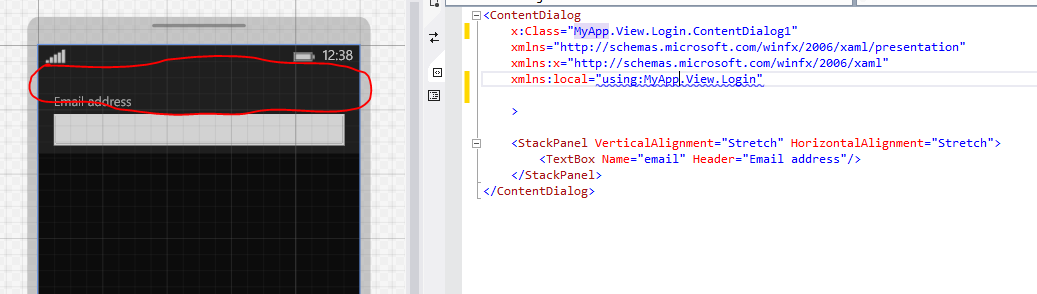
如果不提ContentDialog,如何减少title中最上层的空空间?
回答 1
Stack Overflow用户
回答已采纳
发布于 2015-02-03 06:14:00
标题将显示在内容对话框的TitleTemplate中。你可以根据需要改变它。
<ContentDialog
    x:Class="MyApp.View.Login.ContentDialog1"
    xmlns="http://schemas.microsoft.com/winfx/2006/xaml/presentation"
    xmlns:x="http://schemas.microsoft.com/winfx/2006/xaml"
    xmlns:local="using:MyApp.View.Login"
    Title="DIALOG TITLE">

    <ContentDialog.TitleTemplate>
        <DataTemplate>
            <!-- what do you want the title to look like -->
        </DataTemplate>
    </ContentDialog.TitleTemplate>

    <StackPanel VerticalAlignment="Stretch" HorizontalAlignment="Stretch">
        <TextBox Name="email" Header="Email address"/>
    </StackPanel>
</ContentDialog>页面原文内容由Stack Overflow提供。腾讯云小微IT领域专用引擎提供翻译支持
原文链接:
https://stackoverflow.com/questions/28292242
复制相关文章
相似问题
腾讯云开发者

Copyright © 2013 - 2026 Tencent Cloud. All Rights Reserved. 腾讯云 版权所有
深圳市腾讯计算机系统有限公司 ICP备案/许可证号:粤B2-20090059  粤公网安备44030502008569号
腾讯云计算(北京)有限责任公司 京ICP证150476号 | 京ICP备11018762号