
创建一个浮动的可点击动画控件(图像或.)

我希望在我的WPF应用程序中创建一个浮动、动画、可点击的控件,就像一个氦气气球有时也会向右或向左移动一样。
氦气气球喜欢上升!但如果我们敲击它们或风,它们也会向右或向左移动。 在预先的情况下,有时他们会向右或向左。
..
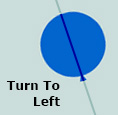

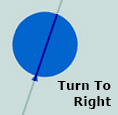
..
所以我搜索了网页,但没有找到任何有用的示例项目、库或样式。
- 如何在WPF中创建样式和动画来显示图像或控制浮力或悬浮在空气中。?
- 你有什么建议来简单地实施这个想法吗?
编辑:
- 您对随机和无限光滑的右、左转的建议是什么?例如,向左51度,向右163度和.我想把我的气球放在我的窗户里,经常放在窗户的顶部,。
编辑:
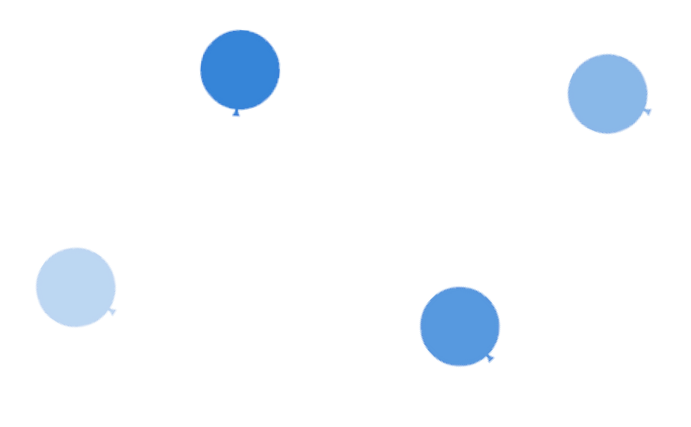
我根据这些答案创建了一个动画,但是通过操作它们并在气球图像及其容器上添加多个并行动画,我创建了一个更复杂的动画。)谢谢大家..。
现在我的主要结果如下:
回答 5
Stack Overflow用户
发布于 2015-02-16 01:12:53
您可以使用DoubleAnimation和@Ega中提到的RotateTransform来实现这一点。要回答你的“随机和无限”转向左右,以下是你如何做到这一点(这是非常基本的,但做的工作)。
    private async void Button_Click(object sender, RoutedEventArgs e)
    {
        var rnd = new Random();
        var direction = -1;

        while (true)
        {
            var percent = rnd.Next(0, 100);
            direction *= -1; // Direction changes every iteration
            var rotation = (int)((percent / 100d) * 45 * direction); // Max 45 degree rotation
            var duration = (int)(750 * (percent / 100d)); // Max 750ms rotation

            var da = new DoubleAnimation
            {
                To = rotation,
                Duration = new Duration(TimeSpan.FromMilliseconds(duration)),
                AutoReverse = true // makes the balloon come back to its original position
            };

            var rt = new RotateTransform();
            Balloon.RenderTransform = rt; // Your balloon object
            rt.BeginAnimation(RotateTransform.AngleProperty, da);

            await Task.Delay(duration * 2); // Waiting for animation to finish, not blocking the UI thread
        }
    }
编辑 for .NET 3.5
    private void Button_Click(object sender, RoutedEventArgs e)
    {
        var thread = new Thread(this.AnimateBalloon);
        thread.Start();
    }

    public void AnimateBalloon()
    {
        var rnd = new Random();
        var direction = -1;

        while (true)
        {
            var percent = rnd.Next(0, 100);
            direction *= -1; // Direction changes every iteration
            var rotation = (int)((percent / 100d) * 45 * direction); // Max 45 degree rotation
            var duration = (int)(750 * (percent / 100d)); // Max 750ms rotation

            Balloon.Dispatcher.BeginInvoke(
                (Action)(() =>
                {
                    var da = new DoubleAnimation
                    {
                        To = rotation,
                        Duration = new Duration(TimeSpan.FromMilliseconds(duration)),
                        AutoReverse = true // makes the balloon come back to its original position
                    };

                    var rt = new RotateTransform();
                    Balloon.RenderTransform = rt; // Your balloon object
                    rt.BeginAnimation(RotateTransform.AngleProperty, da);
                }));

            Thread.Sleep(duration * 2);
        }
}Stack Overflow用户
发布于 2015-02-16 07:31:58
Farseer物理引擎 for C#将允许您创建一个真实世界的模拟。你可以控制重力,惯性,力,甚至其他物理物质。
    World world = new World(new Vector2(0f, 9.82f));
    //We create a body object and make it dynamic (movable)
    Body myBody = world.CreateBody();
    myBody.BodyType = BodyType.Dynamic;

    //We create a circle shape with a radius of 0.5 meters
    CircleShape circleShape = new CircleShape(0.5f);

    //We fix the body and shape together using a Fixture object
    Fixture fixture = myBody.CreateFixture(circleShape);
在这种情况下,您可能需要创建一个重力较小的世界,并且物体会飞起来。你可以从物体的任何一边施加力量来移动它。
Stack Overflow用户
发布于 2015-02-02 14:11:15
在C#中,DoubleAnimation是一个强大的类支持动画,在System.Windows.Media.Animation; NameSpace中,所以这个类有一些方法和属性,让我告诉您
DoubleAnimation ANobj = new DoubleAnimation();//make object from DoubleAnimation
ANobj.From=0 //the 0 is point you want to star animation
ANobj.To=270//the end pont of moving
// that values  is dependent on your self as you want
ANobj.Duration = new Duration(TimeSpan.FromSeconds(60)); //specify the duration of moving
ANobj.RepeatBehavior = RepeatBehavior.Forever;//RepeatBehavior as you want还可以使用RotateTransform类在WPF中旋转C#组件。
RotateTransform RTobj=new RotateTransform();//make object from RotateTransform
RTobj.CenterX = 277;//X point of your Element(Componet)
RTobj.CenterY = 245;//Y point of your Element(Componet)
RTobj.Angle = 360;//angle between
RTobj.BeginAnimation(RotateTransform.AngleProperty,ANobj);同样,在完成配置之后,从元素中将obj设置为RenderTransform属性,就像这样
yourElementName.RenderTransform=RTobj如果你想在MSDN上读更多关于System.Windows.Media.Animation的文章
https://stackoverflow.com/questions/28279094
复制相似问题
腾讯云开发者

Copyright © 2013 - 2026 Tencent Cloud. All Rights Reserved. 腾讯云 版权所有
深圳市腾讯计算机系统有限公司 ICP备案/许可证号:粤B2-20090059  粤公网安备44030502008569号
腾讯云计算(北京)有限责任公司 京ICP证150476号 | 京ICP备11018762号