
错误:Gradle:任务执行失败“:app:编译程序Execution‘
错误:Gradle:任务执行失败“:app:编译程序Execution‘
提问于 2015-01-31 20:45:35
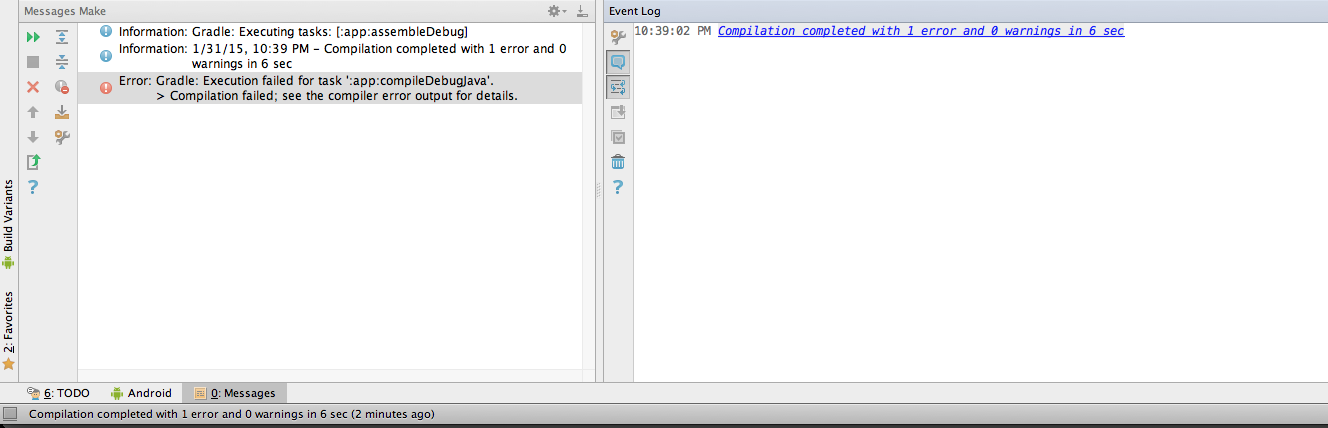
我尝试构建新的android项目,并得到以下错误:
错误:Gradle:执行失败的任务':app:compileDebugJava‘。
编译失败;有关详细信息,请参阅编译器错误输出。
我在intellij的想法中没有看到任何编译细节输出
怎样才能增加更多的细节?
这是我的gradle.build
buildscript {
    repositories {
        jcenter()
    }
    dependencies {
        classpath 'com.android.tools.build:gradle:0.14.2'
    }
}
apply plugin: 'com.android.application'

repositories {
    jcenter()
}

android {
    compileSdkVersion 19
    buildToolsVersion "19.1.0"

    defaultConfig {
        applicationId "com.example.reminders"
        minSdkVersion 14
        targetSdkVersion 19
        versionCode 1
        versionName "1.0"
    }

    compileOptions {
        sourceCompatibility JavaVersion.VERSION_1_8
        targetCompatibility JavaVersion.VERSION_1_8
    }
    buildTypes {
        release {
            runProguard false
            proguardFiles getDefaultProguardFile('proguard-android.txt'), 'proguard-rules.pro'
        }
    }
    lintOptions {
        abortOnError false
    }
}


dependencies {
    compile fileTree(dir: 'libs', include: ['*.jar'])
    compile 'com.android.support:support-v4:21.0.3'
    compile 'org.roboguice:roboguice:3.+'
    provided 'org.roboguice:roboblender:3.+'

}
你知道出了什么问题吗?
回答 1
Stack Overflow用户
发布于 2015-04-08 12:11:13
我也有同样的错误,我的解决方案是将sourceCompatibility和targetCompatibility更改为JavaVersion.VERSION_1_7,如下所示:
compileOptions {
        sourceCompatibility JavaVersion.VERSION_1_7
        targetCompatibility JavaVersion.VERSION_1_7
}此外,您可能需要按照建议的targetSdkVersion更改here。
页面原文内容由Stack Overflow提供。腾讯云小微IT领域专用引擎提供翻译支持
原文链接:
https://stackoverflow.com/questions/28256349
复制相关文章
相似问题
腾讯云开发者

Copyright © 2013 - 2026 Tencent Cloud. All Rights Reserved. 腾讯云 版权所有
深圳市腾讯计算机系统有限公司 ICP备案/许可证号:粤B2-20090059  粤公网安备44030502008569号
腾讯云计算(北京)有限责任公司 京ICP证150476号 | 京ICP备11018762号