
打标光束中的切换背景
打标光束中的切换背景
提问于 2015-01-30 11:09:46
我正试图把一个LaTeX/LyX演示文稿转换成一个比默尔标记文档。
在一些幻灯片上,我挂起背景图像(上面有资助机构的标识),以便为代码输出留出更多空间。
我以前使用以下命令执行此操作:
\bgroup
\usebackgroundtemplate{\includegraphics[width=\paperwidth]{background.png}}
\begin{frame}[plain]
Some text here!}
\end{frame}
\egroup
我试过这样的方法(不起作用):
\bgroup
\pgfdeclareimage[width=\paperwidth]{empty}{Template_blank.png}
\usebackgroundtemplate{\pgfuseimage{empty}}

## New Slide

some text
\egroup
有什么想法吗?
回答 1
Stack Overflow用户
回答已采纳
发布于 2019-10-31 13:20:46
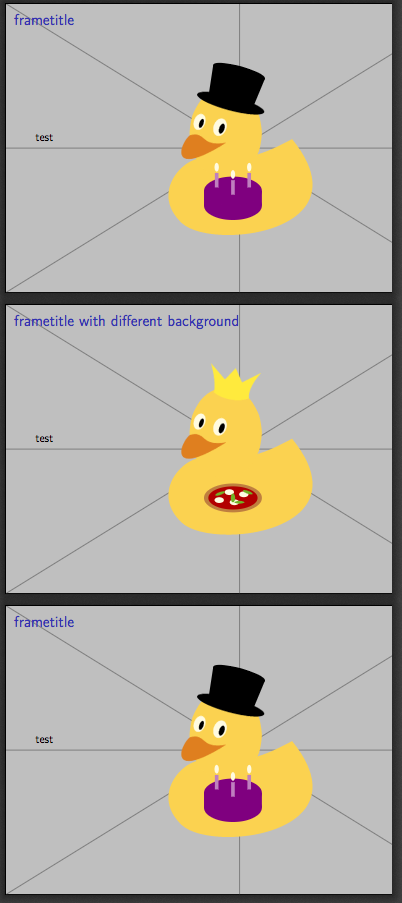
通常在不同的背景模板之间切换是小菜一碟,基于https://tex.stackexchange.com/questions/173201/beamer-template-with-different-style-options-for-frames可以简单地创建一个新的帧选项。
不幸的是,rmarkdown只是忽略用户创建的框架选项,而只传递一个预定义选项的小列表。要欺骗rmarkdown,可以重新使用通常不被光束使用的帧选项,standout帧选项(仅用于大都市主题)。
---
output:
  beamer_presentation:
    keep_tex: true
    includes:
header-includes: |
  \usepackage{etoolbox}

  \defbeamertemplate{background canvas}{mydefault}{%
    \includegraphics[width=\paperwidth,height=\paperheight]{example-image-duck}
  }
  \defbeamertemplate{background canvas}{standout}{%
    \includegraphics[width=\paperwidth,height=\paperheight,page=2]{example-image-duck}
  }

  \BeforeBeginEnvironment{frame}{%
    \setbeamertemplate{background canvas}[mydefault]%
  }

  \makeatletter
  \define@key{beamerframe}{standout}[true]{%
    \setbeamertemplate{background canvas}[standout]%
  }
  \makeatother

---

# frametitle

test

# frametitle with different background {.standout}

test

# frametitle

test
页面原文内容由Stack Overflow提供。腾讯云小微IT领域专用引擎提供翻译支持
原文链接:
https://stackoverflow.com/questions/28234605
复制相关文章
相似问题
腾讯云开发者

Copyright © 2013 - 2026 Tencent Cloud. All Rights Reserved. 腾讯云 版权所有
深圳市腾讯计算机系统有限公司 ICP备案/许可证号:粤B2-20090059  粤公网安备44030502008569号
腾讯云计算(北京)有限责任公司 京ICP证150476号 | 京ICP备11018762号