
Excel VBA输入框
Excel VBA输入框
提问于 2015-01-28 10:27:50
我有下面的excel文件输入框。我不想显示输入字符和需要显示输入框字符*,如何做到这一点?
Private Sub Workbook_Open()

Dim UserName As String

UserName = InputBox("Please Enter Your USER NAME.")

Range("O1") = UCase(UserName)


End Sub
谢谢你,Hewage
回答 5
Stack Overflow用户
回答已采纳
发布于 2015-01-28 15:05:40
使用UserForm创建一个具有Textbox的用户表单,textbox属性中的两个按钮在PasswordChar框中输入*
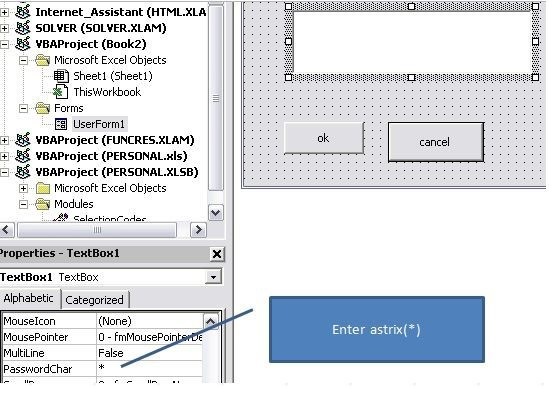
使用userForm模块中下面的代码。
Private Sub CommandButton1_Click()

If TextBox1 = "123456" Then
MsgBox "Correct"
Else
MsgBox "Incorrect"
End If
Unload Me

End Sub

Private Sub CommandButton2_Click()

'cancel button

Unload Me
End Sub

Private Sub UserForm_Initialize()

Me.Caption = "Enter Password"

End Sub
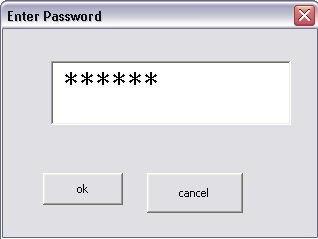
您的用户表单将如下所示
Stack Overflow用户
发布于 2020-11-13 20:22:28
感谢Bhanu Pratap提供了Daniel的动态更改内置InputBox的实现,以屏蔽密码提示中使用的字符。将此模块添加到项目并调用PasswordInputBox比添加新表单容易得多。
感谢Joseph316将代码更新为64位,所以它可以在Office365Excel(版本16)中工作!
我使用了Daniel & Joseph代码,重新命名了一些变量,并添加了一些注释,以便更容易地理解代码所做的事情。没有功能上的区别。
Option Explicit

'////////////////////////////////////////////////////////////////////
'Password masked inputbox
'Allows you to hide characters entered in a VBA Inputbox.
'
'Code written by Daniel Klann
'March 2003
'
'Code updated by Joseph for Excel 64-bit Environments
'February 2020
'PtrSafe added & Long to PtrLong conversion
'see https://social.msdn.microsoft.com/Forums/office/en-US/c414ef6d-fa9a-406c-9644-e479e7e72d0b/addressof-function-data-type-mismatch?forum=accessdev
'
' Code names and comments updated by Barbara Bazemore Kiszka for clarity
' November 2020
'////////////////////////////////////////////////////////////////////

'API functions to be used
Private Declare PtrSafe Function CallNextHookEx Lib "user32" (ByVal hHook As LongPtr, _
ByVal ncode As LongPtr, ByVal wParam As LongPtr, lParam As Any) As LongPtr

Private Declare PtrSafe Function GetModuleHandle Lib "kernel32" Alias "GetModuleHandleA" (ByVal lpModuleName As String) As LongPtr

Private Declare PtrSafe Function SetWindowsHookEx Lib "user32" Alias "SetWindowsHookExA" _
(ByVal idHook As LongPtr, ByVal lpfn As LongPtr, ByVal hmod As LongPtr, ByVal dwThreadId As LongPtr) As LongPtr

Private Declare PtrSafe Function UnhookWindowsHookEx Lib "user32" (ByVal hHook As LongPtr) As LongPtr

Private Declare PtrSafe Function SendDlgItemMessage Lib "user32" Alias "SendDlgItemMessageA" _
(ByVal hDlg As LongPtr, ByVal nIDDlgItem As LongPtr, ByVal wMsg As LongPtr, ByVal wParam As LongPtr, ByVal lParam As LongPtr) As LongPtr

Private Declare PtrSafe Function GetClassName Lib "user32" Alias "GetClassNameA" (ByVal hwnd As LongPtr, _
ByVal lpClassName As String, ByVal nMaxCount As LongPtr) As LongPtr

Private Declare PtrSafe Function GetCurrentThreadId Lib "kernel32" () As LongPtr

' Constants to be used in our API functions
Private Const EM_SETPASSWORDCHAR = &HCC
Private Const WH_CBT = 5
Private Const HCBT_ACTIVATE = 5
Private Const HC_ACTION = 0

Private hMaskedInputHook As LongPtr

' This is a helper function. You probably don't want to call this directly.
Public Function AddMaskToInputBox(ByVal lngCode As LongPtr, ByVal wParam As LongPtr, ByVal lParam As LongPtr) As LongPtr
    Dim RetVal
    Dim strClassName As String, lngBuffer As LongPtr

    ' If we are not active, skip this step
    If lngCode < HC_ACTION Then
        AddMaskToInputBox = CallNextHookEx(hMaskedInputHook, lngCode, wParam, lParam)
        Exit Function
    End If

    ' Initialize the string where we are going to check for the InputBox class
    strClassName = String$(256, " ")
    lngBuffer = 255

    If lngCode = HCBT_ACTIVATE Then        'A window has been activated
        RetVal = GetClassName(wParam, strClassName, lngBuffer)

        ' Check to see if this is the InputBox window
        If Left$(strClassName, RetVal) = "#32770" Then
            ' This changes the edit control so that it displays the password character *.
            ' You can change the Asc("*") as you please.
            SendDlgItemMessage wParam, &H1324, EM_SETPASSWORDCHAR, Asc("•"), &H0
        End If
    End If

    'This line will ensure that any other hooks that may be in place are
    'called correctly.
    CallNextHookEx hMaskedInputHook, lngCode, wParam, lParam
End Function

' Call this function to display Password prompt dialog
Public Function PasswordInputBox(Prompt, Title) As String
    Dim lngModHwnd  As LongPtr, lngThreadID As LongPtr

    ' Set up a Windows hook so the the masked chars are set up the next time we display an InputBox
    lngThreadID = GetCurrentThreadId
    lngModHwnd = GetModuleHandle(vbNullString)

    hMaskedInputHook = SetWindowsHookEx(WH_CBT, AddressOf AddMaskToInputBox, lngModHwnd, lngThreadID)

    ' Prompt the user for the password, masking the input characters
    PasswordInputBox = InputBox(Prompt, Title)

    ' Go back to normal InputBox behavior
    UnhookWindowsHookEx hMaskedInputHook
End FunctionStack Overflow用户
发布于 2018-06-14 06:22:34
可以在vba中屏蔽InputBox文本。
    Option Explicit

'////////////////////////////////////////////////////////////////////
'Password masked inputbox
'Allows you to hide characters entered in a VBA Inputbox.
'
'Code written by Daniel Klann
'March 2003
'////////////////////////////////////////////////////////////////////


'API functions to be used
Private Declare Function CallNextHookEx Lib "user32" (ByVal hHook As Long, _
    ByVal ncode As Long, ByVal wParam As Long, lParam As Any) As Long

Private Declare Function GetModuleHandle Lib "kernel32" Alias "GetModuleHandleA" (ByVal lpModuleName As String) As Long

Private Declare Function SetWindowsHookEx Lib "user32" Alias "SetWindowsHookExA" _
    (ByVal idHook As Long, ByVal lpfn As Long, ByVal hmod As Long, ByVal dwThreadId As Long) As Long

Private Declare Function UnhookWindowsHookEx Lib "user32" (ByVal hHook As Long) As Long

Private Declare Function SendDlgItemMessage Lib "user32" Alias "SendDlgItemMessageA" _
(ByVal hDlg As Long, ByVal nIDDlgItem As Long, ByVal wMsg As Long, ByVal wParam As Long, ByVal lParam As Long) As Long

Private Declare Function GetClassName Lib "user32" Alias "GetClassNameA" (ByVal hwnd As Long, _
ByVal lpClassName As String, ByVal nMaxCount As Long) As Long

Private Declare Function GetCurrentThreadId Lib "kernel32" () As Long

'Constants to be used in our API functions
Private Const EM_SETPASSWORDCHAR = &HCC
Private Const WH_CBT = 5
Private Const HCBT_ACTIVATE = 5
Private Const HC_ACTION = 0


Private hHook As Long


Public Function NewProc(ByVal lngCode As Long, ByVal wParam As Long, ByVal lParam As Long) As Long
    Dim RetVal
    Dim strClassName As String, lngBuffer As Long

    If lngCode < HC_ACTION Then
        NewProc = CallNextHookEx(hHook, lngCode, wParam, lParam)
        Exit Function
    End If

    strClassName = String$(256, " ")
    lngBuffer = 255

    If lngCode = HCBT_ACTIVATE Then    'A window has been activated

        RetVal = GetClassName(wParam, strClassName, lngBuffer)

        If Left$(strClassName, RetVal) = "#32770" Then  'Class name of the Inputbox

            'This changes the edit control so that it display the password character *.
            'You can change the Asc("*") as you please.
            SendDlgItemMessage wParam, &H1324, EM_SETPASSWORDCHAR, Asc("*"), &H0
        End If

    End If

    'This line will ensure that any other hooks that may be in place are
    'called correctly.
    CallNextHookEx hHook, lngCode, wParam, lParam

End Function

Function InputBoxDK(Prompt, Title) As String
    Dim lngModHwnd As Long, lngThreadID As Long

    lngThreadID = GetCurrentThreadId
    lngModHwnd = GetModuleHandle(vbNullString)

    hHook = SetWindowsHookEx(WH_CBT, AddressOf NewProc, lngModHwnd, lngThreadID)

    InputBoxDK = InputBox(Prompt, Title)
    UnhookWindowsHookEx hHook

End Function页面原文内容由Stack Overflow提供。腾讯云小微IT领域专用引擎提供翻译支持
原文链接:
https://stackoverflow.com/questions/28189864
复制相关文章
相似问题
腾讯云开发者

Copyright © 2013 - 2026 Tencent Cloud. All Rights Reserved. 腾讯云 版权所有
深圳市腾讯计算机系统有限公司 ICP备案/许可证号:粤B2-20090059  粤公网安备44030502008569号
腾讯云计算(北京)有限责任公司 京ICP证150476号 | 京ICP备11018762号