
如何使用多个HorizontalListView填充布局
我有一个水平的列表。效果很好。我的ArrayList eList将显示屏幕上有一个ListView。太好了。我的问题是,eList有多个行,这意味着eList可能是飞机、汽车和船只,也可能是无限数量的对象。目前,这个水平ListView将只显示数据库中的所有类型的飞机或汽车或船只。如何根据对象类型(飞机、汽车、船只、玉米饼、人员)垂直显示多个或无限数量的hListViews。
在活动中
HorizontalListView hListView = (HorizontalListView) findViewById(R.id.hlistview1);
    hListView.setAdapter(new ItemAdapter());
    ArrayList<HashMap<String, String>> eList = controller.getAllts();
    ListAdapter adapter = new SimpleAdapter(Su.this,eList,R.layout.view_m_ts, images, ins);
hListView.setAdapter(adapter);
在数据库中
public ArrayList<HashMap<String, String>> getAllts() {
    ArrayList<HashMap<String, String>> List3;
    List3 = new ArrayList<HashMap<String, String>>();
    String selectQuery3 = "SELECT DISTINCT * FROM INV where p2 IS NOT NULL ORDER BY p2 COLLATE NOCASE ASC";
    SQLiteDatabase database = this.getWritableDatabase();
    Cursor cursor3 = database.rawQuery(selectQuery3, null);
    HashMap<String, String> map = new HashMap<String, String>();
    if (cursor3.moveToFirst()) {
        do {

            map.put("iImageL", cursor3.getString(13));
            map.put("p2", cursor3.getString(2));
            map.put("se2", cursor3.getString(10));
            map.put("te", cursor3.getString(17));
            List3.add(map);
        } while (cursor3.moveToNext());
    }
    close();
    return List3;
}
在XML中
 <LinearLayout
    android:id="@+id/LinearViewa"
    android:layout_width="fill_parent"
    android:layout_height="wrap_content"
    android:layout_weight=".1"
    android:orientation="vertical" >

   <com.devsmart.android.ui.HorizontalListView
       android:id="@+id/hlistview1"
       android:layout_width="fill_parent"
       android:layout_height="10dp"
       android:layout_weight=".1"
       android:background="#000000" />

</LinearLayout>
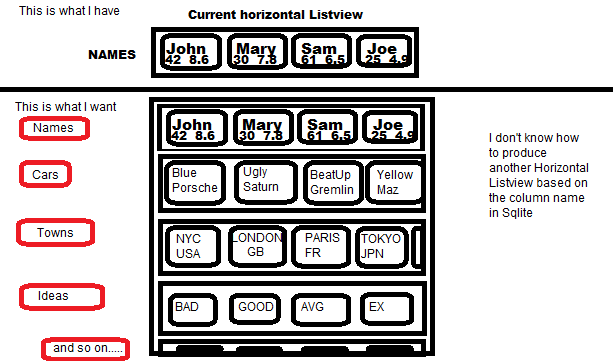
回答 1
Stack Overflow用户
发布于 2015-01-30 12:36:20
我将假设所有不同类型的对象都在一个SQLite表中,其中一个列中的类型存储为字符串,并且每个类型没有不同的表。
更改您的getAllts()函数以返回HashMap of ArrayLists of HashMaps,而不是ArrayList of HashMaps,这样您就可以创建多个HorizontalListViews,为HashMaps的每个ArrayList创建一个HorizontalListViews,为特定类型创建每个HorizontalListViews。当您迭代游标中返回的行时,获取类型并检查大HashMap中是否已经存在它的HashMap,如果没有,则创建一个,如果是,则添加到现有的:
public HashMap<String, ArrayList<HashMap<String, String>>> getAllts() {
    HashMap<String, ArrayList<HashMap<String, String>>> hashMap = new HashMap<String, ArrayList<HashMap<String, String>>>();

    String selectQuery3 = "SELECT DISTINCT * FROM INV where p2 IS NOT NULL ORDER BY p2 COLLATE NOCASE ASC";
    SQLiteDatabase database = this.getWritableDatabase();
    Cursor cursor3 = database.rawQuery(selectQuery3, null);

    int typeColumnIndex = 18; // <- You need to set the correct column here, possibly using cursor3.getColumnIndexOrThrow()

    if (cursor3.moveToFirst()) {
        do {
            // create this HashMap inside the loop because we need a new one each time:
            HashMap<String, String> map = new HashMap<String, String>();
            ArrayList<HashMap<String, String>> List3;

            // get the type of this entry as a string
            String typename = cursor3.getString(typeColumnIndex);
            // check if there already is an ArrayList for this type:
            if(hashMap.containsKey(typename))
            {
                // get existing ArrayList for this type:
                List3 = hashMap.get(typename);
            }
            else
            {
                // create new ArrayList for this type:
                List3 = new ArrayList<HashMap<String, String>>();
                hashMap.put(typename, List3);
            }
            map.put("iImageL", cursor3.getString(13));
            map.put("p2", cursor3.getString(2));
            map.put("se2", cursor3.getString(10));
            map.put("te", cursor3.getString(17));
            List3.add(map);
        } while (cursor3.moveToNext());
    }
    close();
    return hashMap;
}
更改XML,以便在活动XML中有一个空的LinearLayout:
<LinearLayout
    android:id="@+id/LinearViewa"
    android:layout_width="fill_parent"
    android:layout_height="wrap_content"
    android:layout_weight=".1"
    android:orientation="vertical" >

</LinearLayout>
并为水平列表视图创建一个单独的XML,您可以多次创建该视图并动态地在horiz_listview.xml或类似的内容中添加到您的horiz_listview.xml中。您可以使用类型名称设置您自己的自定义布局,如TextView头等:
<LinearLayout
    android:layout_width="fill_parent"
    android:layout_height="wrap_content">

<!-- Add type name here if you like-->

    <com.devsmart.android.ui.HorizontalListView
        android:id="@+id/hlistview1"
        android:layout_width="fill_parent"
        android:layout_height="wrap_content"
        android:background="#000000" />

</LinearLayout>
然后,在您的活动中,获取包含所有ArrayLists的大量散列映射,并遍历它,为每个HorizontalListView创建一个HorizontalListView,并将其添加到LinearLayout中:
LinearLayout layout = (LinearLayout)findViewById(R.id.LinearViewa);
HashMap<String, ArrayList<HashMap<String, String>>> eHash = controller.getAllts();
LayoutInflater inflater = getLayoutInflater();
for(Map.Entry<String, ArrayList<HashMap<String, String>>> entry : eHash.entrySet())
{
    // get the type name and ArrayList of Hashmaps for this type:
    String typename = entry.getKey();
    ArrayList<HashMap<String, String>> eList = entry.getValue();

    // inflate a horizonal list view and add it to the layout:
    View view = inflater.inflate(R.layout.horiz_listview, null, false);
    layout.addView(view);

    // set up the horizontal list view like before:
    HorizontalListView hListView = (HorizontalListView) view.findViewById(R.id.hlistview1);
    ListAdapter adapter = new SimpleAdapter(Su.this,eList,R.layout.view_m_ts, images, ins);
    hListView.setAdapter(adapter);
}如果您有更多的HorizontalListViews无法在屏幕上安装,那么您可能需要将您的主LinearLayout封装在一个ScrollView中,但是请注意,您可能会遇到麻烦,请参阅this question。
https://stackoverflow.com/questions/28160969
复制相似问题
腾讯云开发者

Copyright © 2013 - 2026 Tencent Cloud. All Rights Reserved. 腾讯云 版权所有
深圳市腾讯计算机系统有限公司 ICP备案/许可证号:粤B2-20090059  粤公网安备44030502008569号
腾讯云计算(北京)有限责任公司 京ICP证150476号 | 京ICP备11018762号