
动态内容单页应用SEO
我是新的SEO,只是想得到的想法,它如何为单一页面应用程序的动态内容。
在我的例子中,我有一个页面应用程序(由AngularJS驱动,使用路由器显示不同的状态),它提供了一些基于位置的搜索功能,类似于齐洛、红鳍或叶利普。在mt站点上,用户可以输入一个位置名称,并且该站点将返回一些基于位置的结果。
我正试图找到一种方法,使它与谷歌良好的工作。例如,如果我在谷歌( Google )中输入“公寓”,结果将是:
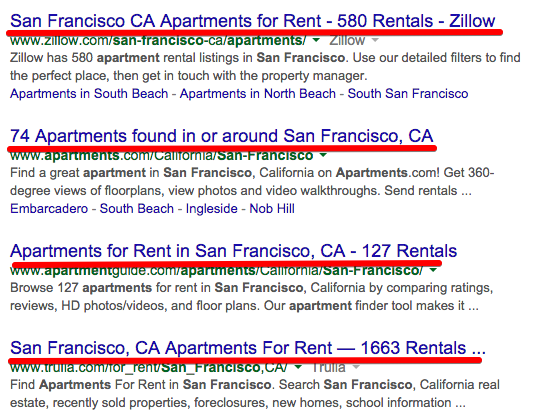
当用户点击这些链接时,网站将显示正确的结果。我正在考虑有类似的SEO为我的网站这样。
问题是,页面内容完全取决于用户的查询。用户可以按城市名称、州名、邮政编码等进行搜索,以显示不同的结果,而且不可能将它们全部放到站点地图中。谷歌如何为这种动态页面结果抓取内容?
我没有SEO的经验,也不知道如何做我的网站。请分享一些经验或建议,以帮助我开始。非常感谢!
===========
跟进问题:
我看到Googlebot可以现在运行Javascript。我想更多地了解这一点。
当打开我的SPA应用程序的特定url时,它会执行几秒钟的网络查询(XHR请求),然后显示页面内容。在这种情况下,GoogleBot会等待http响应吗?
我看到一些教程说我们需要专门为搜索引擎准备静态html。如果我只想和Google打交道,这是否意味着我不必再为静态html服务了,因为Google可以运行Javascript?
再次感谢。
回答 1
Stack Overflow用户
发布于 2015-01-18 14:08:14
如果搜索引擎遇到您的JavaScript应用程序,那么我们可以将搜索引擎重定向到另一个为页面提供完整呈现版本的URL。
这份工作的
- 您可以使用Thomas Davis在github上提供的工具。
或
- 您可以使用下面的代码来完成与上面相同的工作,这些代码也是可用的这里
使用Phantom.js实现
我们可以设置一个node.js服务器,给出一个URL,它将完全呈现页面内容。然后,我们将将机器人重定向到此服务器,以检索正确的内容。
我们需要在一个盒子上安装node.js和phantom.js。然后启动下面的服务器。有两个文件,一个是web服务器,另一个是呈现页面的幻影脚本。
// web.js

// Express is our web server that can handle request
var express = require('express');
var app = express();
var getContent = function(url, callback) {
  var content = '';
  // Here we spawn a phantom.js process, the first element of the
  // array is our phantomjs script and the second element is our url
  var phantom = require('child_process').spawn('phantomjs',['phantom-server.js', url]);
  phantom.stdout.setEncoding('utf8');
  // Our phantom.js script is simply logging the output and
  // we access it here through stdout
  phantom.stdout.on('data', function(data) {
    content += data.toString();
  });
  phantom.on('exit', function(code) {
    if (code !== 0) {
      console.log('We have an error');
    } else {
      // once our phantom.js script exits, let's call out call back
      // which outputs the contents to the page
      callback(content);
    }
  });
};

var respond = function (req, res) {
  // Because we use [P] in htaccess we have access to this header
  url = 'http://' + req.headers['x-forwarded-host'] + req.params[0];
  getContent(url, function (content) {
    res.send(content);
  });
}
app.get(/(.*)/, respond);
app.listen(3000);
下面的脚本是幻影-server.js,将负责内容的完全呈现。在页面完全呈现之前,我们不会返回内容。我们连接到资源侦听器来完成这个任务。
var page = require('webpage').create();
var system = require('system');

var lastReceived = new Date().getTime();
var requestCount = 0;
var responseCount = 0;
var requestIds = [];
var startTime = new Date().getTime();

page.onResourceReceived = function (response) {
    if(requestIds.indexOf(response.id) !== -1) {
        lastReceived = new Date().getTime();
        responseCount++;
        requestIds[requestIds.indexOf(response.id)] = null;
    }
};
page.onResourceRequested = function (request) {
    if(requestIds.indexOf(request.id) === -1) {
        requestIds.push(request.id);
        requestCount++;
    }
};

// Open the page
page.open(system.args[1], function () {});
var checkComplete = function () {
  // We don't allow it to take longer than 5 seconds but
  // don't return until all requests are finished
  if((new Date().getTime() - lastReceived > 300 && requestCount === responseCount) || new Date().getTime() - startTime > 5000)  {
    clearInterval(checkCompleteInterval);
    console.log(page.content);
    phantom.exit();
  }
}
// Let us check to see if the page is finished rendering
var checkCompleteInterval = setInterval(checkComplete, 1);
一旦启动并运行了该服务器,我们只需将机器人重定向到客户端web服务器配置中的服务器。
重定向机器人,如果您正在使用apache,我们可以编辑出.htaccess,以便将Google请求代理到我们的中间人phantom.js服务器。
RewriteEngine on
RewriteCond %{QUERY_STRING} ^_escaped_fragment_=(.*)$
RewriteRule (.*) http://webserver:3000/%1? [P]我们还可以包括其他RewriteCond,例如用户代理,以重定向希望索引的其他搜索引擎。
不过,谷歌不会使用_escaped_fragment_,除非我们通过在链接中包含一个元标记、<meta name="fragment" content="!">或使用#! URL来告诉它。
你很可能必须两者兼用。
这已经用谷歌网站管理员的抓取工具进行了测试。在使用fetch工具时,一定要在URL中包含#!。
https://stackoverflow.com/questions/27960155
复制相似问题
腾讯云开发者

Copyright © 2013 - 2026 Tencent Cloud. All Rights Reserved. 腾讯云 版权所有
深圳市腾讯计算机系统有限公司 ICP备案/许可证号:粤B2-20090059  粤公网安备44030502008569号
腾讯云计算(北京)有限责任公司 京ICP证150476号 | 京ICP备11018762号