
用CAShapeLayer旋转CAShapeLayer弧的中心
用CAShapeLayer旋转CAShapeLayer弧的中心
提问于 2015-01-13 03:14:59
我有一个用CAShapeLayer画的弧线,我想让它绕着圆心旋转。我试图使用‘CABasicAnimation’属性上的一个transform.rotation来获得这个动画。但是旋转似乎发生在一个与圆的中心不一样的点上。
-(void)drawRect:(CGRect)rect{
 int radius = 100;
 CAShapeLayer *circle = [CAShapeLayer layer];
 circle.path = [UIBezierPath bezierPathWithRoundedRect:CGRectMake(0, 0, 2.0*radius, 2.0*radius) cornerRadius:radius].CGPath;
 circle.fillColor = [UIColor orangeColor].CGColor;
 circle.strokeColor = [UIColor blueColor].CGColor;
 circle.lineWidth = 5;
 circle.strokeStart = 0.0f;
 circle.strokeEnd = 0.1f;
 [self.layer addSublayer:circle];

 CABasicAnimation *spinAnimation = [CABasicAnimation animationWithKeyPath:@"transform.rotation"];
 spinAnimation.byValue = [NSNumber numberWithFloat:2.0f*M_PI];
 spinAnimation.duration = 4;
 spinAnimation.repeatCount = INFINITY;
 [circle addAnimation:spinAnimation forKey:@"indeterminateAnimation"];
}
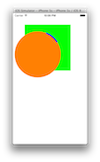
我知道这是个老问题,但有什么出路呢?我已经通过设置图层的边界或锚点进行了大量的修补,但它还没有围绕中心旋转。
circle.bounds = self.frame;下面是如何将视图添加到视图控制器中。
[self.view addSubview:[[ProgressIndicator alloc] initWithFrame:CGRectMake(50, 50, 200, 200)]];回答 2
Stack Overflow用户
回答已采纳
发布于 2015-02-19 20:27:18
这就是我最终所做的。错误是将动画添加到子层而不是图层。当旋转只需要围绕圆心旋转时,就没有必要在这里修补anchorPoint或位置。
- (id)initWithFrame:(CGRect)frame {
    self = [super initWithFrame:frame];
    if (self) {
       self.backgroundColor = [UIColor clearColor];

       int radius = 50;
       CAShapeLayer *circle = [CAShapeLayer layer];
       circle.path = [UIBezierPath bezierPathWithRoundedRect:CGRectMake(0, 0, 2.0*radius, 2.0*radius) cornerRadius:radius].CGPath;
       circle.fillColor = [UIColor clearColor].CGColor;
       circle.strokeColor = [UIColor blueColor].CGColor;
       circle.lineWidth = 5;
       circle.strokeStart = 0.0f;
       circle.strokeEnd = 0.1f;

       [self.layer addSublayer:circle];
    }

   return self; }

- (void)drawRect:(CGRect)rect {

    CABasicAnimation *spinAnimation = [CABasicAnimation animationWithKeyPath:@"transform.rotation"];
    spinAnimation.byValue = [NSNumber numberWithFloat:2.0f*M_PI];
    spinAnimation.duration = 4;
    spinAnimation.repeatCount = INFINITY;

[self.layer addAnimation:spinAnimation forKey:@"indeterminateAnimation"]; }Stack Overflow用户
发布于 2017-04-01 15:36:17
想这样做更好)
CGFloat center = CGRectGetWidth(frame) / 2;
CGFloat lineWidth = 5;
CGFloat radius = center - lineWidth / 2;
CGRect bounds = frame;
bounds.origin = CGPointZero;

CAShapeLayer *spinLayer = [CAShapeLayer layer];
spinLayer.path = [UIBezierPath bezierPathWithArcCenter:CGPointMake(center, center) radius:radius startAngle:0 endAngle:0.2 clockwise:YES].CGPath;
spinLayer.fillColor = [UIColor clearColor].CGColor;
spinLayer.strokeColor = [UIColor blueColor].CGColor;
spinLayer.lineWidth = 5;
spinLayer.lineCap = kCALineCapRound;
spinLayer.bounds = bounds;
spinLayer.position = CGPointMake(center, center);
[self.layer insertSublayer:spinLayer above:nil];
和动画:
CABasicAnimation *animation = [CABasicAnimation animationWithKeyPath:@"transform.rotation"];
animation.byValue = [NSNumber numberWithFloat:2.f * M_PI];
animation.duration = 1.5f;
animation.repeatCount = INFINITY;
[spinLayer addAnimation:animation forKey:@"lineRotation"];
[self setNeedsLayout];
Swift 3
        var bounds = frame
        bounds.origin = CGPoint.zero
        let center: CGFloat = frame.size.width
        let lineWidth: CGFloat = 5
        let radius = center - lineWidth / 2

        let spinLayer = CAShapeLayer()
        spinLayer.path = UIBezierPath(arcCenter: CGPoint(x: center, y: center),
                                 radius: radius,
                                 startAngle: 0,
                                 endAngle: 0.2,
                                 clockwise: true).cgPath

        spinLayer.strokeColor = UIColor.blue.cgColor
        spinLayer.fillColor = UIColor.clear.cgColor
        spinLayer.lineWidth = lineWidth
        spinLayer.lineCap = kCALineCapRound
        spinLayer.bounds = bounds
        spinLayer.position = CGPoint(x: center, y: center)

        view.layer.insertSublayer(spinLayer, above: nil)

        let rotation = CABasicAnimation(keyPath: "transform.rotation")
        rotation.byValue = NSNumber(value: 2*M_PI as Double)
        rotation.duration = 1
        rotation.repeatCount = Float.infinity

spinLayer.add(rotation, forKey: "lineRotation")页面原文内容由Stack Overflow提供。腾讯云小微IT领域专用引擎提供翻译支持
原文链接:
https://stackoverflow.com/questions/27914358
复制相关文章
相似问题
腾讯云开发者

Copyright © 2013 - 2026 Tencent Cloud. All Rights Reserved. 腾讯云 版权所有
深圳市腾讯计算机系统有限公司 ICP备案/许可证号:粤B2-20090059  粤公网安备44030502008569号
腾讯云计算(北京)有限责任公司 京ICP证150476号 | 京ICP备11018762号