
如何防止uimenu (MATLAB)在检查时消失
我已经将uicontextmenu添加到行对象中。uicontextmenu包括3个复选框。每当我检查它们中的任何一个,uicontextmenu就会消失。我希望uicontextmenu在一段时间内是可见的,这样我就可以检查多个框并查看更改(与按钮组相同,但在uicontextmenu中)。这种方法或其他方法有什么解决办法吗?
cmenu=uicontextmenu;
set(he,'uicontextmenu',cmenu);
item1=uimenu(cmenu,'label','Data A','checked','off','callback',@func_a);
item2=uimenu(cmenu,'label','Data B','checked','off','callback',@func_b);
item3=uimenu(cmenu,'label','Data C','checked','off','callback',@func_c);基本上,he是由plot(x,y)创建的行对象,func_a, func_b, func_c是将属性'checked'转换为on|off的函数。
回答 2
Stack Overflow用户
发布于 2015-01-13 11:05:04
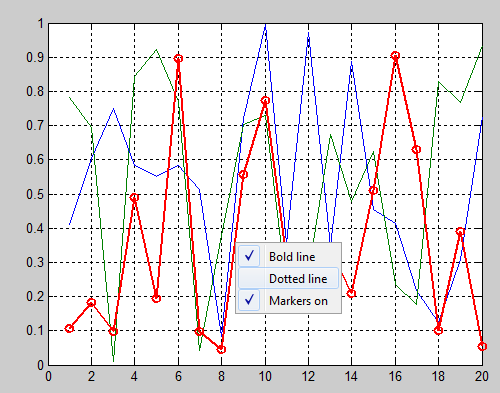
这个例子很受Benoit_11解决方案的启发,但也有一点改进。我还觉得回调中的3个不同函数在做不同的事情,所以我让3个不同的菜单改变了行的不同属性(而不是用不同的值更改相同的属性)。
我在一个嵌套函数中进行了uimenu回调。它根据uimenu定义中提供的参数what2do来决定该做什么(但是可以自由地保留3个单独的函数)。但是,请注意,对于所有uimenu来说,切换复选标记的函数都是相同的(您不需要为每个uimenu设置单独的函数)。
function hf = TestUiContext2

%// Extension of Benoit_11 solution
clear ; clc ; close all

hf = figure ;               %// return the handle of the figure
hax = axes;                 %// Create axes and save handle
plot(rand(20,3));           %// Plot three lines
hcmenu = uicontextmenu;     %// Define a context menu; it is not attached to anything

%// Define the context menu items and install their callbacks
item1 = uimenu(hcmenu, 'Label','Bold line'   , 'Callback' , {@uiCallback,'bold'} );
item2 = uimenu(hcmenu, 'Label','Dotted line' , 'Callback' , {@uiCallback,'dots'} );
item3 = uimenu(hcmenu, 'Label','Markers on'  , 'Callback' , {@uiCallback,'mark'} );

hlines = findall(hax,'Type','line');        %// Locate line objects
for line = 1:length(hlines)                 %// Attach the context menu to each line
    set(hlines(line),'uicontextmenu',hcmenu)
end

    function uiCallback(obj,~,what2do)
        hline = gco ;
        switch what2do
            case 'bold'
                toggle_bold_line(hline)
            case 'dots'
                toggle_dotted_line(hline)
            case 'mark'
                toggle_markers(hline)
        end
        %// reposition the context menu and make it visible
        set(hcmenu,'Position',get(gcf,'CurrentPoint'),'Visible','on')
        toggle_checkmark(obj)               %// toggle the checkmark
    end

    function toggle_checkmark(obj)
        if strcmp(get(obj,'Checked'),'on')
            set(obj,'Checked','off')
        else
            set(obj,'Checked','on')
        end
    end
    function toggle_bold_line(hline)
        if get(hline,'LineWidth')==0.5
            set(hline,'LineWidth',2)
        else
            set(hline,'LineWidth',0.5)
        end
    end
    function toggle_dotted_line(hline)
        if strcmpi(get(hline,'LineStyle'),':')
            set(hline,'LineStyle','-')
        else
            set(hline,'LineStyle',':')
        end
    end
    function toggle_markers(hline)
        if strcmpi(get(hline,'Marker'),'none')
            set(hline,'Marker','o')
        else
            set(hline,'Marker','none')
        end
    end

end
现在你可以享受一次勾选所有菜单的乐趣;)
Stack Overflow用户
发布于 2015-01-13 01:54:54
这里有一个解决办法,可能对你有好处。虽然不太雅致,但似乎很管用。
诀窍是在每个回调(即Visible、@funct_b和@funct_c)中,将菜单‘@func_a’属性设置为'on‘。当我运行下面的示例时(基于Mathworks网站上的演示),当选择被更改时,菜单不会消失。注意,我为每个回调创建了不同的函数。
以下是代码:
function TestUiContext( ~)

%// Based on example from The Mathworks
%// http://www.mathworks.com/help/matlab/ref/uicontextmenu.html
clear
clc
close all

%// Create axes and save handle
hax = axes;
%// Plot three lines
plot(rand(20,3));

%// Define a context menu.
hcmenu = uicontextmenu;

%// Define the context menu items and install their callbacks
item1 = uimenu(hcmenu,'Label','dashed','Callback',@(s,e) hcb1);
item2 = uimenu(hcmenu,'Label','dotted','Callback',@(s,e) hcb2);
item3 = uimenu(hcmenu,'Label','solid','Callback',@(s,e) hcb3);
%// Locate line objects
hlines = findall(hax,'Type','line');
%// Attach the context menu to each line
for line = 1:length(hlines)
    set(hlines(line),'uicontextmenu',hcmenu)
end

%// In the callback of every item/option, set the menu property 'Visible' to 'on'.
    function hcb1

        set(gco,'LineStyle','--');
        set(hcmenu,'Visible','on')
    end

    function hcb2

        set(gco,'LineStyle',':');
        set(hcmenu,'Visible','on')
    end

    function hcb3
        set(gco,'LineStyle','-');
        set(hcmenu,'Visible','on')
    end
end
还有两个截图来展示它是什么样子的:
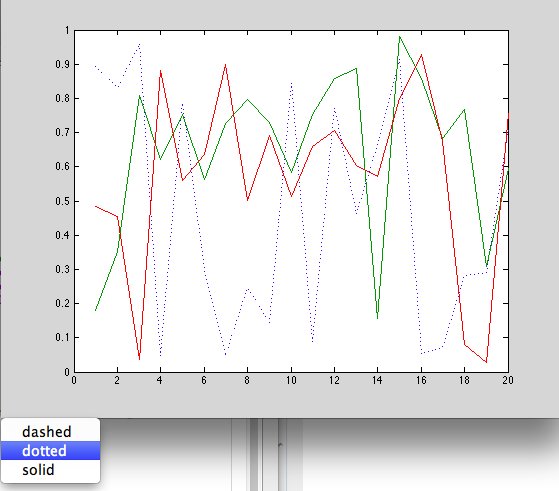
并将光标向下移动:
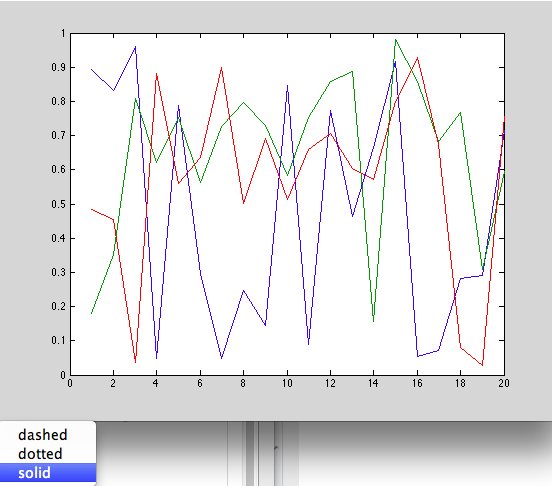
所以就像我说的,并不完美,但希望它能为你做好这份工作!
https://stackoverflow.com/questions/27909271
复制相似问题
腾讯云开发者

Copyright © 2013 - 2026 Tencent Cloud. All Rights Reserved. 腾讯云 版权所有
深圳市腾讯计算机系统有限公司 ICP备案/许可证号:粤B2-20090059  粤公网安备44030502008569号
腾讯云计算(北京)有限责任公司 京ICP证150476号 | 京ICP备11018762号