
如何处理UITabBarController的子视图时interactivePopGesture (如剪贴板)
如何处理UITabBarController的子视图时interactivePopGesture (如剪贴板)
提问于 2015-01-09 20:27:41
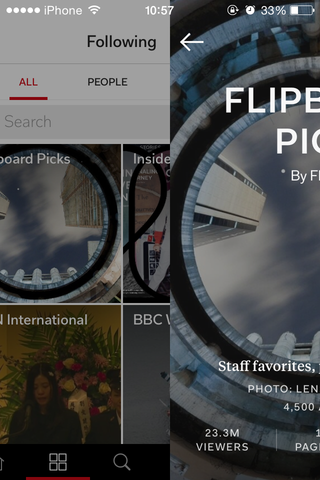
我想要一个下划线来表示选择了哪一项。每当点击该项目时,它将滑到任何其他项目。因此,我向自定义UITabBarController添加了一个子视图并设置了动画。然后,在按下时,我使用hidesBottomBarWhenPushed隐藏选项卡栏。然而,下划线似乎并没有结合自定义UITabBarController。
如何处理子视图,使其始终在顶部,即使使用后退姿态?这个剪贴板应用程序捕获是我想要做的。
编辑:
CustomTabBarController.m
- (void)viewDidLoad
{
    [super viewDidLoad];

    // create underline view
    CGRect tabBarFrame = self.tabBar.frame;
    CGFloat itemWidth = (CGFloat)CGRectGetWidth(tabBarFrame) / MIN(5, self.tabBar.items.count);
    CGFloat originX = (CGFloat)itemWidth * self.selectedIndex;
    CGRect underlineFrame = CGRectMake(originX, CGRectGetMaxY(tabBarFrame) - 3.0f, itemWidth, 3.0f);

    self.underlineView = [[UIView alloc] initWithFrame:underlineFrame];
    self.underlineView.backgroundColor = [UIColor redColor];
    [self.view addSubview:self.underlineView];
}

#pragma mark - UITabBarDelegate

- (void)tabBar:(UITabBar *)tabBar didSelectItem:(UITabBarItem *)item
{
    NSUInteger itemIndex = [tabBar.items indexOfObject:item];
    CGRect underlineFrame = self.underlineView.frame;
    CGFloat originX = (CGFloat)CGRectGetWidth(self.underlineView.frame) * itemIndex;

    // underline shifting animation
    [UIView animateWithDuration:0.25
                     animations:^{
                         self.underlineView.frame = CGRectMake(originX, underlineFrame.origin.y, CGRectGetWidth(underlineFrame), CGRectGetHeight(underlineFrame));
                     }];
}

CustomTableViewController.m
- (void)prepareForSegue:(UIStoryboardSegue *)segue sender:(id)sender
{
    UIViewController *detailViewController = segue.destinationViewController;
    detailViewController.hidesBottomBarWhenPushed = YES;
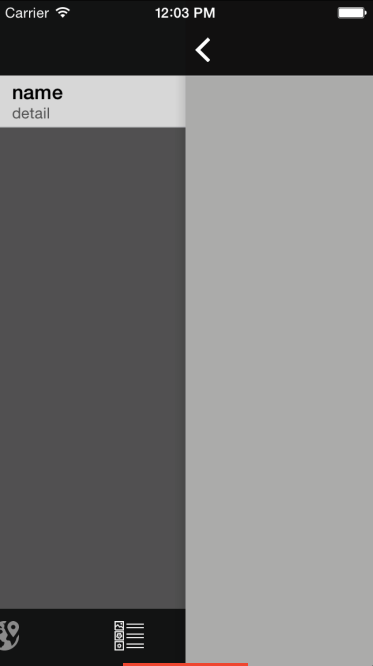
}hidesBottomBarWhenPushed隐藏制表符栏,但隐藏子视图(下划线视图)。如果我自己隐藏它并在viewWillAppear中显示它,则“下划线”视图看起来不像选项卡栏的顶部。
回答 1
Stack Overflow用户
回答已采纳
发布于 2015-05-04 15:36:51
我终于找到了解决办法。若要重写方法hidesBottomBarWhenPushed,则可以为选项卡条的子视图添加另一个视图。
sourceViewController.m

- (BOOL)hidesBottomBarWhenPushed
{
    [super hidesBottomBarWhenPushed];

    CustomTabBarController *tabBarController = (CustomTabBarController *)self.tabBarController;

    if (tabBarController.underlineView.isHidden) {

        CGRect tabBarBounds = tabBarController.tabBar.bounds;
        CGFloat underlineHeight = CGRectGetHeight(tabBarController.underlineView.frame);
        CGFloat itemWidth = (CGFloat)CGRectGetWidth(tabBarBounds) / MIN(5, tabBarController.tabBar.items.count);
        CGFloat originX = (CGFloat)itemWidth * tabBarController.selectedIndex;

        UIView *alternativeView = [[UIView alloc] initWithFrame:CGRectMake(originX,
                                                                CGRectGetMaxY(tabBarBounds) - underlineHeight,
                                                                itemWidth,
                                                                underlineHeight)];
        alternativeView.tag = tabBarController.underlineViewTag;
        alternativeView.backgroundColor = tabBarController.underlineView.backgroundColor;
        [tabBarController.tabBar addSubview:alternativeView];
    }

    return NO;
}

- (void)viewDidAppear:(BOOL)animated
{
    [super viewDidAppear:animated];

    CustomTabBarController *tabBarController = (CustomTabBarController *)self.tabBarController;

    if (tabBarController.underlineView.isHidden) {
        tabBarController.underlineView.hidden = NO;

        NSInteger underlineViewTag = tabBarController.underlineViewTag;
        UIView *alternativeView = [tabBarController.tabBar viewWithTag:underlineViewTag];
        [alternativeView removeFromSuperview];
    }
}不要忘记interactivePopGesture未能打开视图控制器的情况,替代视图仍然被添加到选项卡栏中。因此,如果需要的话,在目标视图控制器上删除它。
destinationViewController.m

- (void)viewDidAppear:(BOOL)animated
{
    [super viewDidAppear:animated];

    CustomTabBarController *tabBarController = (CustomTabBarController *)self.tabBarController;
    NSInteger underlineViewTag = tabBarController.underlineViewTag;
    UIView *alternativeView = [tabBarController.tabBar viewWithTag:underlineViewTag];

    if (alternativeView) [alternativeView removeFromSuperview];
}页面原文内容由Stack Overflow提供。腾讯云小微IT领域专用引擎提供翻译支持
原文链接:
https://stackoverflow.com/questions/27868692
复制相关文章
相似问题
腾讯云开发者

Copyright © 2013 - 2026 Tencent Cloud. All Rights Reserved. 腾讯云 版权所有
深圳市腾讯计算机系统有限公司 ICP备案/许可证号:粤B2-20090059  粤公网安备44030502008569号
腾讯云计算(北京)有限责任公司 京ICP证150476号 | 京ICP备11018762号