
不完全mahapps.metro对话框
不完全mahapps.metro对话框
提问于 2014-12-21 08:44:48
我用的是带有定制口音的mahapps.metro。当应用程序启动时,我正在通过代码更改重音。从那时起,对话框就没有正确地显示出来。
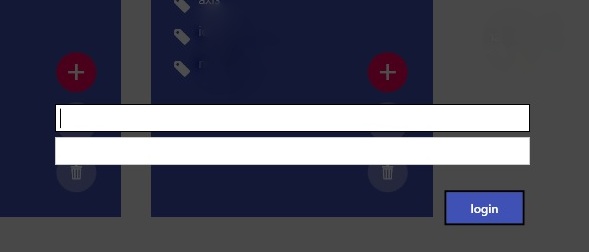
我不知道到底出了什么问题。我的App.xaml是,
<Application.Resources>
    <ResourceDictionary>
        <ResourceDictionary.MergedDictionaries>
            <ResourceDictionary Source="pack://application:,,,/MahApps.Metro;component/Styles/Controls.xaml" />
            <ResourceDictionary Source="pack://application:,,,/MahApps.Metro;component/Styles/Controls.AnimatedTabControl.xaml" />
            <ResourceDictionary Source="pack://application:,,,/MahApps.Metro;component/Styles/Fonts.xaml" />
            <ResourceDictionary Source="pack://application:,,,/MahApps.Metro;component/Styles/Colors.xaml" />
            <ResourceDictionary Source="pack://application:,,,/MahApps.Metro;component/Styles/Accents/Indigo.xaml" />
            <ResourceDictionary Source="pack://application:,,,/MahApps.Metro;component/Styles/Accents/BaseLight.xaml" />
            <ResourceDictionary Source="Assets/ButtonStyles.xaml"/>
        </ResourceDictionary.MergedDictionaries>
    </ResourceDictionary>
</Application.Resources>
在密码中,
Uri objUri = new Uri("Assets/CustomAccent.xaml", UriKind.Relative);
Accent acc = new Accent("CustomAccent", objUri);
ThemeManager.ChangeTheme(App.Current, acc, Theme.Light);
在我的习惯口音里,我只是在改变颜色,没有别的。知道吗?
回答 1
Stack Overflow用户
回答已采纳
发布于 2014-12-21 11:25:51
要使用自定义重音,必须将其添加到ThemeManager中,然后才能使用它(MahApps.Metro v1.0.0)。
public partial class App : Application
{
    protected override void OnStartup(StartupEventArgs e)
    {
        // add custom accent and theme resource dictionaries
        ThemeManager.AddAccent("CustomAccent1", new Uri("pack://application:,,,/MahAppsMetroThemesSample;component/CustomAccents/CustomAccent1.xaml"));

        // get the theme from the current application
        var theme = ThemeManager.DetectAppStyle(Application.Current);

        // now use the custom accent
        ThemeManager.ChangeAppStyle(Application.Current,
                                    ThemeManager.GetAccent("CustomAccent1"),
                                    theme.Item1);

        base.OnStartup(e);
    }
}
希望这能有所帮助。
页面原文内容由Stack Overflow提供。腾讯云小微IT领域专用引擎提供翻译支持
原文链接:
https://stackoverflow.com/questions/27587911
复制相关文章
相似问题
腾讯云开发者

Copyright © 2013 - 2026 Tencent Cloud. All Rights Reserved. 腾讯云 版权所有
深圳市腾讯计算机系统有限公司 ICP备案/许可证号:粤B2-20090059  粤公网安备44030502008569号
腾讯云计算(北京)有限责任公司 京ICP证150476号 | 京ICP备11018762号