
ComponentOne真DBGrid创建自定义单元格
首先,谢谢你的帮助。
这是关于Componentone的True DBGrid,所以这里可能不是期待答案的最佳地方,但在这一点上,我觉得我已经尽了最大的努力,所以我愿意尝试一下。
在过去的几天里,我花了相当长的时间试图弄清楚如何在一个真正的DBGrid中创建一个自定义的单元格,现在我被困住了。我已经阅读了尽可能多的文档,所有关于真DBGrid的教程都显示在下面的附图中。
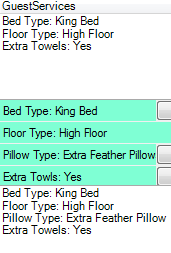
在这里,如果双击一个单元格,我可以获得一个自定义控件,以显示在他们单击的单元格中。但是,我希望单元格在任何时候都是可见的,而不仅仅是在单击时,我希望它是基于行本身的,而不是像我现在所做的那样,每次单击不同的单元格时重新加载"DisplayColumn.DataColumn.Editor“。下面显示了用于此性能的代码。
' Retrieve Column
Dim objPrefDisplayColumn As C1.Win.C1TrueDBGrid.C1DisplayColumn = Me.TestGrid.Splits(0).DisplayColumns("ColumnFieldName")
'Retrieve data from database
Dim data As DataTable = ' My call to database table goes here Retrieve data that relates to row
' Create Custom Controller and Insert Data from table into it
Dim prvNewCellList As New TestCellList
prvNewCellList.LabelButtonHeight = Me.TestGrid.RowHeight / pref.Rows.Count
prvNewCellList.LabelWidth = (objPrefDisplayColumn.Width * 0.9)
prvNewCellList.ButtonWidth = (objPrefDisplayColumn.Width * 0.1)
 prvNewCellList.Action_LoadUI(data)
' Assign Custom Controller to Column
objPrefDisplayColumn.DataColumn.Editor = prvNewCellList
objPrefDisplayColumn.Button = True
objPrefDisplayColumn.ButtonAlways = True
objPrefDisplayColumn.DropDownList = False
objPrefDisplayColumn.DataColumn.DropDown = Nothing
当我查看DataGridView教程时,我知道这是可能的,比如下面的链接,它们放置在自定义的"DataGridViewTextBoxCell“中,就像图片显示的那样。
基于我所读到的关于TrueDBGrid的内容,以及ComponentOne最有可能使用DataGridView作为创建TrueDBGrid模板的预期逻辑,我希望创建自定义单元格的方式非常相似。但是,在尝试像下面这样使用TrueDBGrid重新创建这个示例之后,我发现列不接受"DataGridViewColumn“,当我尝试将它更改为"C1DataColumn”以满足它的期望时,我发现该类与字段"CellTemplate“没有类似的东西,可以用来创建自定义单元格。此时,我几乎可以相信,定制单元的功能在TrueDBGrid开发过程中被遗忘了,然而,我更愿意被证明是错误的。
Public Class Form1
    Private Sub Form1_Load(sender As Object, e As EventArgs) Handles MyBase.Load
        Try
            Dim col As New DataGridViewRolloverCellColumn()
            Me.TestGrid.Columns.Add(col)
        Catch ex As Exception
            MsgBox("error arrose", vbInformation, "error")
        End Try
    End Sub
End Class

Public Class DataGridViewRolloverCellColumn
    Inherits DataGridViewColumn

    Public Sub New()
        Me.CellTemplate = New DataGridViewRolloverCell()
    End Sub

End Class

Public Class DataGridViewRolloverCell
    Inherits DataGridViewTextBoxCell

    Protected Overrides Sub Paint( _
    ByVal graphics As Graphics, _
    ByVal clipBounds As Rectangle, _
    ByVal cellBounds As Rectangle, _
    ByVal rowIndex As Integer, _
    ByVal elementState As DataGridViewElementStates, _
    ByVal value As Object, _
    ByVal formattedValue As Object, _
    ByVal errorText As String, _
    ByVal cellStyle As DataGridViewCellStyle, _
    ByVal advancedBorderStyle As DataGridViewAdvancedBorderStyle, _
    ByVal paintParts As DataGridViewPaintParts)

        ' Call the base class method to paint the default cell appearance.
        MyBase.Paint(graphics, clipBounds, cellBounds, rowIndex, elementState, _
            value, formattedValue, errorText, cellStyle, _
            advancedBorderStyle, paintParts)

        ' Retrieve the client location of the mouse pointer.
        Dim cursorPosition As Point = _
            Me.DataGridView.PointToClient(Cursor.Position)

        ' If the mouse pointer is over the current cell, draw a custom border.
        If cellBounds.Contains(cursorPosition) Then
            Dim newRect As New Rectangle(cellBounds.X + 1, _
                cellBounds.Y + 1, cellBounds.Width - 4, _
                cellBounds.Height - 4)
            graphics.DrawRectangle(Pens.Red, newRect)
        End If
    End Sub
End Class
再次感谢你的帮助
回答 1
Stack Overflow用户
发布于 2015-01-02 22:51:19
过了一段时间,我在附近找到了一份工作。
下面的解决方案对单元格进行了公共控制,并给出了它在实际中仅存在于单元格之上时存在的外观。要执行此解决方案,您需要将公共控件添加到网格的控制器中,并在每次调用油漆事件时更新公共控件位置和可见性。
Private Sub LoadGrid()
    ' Create and Load Common control
    Dim prvsdServiceDelivery As ServiceDelTable = New ServiceDelTable()
    prvsdServiceDelivery.Action_LoadUI(DataTable)
    ' Add Common Control to Datastruct so it can be accessed anytime
    Dictionary.put(key, prvsdServiceDelivery)
    ' insert hosted control into grid
    C1TrueDBGrid.Controls.Add(prvptPreferences)
End Sub

Private Sub TestGrid_Paint(sender As Object, e As PaintEventArgs) Handles TestGrid.Paint

    For Each item As KeyValuePair(Of String, prvsdServiceDelivery) In Dictionary
        Try
            Dim prvsdServiceDelivery as ServiceDelTable  = item.Value

            ' get cell rect, may throw error if cell is outside the bounds of table's rectangle
            Dim bnds As Rectangle = frc1tdOwnerTable.Splits(0).GetCellBounds(row,C1TrueDBGrid.Splits(0).DisplayColumns.IndexOf(column))

            ' Set Visibility and move if error isn't thrown
            prvsdServiceDelivery.Bounds = bnds
            prvsdServiceDelivery.Visible = True
        Catch ex As Exception
            ' Set as invisible if exception thrown to say not found
            prvsdServiceDelivery.Visible = False
        End Try
    Next
End Subhttps://stackoverflow.com/questions/27572627
复制相似问题
腾讯云开发者

Copyright © 2013 - 2026 Tencent Cloud. All Rights Reserved. 腾讯云 版权所有
深圳市腾讯计算机系统有限公司 ICP备案/许可证号:粤B2-20090059  粤公网安备44030502008569号
腾讯云计算(北京)有限责任公司 京ICP证150476号 | 京ICP备11018762号