
如何在android穿戴中实现手势识别
如何在android穿戴中实现手势识别
提问于 2014-12-17 11:19:03
你好,我在寻找如何检测android穿戴中的手势,在android中,我使用这样的代码,但在android穿戴中不起作用。是否有一种方法可以覆盖默认的手势动作或只识别它们?
我就像google开发者一样:WbtFAlY,5c2c?t=25m1s,仿真器有什么问题吗?(我使用32位仿真器:emulator -avd AndroidWearXC -force-32bit)
import android.app.Activity;
import android.os.Bundle;
import android.util.Log;
import android.view.GestureDetector;
import android.view.MotionEvent;


public class MainActivity extends Activity {
    private GestureDetector mDetector;

    private static String DEBUG_TAG="MainActivity";
    @Override
    protected void onCreate(Bundle savedInstanceState) {
        super.onCreate(savedInstanceState);
        setContentView(R.layout.activity_main);


        mDetector = new GestureDetector(this, new GestureDetector.SimpleOnGestureListener() {

            @Override
            public void onLongPress(MotionEvent event) {

                Log.d(DEBUG_TAG, " onLongPress: " + event.toString());
            }

            @Override
            public boolean onDown(MotionEvent event) {
                Log.d(DEBUG_TAG," onDown: " + event.toString());
                return true;
            }

            @Override
            public boolean onFling(MotionEvent event1, MotionEvent event2,
                                   float velocityX, float velocityY) {
                Log.d(DEBUG_TAG, " onFling: " + event1.toString()+event2.toString());
                return true;
            }

            @Override
            public boolean onScroll(MotionEvent e1, MotionEvent e2, float distanceX,
                                    float distanceY) {
                Log.d(DEBUG_TAG, " onScroll: " + e1.toString()+e2.toString());
                return true;
            }

            @Override
            public void onShowPress(MotionEvent event) {
                Log.d(DEBUG_TAG, " onShowPress: " + event.toString());
            }

            @Override
            public boolean onSingleTapUp(MotionEvent event) {
                Log.d(DEBUG_TAG, " onSingleTapUp: " + event.toString());
                return true;
            }

            @Override
            public boolean onDoubleTap(MotionEvent event) {
                Log.d(DEBUG_TAG, " onDoubleTap: " + event.toString());
                return true;
            }

            @Override
            public boolean onDoubleTapEvent(MotionEvent event) {
                Log.d(DEBUG_TAG, " onDoubleTapEvent: " + event.toString());
                return true;
            }

            @Override
            public boolean onSingleTapConfirmed(MotionEvent event) {
                Log.d(DEBUG_TAG, " onSingleTapConfirmed: " + event.toString());
                return true;
            }
        });

    }
    @Override
    public boolean onTouchEvent(MotionEvent ev) {
        return mDetector.onTouchEvent(ev)  || super.onTouchEvent(ev);
    }


}
我想要左右滑动,滚动upp和向下的手势:
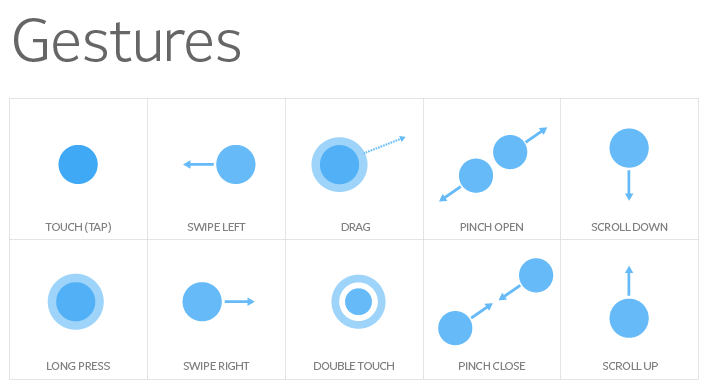
解决了!检查我的答案.
回答 2
Stack Overflow用户
回答已采纳
发布于 2014-12-18 18:02:56
有一天,我开始工作了,失去的部分是,我必须禁用滑动-解散手势,并将DismissOverlayView添加到我的布局中,步骤:
- 禁用闪避手势,将AppTheme样式添加到styles.xml中,并将其作为应用程序样式在您的主机上使用。
styles.xml:
    <style name="AppTheme" parent="Theme.DeviceDefault">
    <item name="android:windowSwipeToDismiss">false</item>
    </style>
AndroidManifest.xml:
    <application
    android:allowBackup="true"
    android:icon="@drawable/ic_launcher"
    android:label="@string/app_name"
android:theme="@style/AppTheme" >- 将DissmissOverlayView添加到主布局中
- 在你的活动中用它来获得手势 公共类WearActivity扩展活动{ private DismissOverlayView mDismissOverlay;private GestureDetector mDetector;public void onCreate(Bundle savedState) { super.onCreate(savedState);setContentView(R.layout.wear_activity);//获取DismissOverlayView元素mDismissOverlay = (DismissOverlayView) findViewById(R.id.dismiss_overlay);//配置一个手势检测器mDetector =新的GestureDetector(this,新的SimpleOnGestureListener() {新的SimpleOnGestureListener(@SimpleOnGestureListener()){MotionEvent事件){ Log.d(DEBUG_TAG,“onLongPress:”+ event.toString());}@重写公共布尔值onDown(MotionEvent事件){ Log.d(DEBUG_TAG,“onDown:+event.toString()”);返回真;}@覆盖公共布尔值onFling(MotionEvent event1,MotionEvent event2,float velocityX,float velocityY) { Log.d(DEBUG_TAG,“onFling:”+ event1.toString()+event2.toString());返回true;}@重写公共布尔onScroll(MotionEvent e1,MotionEvent e2,float distanceX,float distanceY) { Log.d(DEBUG_TAG,“onScroll:”+e1.toString()+e2.toString();返回true;}@重写公共void onShowPress(MotionEvent事件){ Log.d(DEBUG_TAG,“onShowPress:”+ event.toString());}@重写公共布尔值onSingleTapUp(MotionEvent事件){ Log.d(DEBUG_TAG,“onSingleTapUp:+event.toString()”);返回true;}@重写公共布尔值onDoubleTap(MotionEvent事件){ Log.d(DEBUG_TAG,“onDoubleTap:”+event.toString();返回event.toString();}@重写公共布尔值onDoubleTapEvent(MotionEvent事件)){ Log.d(DEBUG_TAG,“onDoubleTapEvent:”+event.toString();返回真);}@覆盖公共布尔值onSingleTapConfirmed(MotionEvent事件){ Log.d(DEBUG_TAG,“onSingleTapConfirmed:”+event.toString();返回true;});} //捕获长按压@重写公共布尔值onTouchEvent(MotionEvent ev) {返回mDetector.onTouchEvent(ev) \}
Stack Overflow用户
发布于 2014-12-17 17:14:09
你查过密码了吗?效果很好。对于简单的操作,您可以使用SimpleOnGestureListener来启动工作(它也适用于Android磨损):
    GestureDetector mDetector;
    mDetector = new GestureDetector(this, new SimpleOnGestureListener() {

        //http://developer.android.com/reference/android/view/GestureDetector.SimpleOnGestureListener.html
//For example:
                public void onLongPress(MotionEvent ev) {
                    //TODO handle your action
                }
            });

        @Override
        public boolean onTouchEvent(MotionEvent ev) {
            return mDetector.onTouchEvent(ev) || super.onTouchEvent(ev);
}页面原文内容由Stack Overflow提供。腾讯云小微IT领域专用引擎提供翻译支持
原文链接:
https://stackoverflow.com/questions/27524418
复制相关文章
相似问题
腾讯云开发者

Copyright © 2013 - 2026 Tencent Cloud. All Rights Reserved. 腾讯云 版权所有
深圳市腾讯计算机系统有限公司 ICP备案/许可证号:粤B2-20090059  粤公网安备44030502008569号
腾讯云计算(北京)有限责任公司 京ICP证150476号 | 京ICP备11018762号