
"SignFile“任务没有为所需的参数"CertificateThumbprint”提供值。
我们有一个通过clickonce部署的业务应用程序。我可以在没有任何问题的情况下构建和发布应用程序,但是当我尝试使用连续集成(构建每个签入)时,我会得到以下错误:
(x86)\MSBuild\12.0\bin\amd64\Microsoft.Common.CurrentVersion.targets(3450,5):2>C:\Program文件 错误MSB4044:未为所需参数"CertificateThumbprint“提供"SignFile”任务的值。 C:\Builds\1\Pulse\DefaultBuild\src\Pulse\Pulse\Pulse.csproj 完成执行任务"SignFile“--失败。
我们使用代码签名证书(更具体地说是: ClickOnce清单)对应用程序进行签名,该证书在AD中注册为受信任的发布服务器。
证书存储在本地工作站上的证书存储区中。证书还位于构建服务器的证书存储中(1.在Personal Store中,2在TFSBuildServiceHost服务帐户的个人存储中,3在tfs/build服务器本身的个人存储中)。
其中使用2013年更新4、C#、.Net 4.5和TFS 2013更新4。
我不知道是什么导致了这个错误,任何帮助都是非常感谢的。
编辑:
我忘了提到几周前tfs构建运行良好。我没有改变任何事情,我验证了项目文件( Pulse.csproj )没有改变,我也有一些成功的Pulse.csproj文件/构建定义的构建。我很确定这一定是tfs服务器上的东西。我记得微软在有关证书基础设施的一些更新方面遇到了一些麻烦,这可能是相关的吗?
编辑2: I尝试使用以下命令通过命令行构建项目:
"C:\Program (x86)\MSBuild\12.0\bin\amd64\MSBuild.exe“\MSBuild\12.0\bin\amd64\MSBuild.exe
生成失败的消息如下:
CleanPublishFolder:删除目录"bin\Debug\app.publish\“。_DeploymentComputeClickOnceManifestInfo:创建目录"bin\Debug\app.publish“。 将文件从"obj\Debug\Pulse.exe“复制到"bin\Debug\app.publish\Pulse.exe”。C:\Program (x86)\MSBuild\12.0\bin\amd64\Microsoft.Common.CurrentVersion.targets(3450,5):error MSB3482:当signi : SignTool.exe未找到时发生了错误。C:\Builds\1\Pulse\DefaultBuild\src\Pulse\Pulse\Pulse.csproj完成了构建项目"C:\Builds\1\Pulse\DefaultBuild\src\Pulse\Pulse\Pulse.csproj“(默认目标) --失败。 完成构建项目"C:\Builds\1\Pulse\DefaultBuild\src\Pulse\Pulse.sln“(默认目标) --失败。 构建失败。 "C:\Builds\1\Pulse\DefaultBuild\src\Pulse\Pulse.sln“(默认目标) (1) -> "C:\Builds\1\Pulse\DefaultBuild\src\Pulse\Pulse\Pulse.csproj”(默认目标) (2) -> (_DeploymentComputeClickOnceManifestInfo目标) -> C:\Program (x86)\MSBuild\12.0\bin\amd64\Microsoft.Common.CurrentVersion.targets(3450,5):error MSB3482:出现了错误,而sig : SignTool.exe未找到。C:\Builds\1\Pulse\DefaultBuild\src\Pulse\Pulse\Pulse.csproj 0警告1错误
Signtool绝对存在于服务器上。指向签名工具的路径是:"C:\Program (x86)\Microsoft SDKs\Windows\v7.1A\Bin\signtool.exe“和"C:\Program \Microsoft SDKs\Windows\v7.1\Bin\signtool.exe”
最有趣的部分是,我可以使用不同的msbuild工具构建解决方案。
"C:\Windows\Microsoft.NET\Framework\v4.0.30319\MSBuild.exe“C:\Builds\1\Pulse\DefaultBuild\src\Pulse\Pulse.sln
编辑3:
我安装了Windows Software Development Kit (SDK) for Windows 8,现在可以通过命令行构建解决方案。因此,安装了代码签名证书&可用。
但是TFS构建失败了。
下面是从tfsbuild日志文件中收集的错误输出:
      Task "AL"
         C:\Program Files (x86)\Microsoft SDKs\Windows\v8.1A\bin\NETFX 4.5.1 Tools\x64\AL.exe /culture:de /out:obj\Debug\de\Pulse.resources.dll /platform:AnyCPU /template:obj\Debug\Pulse.exe /embed:obj\Debug\Pulse.View.Localization.CreditsView.de.resources /embed:obj\Debug\Pulse.View.Localization.PulseMainWindow.de.resources
         Microsoft (R) Assembly Linker version 12.0.20806.33440
         Copyright (C) Microsoft Corporation. All rights reserved.

       Done executing task "AL".
     2>Done building target "GenerateSatelliteAssemblies" in project "Pulse.csproj".
     2>Target "CreateSatelliteAssemblies" in file "C:\Program Files (x86)\MSBuild\12.0\bin\amd64\Microsoft.Common.CurrentVersion.targets" from project "C:\Builds\1\Pulse\DefaultBuild\src\Pulse\Pulse\Pulse.csproj" (target "CoreBuild" depends on it):
     2>Done building target "CreateSatelliteAssemblies" in project "Pulse.csproj".
       Target "SetWin32ManifestProperties" skipped. Previously built successfully.
       Target "_DeploymentComputeNativeManifestInfo" skipped, due to false condition; ('$(GenerateClickOnceManifests)'!='true') was evaluated as ('true'!='true').
     2>Target "CleanPublishFolder" in file "C:\Program Files (x86)\MSBuild\12.0\bin\amd64\Microsoft.Common.CurrentVersion.targets" from project "C:\Builds\1\Pulse\DefaultBuild\src\Pulse\Pulse\Pulse.csproj" (target "_DeploymentComputeClickOnceManifestInfo" depends on it):
       Task "RemoveDir" skipped, due to false condition; ('$(PublishDir)'=='$(OutputPath)app.publish\' and Exists('$(PublishDir)')) was evaluated as ('bin\Debug\app.publish\'=='bin\Debug\app.publish\' and Exists('bin\Debug\app.publish\')).
     2>Done building target "CleanPublishFolder" in project "Pulse.csproj".
       Target "_DeploymentGenerateTrustInfo" skipped, due to false condition; ('$(TargetZone)'!='') was evaluated as (''!='').
     2>Target "_DeploymentComputeClickOnceManifestInfo" in file "C:\Program Files (x86)\MSBuild\12.0\bin\amd64\Microsoft.Common.CurrentVersion.targets" from project "C:\Builds\1\Pulse\DefaultBuild\src\Pulse\Pulse\Pulse.csproj" (target "GenerateApplicationManifest" depends on it):
       Task "Copy"
         Creating directory "bin\Debug\app.publish".
         Copying file from "obj\Debug\Pulse.exe" to "bin\Debug\app.publish\Pulse.exe".
       Done executing task "Copy".
       Using "SignFile" task from assembly "Microsoft.Build.Tasks.v12.0, Version=12.0.0.0, Culture=neutral, PublicKeyToken=b03f5f7f11d50a3a".
       Task "SignFile"
     2>C:\Program Files (x86)\MSBuild\12.0\bin\amd64\Microsoft.Common.CurrentVersion.targets(3450,5): error MSB4044: The "SignFile" task was not given a value for the required parameter "CertificateThumbprint". [C:\Builds\1\Pulse\DefaultBuild\src\Pulse\Pulse\Pulse.csproj]
       Done executing task "SignFile" -- FAILED.
     2>Done building target "_DeploymentComputeClickOnceManifestInfo" in project "Pulse.csproj" -- FAILED.
     2>Target "_CheckForCompileOutputs" in file "C:\Program Files (x86)\MSBuild\12.0\bin\amd64\Microsoft.Common.CurrentVersion.targets" from project "C:\Builds\1\Pulse\DefaultBuild\src\Pulse\Pulse\Pulse.csproj" (target "_CleanGetCurrentAndPriorFileWrites" depends on it):
     2>Done building target "_CheckForCompileOutputs" in project "Pulse.csproj".
       Target "_SGenCheckForOutputs" skipped, due to false condition; ('$(_SGenGenerateSerializationAssembliesConfig)' == 'On' or ('@(WebReferenceUrl)'!='' and '$(_SGenGenerateSerializationAssembliesConfig)' == 'Auto')) was evaluated as ('Off' == 'On' or (''!='' and 'Off' == 'Auto')).
     2>Target "_CleanGetCurrentAndPriorFileWrites" in file "C:\Program Files (x86)\MSBuild\12.0\bin\amd64\Microsoft.Common.CurrentVersion.targets" from project "C:\Builds\1\Pulse\DefaultBuild\src\Pulse\Pulse\Pulse.csproj" (target "_CleanRecordFileWrites" depends on it):
       Task "ReadLinesFromFile"
       Done executing task "ReadLinesFromFile".
       Task "ConvertToAbsolutePath"
       Done executing task "ConvertToAbsolutePath".
       Task "FindUnderPath"
         Comparison path is "C:\Builds\1\Pulse\DefaultBuild\src\Pulse\Pulse".
       Done executing task "FindUnderPath".
       Task "FindUnderPath"
         Comparison path is "C:\Builds\1\Pulse\DefaultBuild\bin\".
       Done executing task "FindUnderPath".
       Task "FindUnderPath"
         Comparison path is "obj\Debug\".
       Done executing task "FindUnderPath".
       Task "RemoveDuplicates"
       Done executing task "RemoveDuplicates".
     2>Done building target "_CleanGetCurrentAndPriorFileWrites" in project "Pulse.csproj".
     2>Target "_CleanRecordFileWrites" in file "C:\Program Files (x86)\MSBuild\12.0\bin\amd64\Microsoft.Common.CurrentVersion.targets" from project "C:\Builds\1\Pulse\DefaultBuild\src\Pulse\Pulse\Pulse.csproj" (target "CoreBuild" depends on it):
       Task "RemoveDuplicates"
       Done executing task "RemoveDuplicates".
       Task "MakeDir"
       Done executing task "MakeDir".
       Task "WriteLinesToFile"
       Done executing task "WriteLinesToFile".
     2>Done building target "_CleanRecordFileWrites" in project "Pulse.csproj".
     2>Done Building Project "C:\Builds\1\Pulse\DefaultBuild\src\Pulse\Pulse\Pulse.csproj" (default targets) -- FAILED.
     1>Done executing task "MSBuild" -- FAILED.
     1>Done building target "Build" in project "Pulse.sln" -- FAILED.
     1>Done Building Project "C:\Builds\1\Pulse\DefaultBuild\src\Pulse\Pulse.sln" (default targets) -- FAILED.

Build FAILED.

       "C:\Builds\1\Pulse\DefaultBuild\src\Pulse\Pulse.sln" (default target) (1) ->
       "C:\Builds\1\Pulse\DefaultBuild\src\Pulse\Pulse\Pulse.csproj" (default target) (2) ->
       (_DeploymentComputeClickOnceManifestInfo target) ->
         C:\Program Files (x86)\MSBuild\12.0\bin\amd64\Microsoft.Common.CurrentVersion.targets(3450,5): error MSB4044: The "SignFile" task was not given a value for the required parameter "CertificateThumbprint". [C:\Builds\1\Pulse\DefaultBuild\src\Pulse\Pulse\Pulse.csproj]

    0 Warning(s)
    1 Error(s)
编辑4:
我们的构建服务器上没有安装Visual 2013。我已经浏览了日志文件,并发现TFS构建使用了存储在C:\Program (X86)\MSBuild\12.0\bin\ and 64中的x86。
由于我可以使用MSBuild.exe构建在构建服务器上构建项目,而不是使用TFS构建,所以我可以确保证书本身不是问题。
我在没有修改任何设置的情况下创建了一个新的构建定义,但仍然得到了相同的错误消息。
我还在构建服务器上修复了TFS安装,但没有成功。
我比较了服务器上存储在C:\Program (X86)\MSBuild\12.0\bin\ all 64\文件夹中的所有*.targets文件和我的客户端计算机上同一位置的*.targets文件。100%完全相同。
不用说,我可以在我的客户端机器上(通过VS2013和命令行)构建项目,而不会出现任何问题。
我删除并重新注册/创建了构建服务/控制器/代理。结果仍然一样。
,我被困在这里了。有什么主意吗?
回答 7
Stack Overflow用户
发布于 2015-04-01 10:39:05
我就是这样解决问题的:
我们的构建服务被配置为以NT AUTHORITY\NetworkService的形式运行,我只是将它更改为我自己的用户帐户。注意,我已经将*.pfx文件安装到了个人证书存储区。
我猜问题是用户NT AUTHORITY\NetworkService在证书存储区中没有所需的证书。我仍然不知道如何将证书添加到系统帐户的个人存储中。尽管如此,我的问题现在已经解决了,尽管我不喜欢构建服务与我的凭据一起运行。
Stack Overflow用户
发布于 2015-08-07 00:59:14
注意:,如果您正在寻找一个快速修复和it is okay for your project to not be signed,那么您可以这样做。我在寻找示例代码和using this quick fix solves my problem instantly.时遇到了这个问题
- 转到项目属性
- 选择签名选项
- 取消选中“ClickOnce清单的符号”
- 保存
- 重新运行它
- (可选)在某些情况下,您需要重新构建它。
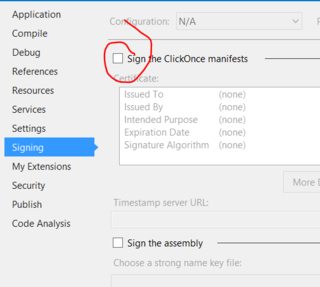
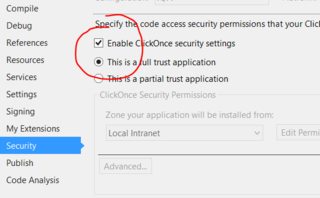
如果enable ClickOnce security settings不能工作,请尝试取消选中Security选项卡上的。
Stack Overflow用户
发布于 2015-01-28 15:17:41
通过选择“从存储中选择”,尝试在项目属性的签名选项卡中添加证书。
或
试着点击“创建测试证书”。
https://stackoverflow.com/questions/27508421
复制相似问题
腾讯云开发者

Copyright © 2013 - 2026 Tencent Cloud. All Rights Reserved. 腾讯云 版权所有
深圳市腾讯计算机系统有限公司 ICP备案/许可证号:粤B2-20090059  粤公网安备44030502008569号
腾讯云计算(北京)有限责任公司 京ICP证150476号 | 京ICP备11018762号