
使用PSCX运行Powershell脚本时出错
使用PSCX运行Powershell脚本时出错
提问于 2014-12-15 17:17:25
我们正在运行一个Team构建服务器,它已经在本地执行这个脚本,没有问题。但是,当我尝试手动运行这个脚本时,我遇到了以下问题:
Windows PowerShell
Copyright (C) 2012 Microsoft Corporation. All rights reserved.

PowerShell Community Extensions Imported.
PS C:\Users\user.domain> cd D:\pkg\platform-2b0c7e3f71f9-BUILD01; powershell.exe -noprofile -executionpolicy Bypass -file D:\pkg\platform-2b0c7e3f71f9-BUILD01\stage.ps1 production \\192.168.x.x\staging \\testserver.domain.com\staging
D:\pkg\platform-2b0c7e3f71f9-BUILD01
Start Staging: 12/15/2014 11:18:14
Verifying target environment configuration and staging targets
Copying source and environment switch
...
Verifying configuration files are valid XML files
Test-Xml : The 'Test-Xml' command was found in the module 'Pscx', but the module could not be loaded. For more information, run 'Import-Module Pscx'.
At D:\pkg\platform-2b0c7e3f71f9-BUILD01\stage.ps1:72 char:9
+   if (!(Test-Xml $file))
+         ~~~~~~~~
    + CategoryInfo          : ObjectNotFound: (Test-Xml:String) [], CommandNotFoundException
    + FullyQualifiedErrorId : CouldNotAutoloadMatchingModule
因此,我看到PowerShell社区扩展正在被导入(第4行),这让我想知道发生了什么。我正在运行脚本,与在Team下运行脚本的用户完全相同。我检查了我试图复制的构建步骤:
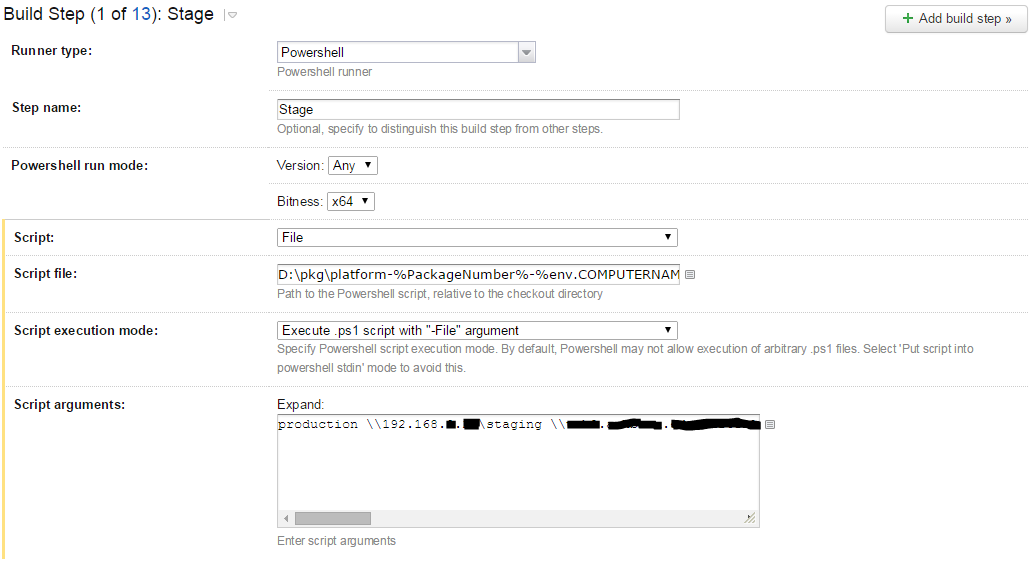
我想不出我错过了什么(工作目录选项设置为脚本文件的目录)。任何想法都将不胜感激..。
回答 1
Stack Overflow用户
回答已采纳
发布于 2014-12-15 17:23:00
第4行加载Pscx,第5行打开一个新的带有-NoProfile选项的powershell会话,因此Pscx不太可能加载到该Powershell会话中。
页面原文内容由Stack Overflow提供。腾讯云小微IT领域专用引擎提供翻译支持
原文链接:
https://stackoverflow.com/questions/27489465
复制相关文章
相似问题
腾讯云开发者

Copyright © 2013 - 2026 Tencent Cloud. All Rights Reserved. 腾讯云 版权所有
深圳市腾讯计算机系统有限公司 ICP备案/许可证号:粤B2-20090059  粤公网安备44030502008569号
腾讯云计算(北京)有限责任公司 京ICP证150476号 | 京ICP备11018762号